在Python编程中,理解作用域和变量访问规则是掌握这门语言的关键之一。当我们处理嵌套函数时,经常会遇到需要修改外层函数局部变量的情况。这时候,nonlocal关键字就派上了用场。本文将从实际痛点出发,深入探讨nonlocal关键字的使用场景、工作原理以及真实项目中的应用。
什么是nonlocal关键字?
nonlocal是Python 3.0引入的一个关键字,用于在嵌套函数中声明一个变量不是本地变量,也不是全局变量,而是来自包含它的外层函数的作用域。简单来说,它允许我们在内层函数中修改外层函数的局部变量。
先看一个典型问题:
def outer_function():
    x = 10
    def inner_function():
        x = 20  # 这里创建了一个新的局部变量x
        print(f"Inner function x: {x}")
    inner_function()
    print(f"Outer function x: {x}")
outer_function()
运行结果:
Inner function x: 20
Outer function x: 10看到了吗?虽然我们想在内层函数中修改外层函数的变量x,但实际上只是创建了一个新的局部变量——外层函数的x值纹丝不动。这种“看似修改了却没改”的情况,正是nonlocal要解决的问题。
现在用nonlocal关键字来纠正:
def outer_function():
    x = 10
    def inner_function():
        nonlocal x  # 声明x是非局部变量
        x = 20
        print(f"Inner function x: {x}")
    inner_function()
    print(f"Outer function x: {x}")
outer_function()
运行结果:
Inner function x: 20
Outer function x: 20这一次,内层函数成功地修改了外层函数的变量x。✨
Python作用域规则回顾
在深入了解nonlocal之前,先回顾一下Python的作用域规则。Python遵循LEGB规则:
L - Local (局部作用域)
这是当前函数内部定义的变量。
def my_function():
    local_var = "I'm local"
    print(local_var)
my_function()
# print(local_var)  # 这会引发NameError
E - Enclosing (封闭作用域)
这是嵌套函数中外层函数的作用域。
def outer():
    enclosing_var = "I'm in enclosing scope"
    def inner():
        print(enclosing_var)  # 访问外层函数的变量
    inner()
outer()
G - Global (全局作用域)
这是模块级别的变量。
global_var = "I'm global"
def my_function():
    print(global_var)  # 可以访问全局变量
my_function()
B - Built-in (内置作用域)
这是Python内置的名称空间。
print(len("Hello")) # len是内置函数nonlocal的工作原理
当Python解释器遇到一个变量名时,它会按照LEGB规则查找这个变量。对于赋值操作,默认情况下会在当前作用域创建新变量。但是使用nonlocal后,Python会在外层作用域中查找并修改该变量。
通过一个更复杂的例子来理解:
def counter_factory():
    count = 0
    def increment():
        nonlocal count
        count += 1
        return count
    def decrement():
        nonlocal count
        count -= 1
        return count
    def get_count():
        return count
    return increment, decrement, get_count

inc, dec, get = counter_factory()
print(inc())  # 1
print(inc())  # 2
print(dec())  # 1
print(get()) # 1在这个例子中,三个内层函数都共享同一个外层函数的count变量。通过使用nonlocal,它们都能修改这个共享状态——这就是闭包中状态管理的精髓。
nonlocal vs global 对比
为了更好地理解nonlocal,把它与global关键字放在一起对比:
global_var = "Global variable"
def outer_function():
    enclosing_var = "Enclosing variable"
    def inner_function():
        local_var = "Local variable"
        def deepest_function():
            global global_var
            nonlocal enclosing_var
            global_var = "Modified global"
            enclosing_var = "Modified enclosing"
            local_var = "Modified local"
            print(f"Inside deepest function:")
            print(f"  global_var: {global_var}")
            print(f"  enclosing_var: {enclosing_var}")
            print(f"  local_var: {local_var}")
        deepest_function()
        print(f"After deepest function:")
        print(f"  global_var: {global_var}")
        print(f"  enclosing_var: {enclosing_var}")
        print(f"  local_var: {local_var}")
    inner_function()
outer_function()
print(f"Global scope: {global_var}")
运行结果:
Inside deepest function:
  global_var: Modified global
  enclosing_var: Modified enclosing
  local_var: Modified local
After deepest function:
  global_var: Modified global
  enclosing_var: Modified enclosing
  local_var: Local variable
Global scope: Modified global
从这个例子可以清晰看出:
global影响的是模块级别的全局变量nonlocal影响的是最近的封闭作用域变量- 没有修饰符的赋值只影响当前作用域的局部变量
实际应用场景
1. 状态保持和闭包
nonlocal最常见的用途是在闭包中保持状态:
def create_multiplier(factor):
    """创建一个乘法器函数"""
    def multiplier(number):
        nonlocal factor
        result = number * factor
        factor += 1  # 更新因子
        return result
    return multiplier

double = create_multiplier(2)
triple = create_multiplier(3)
print(double(5))   # 10 (5 * 2)
print(double(5))   # 15 (5 * 3),因为factor已更新
print(triple(4))   # 12 (4 * 3)
print(triple(4))   # 16 (4 * 4)
2. 装饰器实现
在装饰器中,nonlocal常用于跟踪函数调用次数:
def call_counter(func):
    """统计函数被调用的次数"""
    count = 0
    def wrapper(*args, **kwargs):
        nonlocal count
        count += 1
        print(f"{func.__name__} has been called {count} times")
        return func(*args, **kwargs)
    return wrapper

@call_counter
def greet(name):
    return f"Hello, {name}!"

print(greet("Alice"))
print(greet("Bob"))
print(greet("Charlie"))
输出:
greet has been called 1 times
Hello, Alice!
greet has been called 2 times
Hello, Bob!
greet has been called 3 times
Hello, Charlie!
3. 缓存机制
利用nonlocal实现简单的缓存功能:
def cached_fibonacci():
    cache = {}
    def fibonacci(n):
        nonlocal cache
        if n in cache:
            return cache[n]
        if n <= 1:
            result = n
        else:
            result = fibonacci(n-1) + fibonacci(n-2)
        cache[n] = result
        return result
    return fibonacci

fib = cached_fibonacci()
print(fib(10))  # 55
print(fib(20))  # 6765
4. 配置管理
在配置管理系统中维护状态:
def config_manager():
    config = {
        'debug': False,
        'max_connections': 100,
        'timeout': 30
    }
    def get_config(key):
        return config.get(key, None)
    def set_config(key, value):
        nonlocal config
        config[key] = value
    def update_config(new_config):
        nonlocal config
        config.update(new_config)
    def reset_config():
        nonlocal config
        config = {
            'debug': False,
            'max_connections': 100,
            'timeout': 30
        }
    return {
        'get': get_config,
        'set': set_config,
        'update': update_config,
        'reset': reset_config
    }

config = config_manager()
print(config['get']('debug'))  # False
config['set']('debug', True)
print(config['get']('debug'))  # True
错误和注意事项
1. nonlocal声明的位置
nonlocal语句必须在变量赋值之前:
def outer():
    x = 10
    def inner():
        # print(x)  # 如果取消注释这行,下面的nonlocal会报错
        nonlocal x
        x = 20
    inner()
    print(x)
outer()如果在nonlocal声明前访问变量,会导致语法错误:
def outer():
    x = 10
    def inner():
        print(x)  # 先访问变量
        nonlocal x  # 然后声明nonlocal - 这会导致SyntaxError
        x = 20
    inner()
2. nonlocal只能用于已有变量
nonlocal不能用于创建新变量,只能引用已存在的外层变量:
def outer():
    def inner():
        nonlocal new_var  # 错误:外层没有new_var变量
        new_var = 10
    inner()
# outer()  # 会抛出SyntaxError
3. 多层嵌套中的nonlocal
在多层嵌套函数中,nonlocal指向最近的外层函数:
def level1():
    x = "Level 1"
    def level2():
        x = "Level 2"
        def level3():
            nonlocal x  # 引用level2中的x
            x = "Modified Level 2"
            print(f"In level3: {x}")
        level3()
        print(f"In level2: {x}")
    level2()
    print(f"In level1: {x}")
level1()
输出:
In level3: Modified Level 2
In level2: Modified Level 2
In level1: Level 1
高级应用技巧
1. 函数工厂模式
使用nonlocal创建具有不同行为的函数:
def operation_factory(initial_value=0):
    value = initial_value
    def add(x):
        nonlocal value
        value += x
        return value
    def subtract(x):
        nonlocal value
        value -= x
        return value
    def multiply(x):
        nonlocal value
        value *= x
        return value
    def divide(x):
        nonlocal value
        if x != 0:
            value /= x
        return value
    def get_value():
        return value
    def reset():
        nonlocal value
        value = initial_value
    return {
        'add': add,
        'subtract': subtract,
        'multiply': multiply,
        'divide': divide,
        'get': get_value,
        'reset': reset
    }

calc = operation_factory(10)
print(calc['add'](5))      # 15
print(calc['multiply'](2)) # 30
print(calc['subtract'](10)) # 20
print(calc['get']())       # 20
2. 事件处理器
创建能够维护状态的事件处理器:
def event_handler_factory():
    handlers = []
    event_count = 0
    def register_handler(handler_func):
        nonlocal handlers
        handlers.append(handler_func)
        print(f"Handler registered. Total handlers: {len(handlers)}")
    def trigger_event(event_data):
        nonlocal event_count
        event_count += 1
        print(f"Event #{event_count} triggered with data: {event_data}")
        for handler in handlers:
            try:
                handler(event_data)
            except Exception as e:
                print(f"Handler error: {e}")
    def get_stats():
        return {
            'handlers_count': len(handlers),
            'events_triggered': event_count
        }
    return {
        'register': register_handler,
        'trigger': trigger_event,
        'stats': get_stats
    }

def log_handler(data):
    print(f"LOG: Event received with {data}")
def alert_handler(data):
    if data.get('severity') == 'high':
        print("ALERT: High severity event detected!")

event_system = event_handler_factory()
event_system['register'](log_handler)
event_system['register'](alert_handler)
event_system['trigger']({'message': 'System started', 'severity': 'low'})
event_system['trigger']({'message': 'Critical error', 'severity': 'high'})
print(event_system['stats']())
3. 数据验证器
创建带有状态的数据验证器:
def validator_factory():
    rules = []
    validation_count = 0
    error_count = 0
    def add_rule(rule_func, description=""):
        nonlocal rules
        rules.append({
            'function': rule_func,
            'description': description or rule_func.__name__
        })
    def validate(data):
        nonlocal validation_count, error_count
        validation_count += 1
        errors = []
        for rule in rules:
            try:
                if not rule['function'](data):
                    errors.append(rule['description'])
                    error_count += 1
            except Exception as e:
                errors.append(f"{rule['description']}: {str(e)}")
                error_count += 1
        return {
            'valid': len(errors) == 0,
            'errors': errors,
            'validation_id': validation_count
        }
    def get_statistics():
        return {
            'total_validations': validation_count,
            'total_errors': error_count,
            'rules_count': len(rules)
        }
    return {
        'add_rule': add_rule,
        'validate': validate,
        'stats': get_statistics
    }

validator = validator_factory()
validator['add_rule'](lambda x: isinstance(x, str), "Must be a string")
validator['add_rule'](lambda x: len(x) > 0, "Cannot be empty")
validator['add_rule'](lambda x: x.isalnum(), "Must be alphanumeric")

test_cases = ["hello123", "", "hello world", 123]
for case in test_cases:
    result = validator['validate'](case)
    print(f"Data: {case}")
    print(f"Valid: {result['valid']}")
    if result['errors']:
        print(f"Errors: {', '.join(result['errors'])}")
    print("-" * 30)
print("Statistics:", validator['stats']())
性能考虑
虽然nonlocal提供了强大的功能,但在性能敏感的应用中需要注意其开销:
import time

def performance_comparison():
    # 不使用nonlocal的版本(通过列表模拟)
    def without_nonlocal():
        counter = [0]
        def increment():
            counter[0] += 1
            return counter[0]
        return increment
    # 使用nonlocal的版本
    def with_nonlocal():
        counter = 0
        def increment():
            nonlocal counter
            counter += 1
            return counter
        return increment

    iterations = 1000000
    start_time = time.time()
    inc1 = without_nonlocal()
    for _ in range(iterations):
        inc1()
    time_without = time.time() - start_time

    start_time = time.time()
    inc2 = with_nonlocal()
    for _ in range(iterations):
        inc2()
    time_with = time.time() - start_time

    print(f"Without nonlocal: {time_without:.4f} seconds")
    print(f"With nonlocal: {time_with:.4f} seconds")
    print(f"Difference: {abs(time_with - time_without):.4f} seconds")

performance_comparison()一般来说,nonlocal的性能开销很小,在大多数应用中不会成为瓶颈。不过,如果在一个高频调用的热点路径中,可以考虑用列表封装变量来绕开nonlocal,但通常没必要过度优化。
最佳实践
1. 明确的文档说明
当使用nonlocal时,应该清楚地记录变量的作用和生命周期:
def api_client_factory(base_url):
    """
    创建API客户端工厂
    Args:
        base_url (str): API的基础URL
    Returns:
        dict: 包含各种API操作的字典
    """
    # 内部状态变量 - 使用nonlocal进行修改
    request_count = 0
    last_response = None

    def make_request(endpoint, method='GET'):
        """
        发起API请求
        Note: 此函数修改了外层作用域的request_count和last_response变量
        """
        nonlocal request_count, last_response
        request_count += 1
        url = f"{base_url}/{endpoint}"
        response = f"Response from {url} (Request #{request_count})"
        last_response = response
        return response

    def get_stats():
        """获取客户端统计信息"""
        return {
            'requests_made': request_count,
            'last_response': last_response
        }

    return {
        'request': make_request,
        'stats': get_stats
    }
2. 合理的状态封装
避免过度使用nonlocal,考虑是否可以用类来替代——尤其是当状态逻辑变得复杂时:
# 使用nonlocal的方式
def counter_with_nonlocal():
    count = 0
    def increment():
        nonlocal count
        count += 1
        return count
    def decrement():
        nonlocal count
        count -= 1
        return count
    def get_count():
        return count
    return increment, decrement, get_count

# 使用类的方式
class Counter:
    def __init__(self):
        self.count = 0
    def increment(self):
        self.count += 1
        return self.count
    def decrement(self):
        self.count -= 1
        return self.count
    def get_count(self):
        return self.count

inc1, dec1, get1 = counter_with_nonlocal()
counter2 = Counter()
print("Nonlocal approach:", inc1(), inc1(), dec1())
print("Class approach:", counter2.increment(), counter2.increment(), counter2.decrement())
两种方式各有优劣:闭包更轻量、更函数式;类更面向对象、更易扩展。当状态逻辑超过三四个变量时,类往往是更清晰的选择。
3. 避免复杂的状态依赖
尽量保持嵌套函数之间的状态依赖简单明了:
def simple_state_machine():
    """
    简单的状态机实现
    状态转换逻辑清晰,易于理解和维护
    """
    state = 'idle'
    def transition_to_running():
        nonlocal state
        if state == 'idle':
            state = 'running'
            return True
        return False
    def transition_to_idle():
        nonlocal state
        if state == 'running':
            state = 'idle'
            return True
        return False
    def get_state():
        return state
    return {
        'start': transition_to_running,
        'stop': transition_to_idle,
        'state': get_state
    }

machine = simple_state_machine()
print(machine['state']())  # idle
print(machine['start']())  # True
print(machine['state']())  # running
print(machine['stop']())   # True
print(machine['state']())  # idle
与其他编程概念的关系
与闭包的关系
nonlocal是实现闭包的重要工具。闭包是指内层函数持有对外层函数作用域的引用:
def create_accumulator(initial=0):
    """
    创建累加器 - 典型的闭包例子
    内层函数accumulate保持着对外层函数变量sum的引用
    """
    sum_value = initial
    def accumulate(value):
        nonlocal sum_value
        sum_value += value
        return sum_value
    return accumulate

acc1 = create_accumulator(10)
acc2 = create_accumulator(100)
print(acc1(5))   # 15
print(acc1(3))   # 18
print(acc2(10))  # 110
print(acc1(2))   # 20
与装饰器的关系
许多装饰器实现都依赖于nonlocal来维护状态:
def correct_retry_decorator(max_attempts=3):
    def decorator(func):
        def wrapper(*args, **kwargs):
            attempts = 0  # wrapper的局部变量
            last_exception = None
            while attempts < max_attempts:
                try:
                    attempts += 1
                    return func(*args, **kwargs)
                except Exception as e:
                    last_exception = e
                    print(f"Attempt {attempts} failed: {e}")
                    if attempts >= max_attempts:
                        break
            raise last_exception
        return wrapper
return decorator注意:这里的attempts是wrapper的局部变量,可以直接访问,不需要nonlocal。但如果要修改外层decorator中的变量,才需要nonlocal。理解这一点能避免常见的陷阱。
作用域查找流程图解
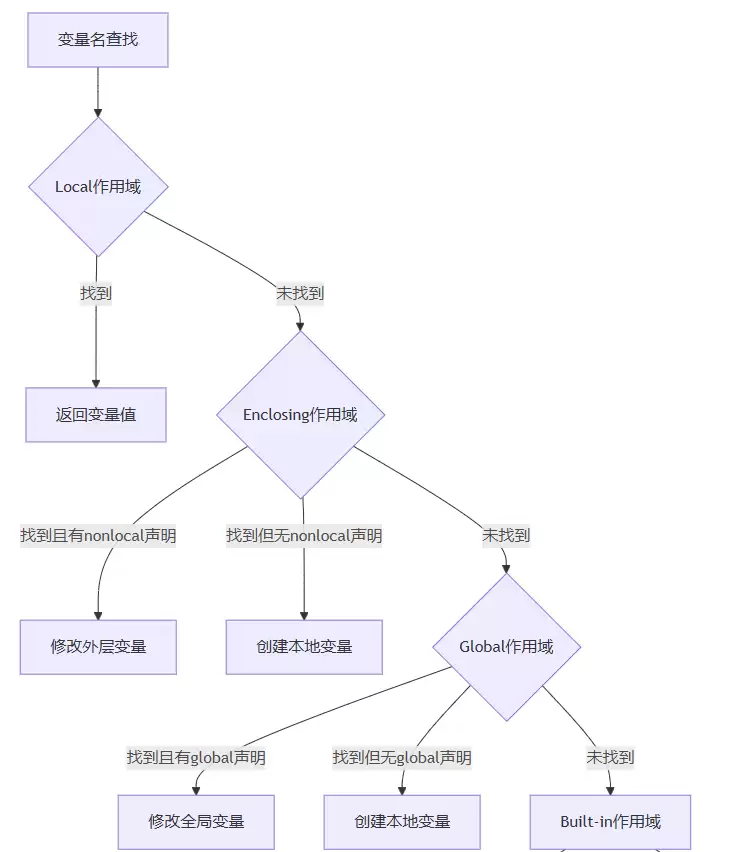
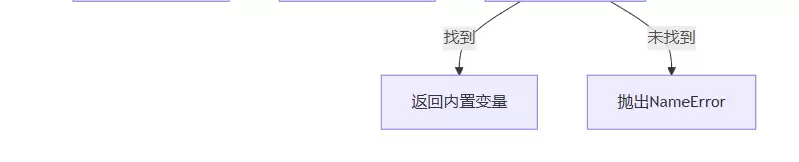
与其他语言的比较
Python的nonlocal概念在其他语言中也有类似实现:
Ja vaScript中的let/const作用域
// Ja vaScript中的闭包类似概念
function outerFunction() {
    let x = 10;
    function innerFunction() {
        x = 20; // 直接修改外层变量
        console.log("Inner:", x);
    }
    innerFunction();
    console.log("Outer:", x);
}
outerFunction();
Ja va中的匿名内部类
在Ja va中,匿名内部类可以访问外部类的final变量:
public class OuterClass {
    private int value = 10;
    public void createRunnable() {
        Runnable runnable = new Runnable() {
            @Override
            public void run() {
                System.out.println("Value: " + value);
            }
        };
    }
}
实际项目应用案例
Web框架中的中间件系统
在Web框架中,中间件经常使用闭包和nonlocal来维护状态:
def middleware_factory():
    middleware_stack = []
    def add_middleware(middleware_func):
        nonlocal middleware_stack
        middleware_stack.append(middleware_func)
        print(f"Middleware added. Total: {len(middleware_stack)}")
    def process_request(request):
        nonlocal middleware_stack
        response = {"status": "processing", "request": request}
        for middleware in middleware_stack:
            try:
                response = middleware(response)
                if response is None:
                    raise ValueError("Middleware returned None")
            except Exception as e:
                response["error"] = str(e)
                response["status"] = "error"
                break
        return response
    def get_middleware_count():
        return len(middleware_stack)
    return {
        'add': add_middleware,
        'process': process_request,
        'count': get_middleware_count
    }

def logging_middleware(response):
    print(f"Logging: Processing {response['request']}")
    response['logged'] = True
    return response
def authentication_middleware(response):
    if response['request'].get('token') == 'secret':
        response['authenticated'] = True
    else:
        raise ValueError("Authentication failed")
    return response
def rate_limiting_middleware(response):
    response['rate_limited'] = True
    return response

web_app = middleware_factory()
web_app['add'](logging_middleware)
web_app['add'](authentication_middleware)
web_app['add'](rate_limiting_middleware)

requests = [
    {'path': '/api/users', 'token': 'secret'},
    {'path': '/api/admin', 'token': 'wrong'},
    {'path': '/api/public'}
]
for req in requests:
    result = web_app['process'](req)
    print(f"Result: {result}")
    print("-" * 50)
游戏开发中的状态管理
在游戏中,nonlocal可以用来管理游戏对象的状态:
def game_object_factory(object_type, initial_health=100):
    health = initial_health
    alive = True
    damage_taken = 0

    def take_damage(damage):
        nonlocal health, alive, damage_taken
        if not alive:
            return {"message": "Already dead", "alive": False}
        damage_taken += damage
        health -= damage
        if health <= 0:
            health = 0
            alive = False
            return {"message": f"{object_type} destroyed!", "alive": False}
        else:
            return {
                "message": f"{object_type} took {damage} damage",
                "health": health,
                "alive": True
            }
    def heal(amount):
        nonlocal health, alive
        if not alive:
            return {"message": "Cannot heal dead object", "alive": False}
        health = min(initial_health, health + amount)
        return {
            "message": f"{object_type} healed by {amount}",
            "health": health,
            "alive": True
        }
    def get_status():
        return {
            "type": object_type,
            "health": health,
            "alive": alive,
            "damage_taken": damage_taken,
            "max_health": initial_health
        }
    def is_alive():
        return alive

    return {
        'damage': take_damage,
        'heal': heal,
        'status': get_status,
        'alive': is_alive
    }

player = game_object_factory("Player", 150)
enemy = game_object_factory("Enemy", 80)

print("Battle begins!")
print(player['status']())
print(enemy['status']())
result = enemy['damage'](30)
print(f"Enemy attacks: {result['message']}")
result = player['damage'](25)
print(f"Player attacks: {result['message']}")
result = player['heal'](20)
print(f"Player heals: {result['message']}")
print("nFinal status:")
print(f"Player: {player['status']()}")
print(f"Enemy: {enemy['status']()}")
测试和调试技巧
单元测试
为使用nonlocal的函数编写单元测试:
import unittest

def testable_counter():
    count = 0
    def increment():
        nonlocal count
        count += 1
        return count
    def decrement():
        nonlocal count
        count -= 1
        return count
    def get_count():
        return count
    def reset():
        nonlocal count
        count = 0
    return {
        'inc': increment,
        'dec': decrement,
        'get': get_count,
        'reset': reset
    }

class TestCounter(unittest.TestCase):
    def setUp(self):
        self.counter = testable_counter()
    def test_increment(self):
        self.assertEqual(self.counter['inc'](), 1)
        self.assertEqual(self.counter['inc'](), 2)
    def test_decrement(self):
        self.counter['inc']()
        self.counter['inc']()
        self.assertEqual(self.counter['dec'](), 1)
    def test_get_count(self):
        self.assertEqual(self.counter['get'](), 0)
        self.counter['inc']()
        self.assertEqual(self.counter['get'](), 1)
    def test_reset(self):
        self.counter['inc']()
        self.counter['inc']()
        self.assertEqual(self.counter['get'](), 2)
        self.counter['reset']()
        self.assertEqual(self.counter['get'](), 0)

if __name__ == '__main__':
    unittest.main(argv=[''], exit=False, verbosity=2)
调试技巧
使用locals()和globals()函数来检查作用域:
def debug_scope_example():
    outer_var = "I'm outer"
    def inner_function():
        inner_var = "I'm inner"
        nonlocal outer_var
        print("Local variables in inner function:")
        print(locals())
        print("Global variables (partial):")
        global_vars = {k: v for k, v in globals().items()
                      if not k.startswith('__')}
        print(list(global_vars.keys())[:5])
        outer_var = "Modified outer"
        print(f"Modified outer_var: {outer_var}")
    print("Before inner function:")
    print(f"outer_var: {outer_var}")
    inner_function()
    print("After inner function:")
    print(f"outer_var: {outer_var}")

debug_scope_example()
总结和最佳建议
nonlocal关键字是Python中处理嵌套函数作用域的利器。它让我们能在内层函数中修改外层函数的局部变量,这对实现闭包、装饰器、状态管理等功能至关重要。
关键要点回顾:
- 正确使用时机:只有在外层函数存在相应变量时才能使用
nonlocal - 位置要求:
nonlocal声明必须在变量赋值之前 - 作用范围:指向最近的外层函数作用域
- 性能考虑:通常开销很小,但在高频调用场景下需要注意
- 设计权衡:考虑是否应该用类来替代复杂的闭包结构
推荐学习资源:
- Python官方文档 - 命名和绑定
- Real Python - Python Scope & the LEGB Rule
- Python.org - PEP 3104(
nonlocal语句的技术规范)
实践建议:
- 从小处开始:先在简单的计数器或状态管理器中练习使用
nonlocal - 理解作用域:确保完全理解LEGB规则后再使用
nonlocal - 保持简洁:避免过于复杂的嵌套结构,考虑用类管理复杂状态
- 充分测试:为使用
nonlocal的代码编写全面的单元测试 - 文档化:清楚地标明哪些变量被
nonlocal修改以及原因
掌握nonlocal关键字后,你将能编写更灵活、更强大的Python代码,尤其是在需要维护状态或实现高级函数式编程技术的场景中。记住,强大的工具需要负责任地使用——合理的设计比炫技更重要!