


java怎么连接数据库executeUpdate()和executeQuery()
Update//没有返回值publicvoidupdate(intcount){conn=DBUtil.getConn();Stringsql="updatecountersetcount=?";try{PreparedStatementps=conn.prepareStatement(sql);//传进去的ps.setInt(1,count);ps.executeUpdate();}catch(SQLExceptione){e.printStackTrace();}finally{DBUtil.clos
Update
//没有返回值
public void update(int count){
conn=DBUtil.getConn();
String sql="update counter set count=?";
try {
			PreparedStatement ps = conn.prepareStatement(sql);
			//传进去的
			ps.setInt(1,count);
			ps.executeUpdate();
		} catch (SQLException e) {
			e.printStackTrace();
		}finally{
			DBUtil.closeConn();
		}
}
Insert
//没有返回值,参数是个字符串部门名称就ok了,因为id的话是自增
	public void insert(String departmentname) {
		conn = ConnectionFactory.getConnection();
		String sql = "insert into department (departmentname) values(?)";
		try {
			PreparedStatement pstmt = conn.prepareStatement(sql);
			pstmt.setString(1, departmentname);
			pstmt.executeUpdate();
		} catch (SQLException e) {
			// TODO Auto-generated catch block
			e.printStackTrace();
		} finally {
			ConnectionFactory.closeConnection();
		}
	}
//因为employeeid自增,所以不用设置
public void insert(Employee employee){
conn=ConnectionFactory.getConnection();
String sql="insert into employee"
+
"(employeename,username,password,phone,email,departmentid,status,role)" +
" values(?,?,?,?,?,?,?,?)";
try {
PreparedStatement pstmt = conn.prepareStatement(sql);
pstmt.setString(1,employee.getEmployeename());
pstmt.setString(2,employee.getUsername());
pstmt.setString(3,employee.getPassword() );
pstmt.setString(4,employee.getPhone() );
pstmt.setString(5,employee.getEmail());
pstmt.setInt(6,employee.getDepartmentid());
//注册成功后,默认为正在审核,status为0
pstmt.setString(7,"0");
//注册时,默认为员工角色,role值为2
pstmt.setString(8,"2");
pstmt.executeUpdate();
} catch (SQLException e) {
// TODO Auto-generated catch block
e.printStackTrace();
}finally{
ConnectionFactory.closeConnection();
}
}Delete
//删除不用返回值
public void delete(int departmentid) {
		conn = ConnectionFactory.getConnection();
		String sql = "delete from department where departmentid=?;";
		try {
			PreparedStatement pstmt = conn.prepareStatement(sql);
			pstmt.setInt(1, departmentid);
			pstmt.executeUpdate();
		} catch (SQLException e) {
			// TODO Auto-generated catch block
			e.printStackTrace();
		} finally {
			ConnectionFactory.closeConnection();
		}
	}
select
//返回int类型
public int select(){
	int count=0;
	conn=DBUtil.getConn();
	String sql = "select * from counter";
	try{
		PreparedStatement ps = conn.PreparedStatement(sql);
		ResultSet rs =ps.excuteQuery();
		if(rs.next()){
			count=rs.getInt("visitcount");
		}
	}catch{

	}finally{
		DBUtil.closeConn();
	}
	return count;
}
//返回部门集合 public ListselectAll() { conn = ConnectionFactory.getConnection(); // 新建一个集合departmentsList List departmentsList = new ArrayList (); try { Statement st = null; String sql = "select * from department"; st = conn.createStatement(); ResultSet rs = st.executeQuery(sql); Department department; while (rs.next()) { // 新建一个department来接收数据库的信息 department = new Department(); department.setDepartmentid(rs.getInt("departmentid")); department.setDepartmentname(rs.getString("departmentname")); departmentsList.add(department); } } catch (SQLException e) { // TODO Auto-generated catch block e.printStackTrace(); } finally { ConnectionFactory.closeConnection(); } // 返回集合 return departmentsList; } //返回员工 public List selectAllEmployee(){ conn=ConnectionFactory.getConnection(); List employeeslist=new ArrayList (); Employee employee=null; try { PreparedStatement st=null; //只查询已注册且未审批 且 角色是员工的 String sql="select * from employee where role='2' and status='0'"; st = conn.prepareStatement(sql); ResultSet rs =st.executeQuery(sql); while(rs.next()){ employee=new Employee(); employee.setEmployeeid(rs.getInt("employeeid")); employee.setEmployeename(rs.getString("employeename")); employee.setUsername(rs.getString("username")); employee.setPhone(rs.getString("phone")); employee.setEmail(rs.getString("email")); employee.setStatus(rs.getString("status")); employee.setDepartmentid(rs.getInt("departmentid")); employee.setPassword(rs.getString("password")); employee.setRole(rs.getString("role")); employeeslist.add(employee); } } catch (SQLException e) { e.printStackTrace(); }finally{ //最后总要关闭连接 ConnectionFactory.closeConnection(); } return employeeslist; }
public Employee selectByNamePwd(String username, String pwd) {
		Employee employee = null;
		try {
			//创建PreparedStatement对象
			PreparedStatement st = null;
			//查询语句
			String sql = "select * from employee where username='" + username + "' and  password='" + pwd + "'";
			st = conn.prepareStatement(sql);
			ResultSet rs = st.executeQuery(sql);
			//判断结果集有无记录,如果有:则把内容取出来,变成一个employee对象,并且返回它
			if (rs.next() == true) {
				employee = new Employee();
				employee.setEmployeeid(rs.getInt("employeeid"));
				employee.setEmployeename(rs.getString("employeename"));
				employee.setUsername(rs.getString("username"));
				employee.setPhone(rs.getString("phone"));
				employee.setEmail(rs.getString("email"));
				employee.setStatus(rs.getString("status"));
				employee.setDepartmentid(rs.getInt("status"));
				employee.setPassword(rs.getString("password"));
				employee.setRole(rs.getString("role"));
			}
		} catch (SQLException e) {
			// TODO Auto-generated catch block
			e.printStackTrace();
		} finally {
			ConnectionFactory.closeConnection();
		}
		return employee;
	}
public Employee selectByUsername(String username){
conn=ConnectionFactory.getConnection();
Employee employee=null;
try {
PreparedStatement st=null;
String sql="select * from employee where username='"+username+"'";
st = conn.prepareStatement(sql);
ResultSet rs =st.executeQuery(sql);
if(rs.next()==true){
employee=new Employee();
employee.setEmployeeid(rs.getInt("employeeid"));
employee.setEmployeename(rs.getString("employeename"));
employee.setUsername(rs.getString("username"));
employee.setPhone(rs.getString("phone"));
employee.setEmail(rs.getString("email"));
employee.setStatus(rs.getString("status"));
employee.setDepartmentid(rs.getInt("status"));
employee.setPassword(rs.getString("password"));
employee.setRole(rs.getString("role"));
}
} catch (SQLException e) {
e.printStackTrace();
}finally{
ConnectionFactory.closeConnection();
}
return employee;
}需要注意的点
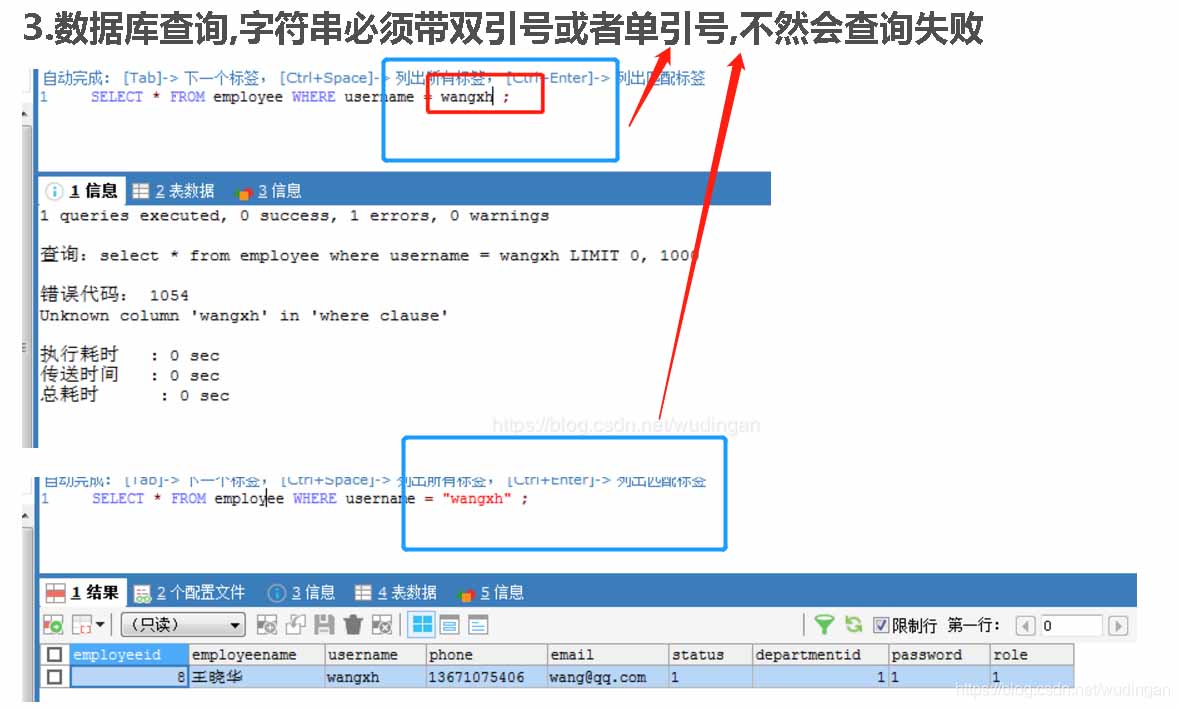
1.字符串的拼接必须在双引号的基础上被单引号套住
上面有个小陷阱
如果加了

会正常执行,如果没有加,会因为字段不是字符串而报错.

结果集为空


2.在Bean类,默认的构造方法还与参数顺序有关
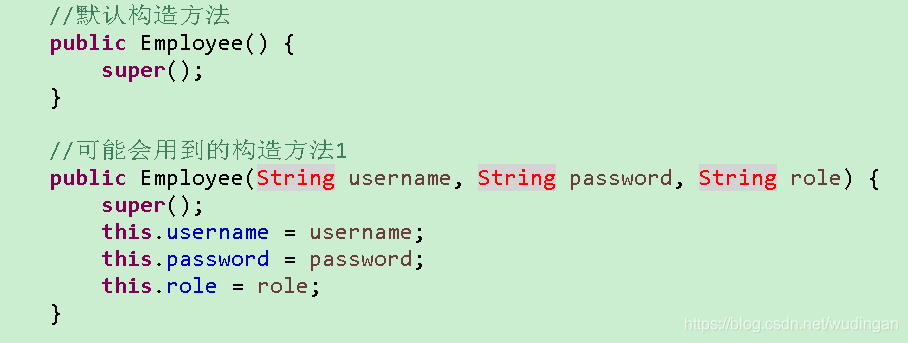
也就是说public Employee(String user,int id, String pwd){}
和 public Employee(int id,String user,String pwd){} 是不一样的构造方法
测试main方法里,插入的数据的类型顺序决定了调用哪个构造方法.

3.构造方法的方法名就是类名....
4.system.out.println 里打印加不加toString的区别

看起来没有区别(这个不敢肯定)
5.sql语句里,双引号的里面套双引号,会有歧义

会报错
应该在里面放单引号











火山引擎是字节跳动旗下企业级云与AI服务平台。聚焦大模型核心能力,依托字节自研豆包多模态大模型,凭借火山方舟一站式平台,提供模型精调、推理部署、智能应用搭建等全链路服务,结合高性能AI算力,助力各行业快速落地大模型数字化与智能化应用。








AirBuddy 3 是面向 macOS 的蓝牙外设增强工具,可集中查看 AirPods、Beats 与苹果设备电量,提供快速连接、播放控制、电量提醒、桌面小组件和多台 Mac 外设接力等功能。

AirServer macOS版可把 Mac 转换为无线投屏接收端,通过 AirPlay 或 Google Cast 接收手机、平板和电脑画面,并支持多设备同时连接、高清镜像及会话录制,适合家庭娱乐、课堂教学、会议演示和应用展示。

火山引擎是字节跳动旗下企业级云与AI服务平台。聚焦大模型核心能力,依托字节自研豆包多模态大模型,凭借火山方舟一站式平台,提供模型精调、推理部署、智能应用搭建等全链路服务,结合高性能AI算力,助力各行业快速落地大模型数字化与智能化应用。

PixTV 是一款在浏览器中使用的 AI 视觉内容创作平台,提供图片、视频、音频、文字生成、AI 分镜、局部重绘、提示词反推和无限画布等工具,适合短剧、漫剧、广告及社交媒体内容制作。


Autodesk Maya 是面向影视、电视、动画和游戏行业的专业三维制作软件,集多边形与 NURBS 建模、角色绑定、关键帧和动作捕捉动画、Bifrost 特效模拟、材质开发及 Arnold 渲染于一体,