


Java之IO流原理及流的分类是什么

IObit Uninstaller 是一款专为 Win 平台设计的软件卸载工具,卸载干净彻底。清理链路的完整性会更好一些,做应用卸载、残留处理和空间整理时,通常能少走很多手动排查步骤。
一、概述I/O是Input/Output的缩写,I/O技术是非常实用的技术,用于处理设备之间的数据传输。如读/写文件,网络通讯等。输入input:读取外部数据(磁盘、光盘等存储设备的数据)到程序(内存)中。输出output:将程序(内存)数据输出到磁盘、光盘等存储设备中。Java程序中,对于数据的输入/输出操作以“流(stream)”的方式进行。java.io包下提供了各种“流”类和接口,用以获取不种类的数据,并通过标准的方法输入或输出数据。二、流的分类1.概述按操作数据单位不同分为:字节流(8bit),

一、概述
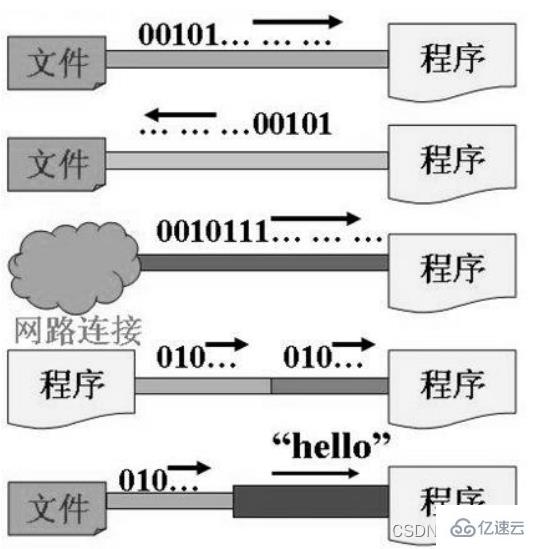
I/O是Input/Output的缩写,I/O技术是非常实用的技术,用于处理设备之间的数据传输。如读/写文件,网络通讯等。
输入
input:读取外部数据(磁 盘、光盘等存储设备的数据)到程序(内存)中。输出
output:将程序(内存)数据输出到磁盘、光盘等存储设 备中。
Java程序中,对于数据的输入/输出操作以“流(
stream)” 的方式进行。
java.io包下提供了各种“流”类和接口,用以获取不种类的数据,并通过标准的方法输入或输出数据。
二、流的分类
1. 概述
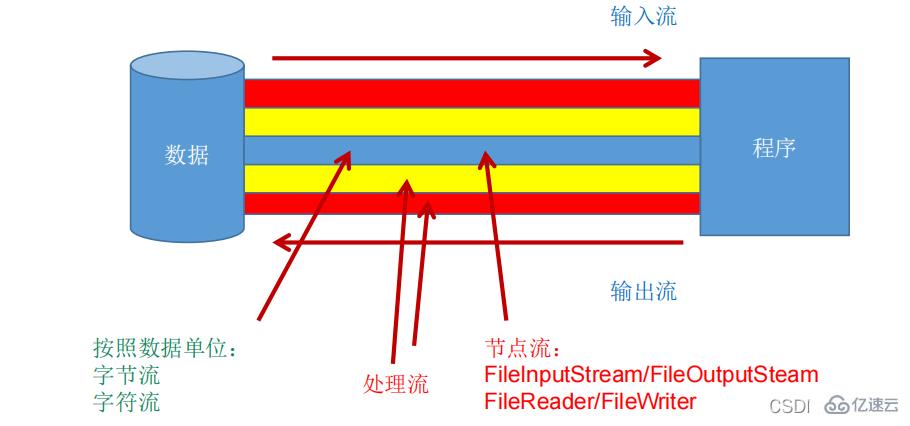
按操作数据单位不同分为:字节流(8
bit),字符流(16bit)
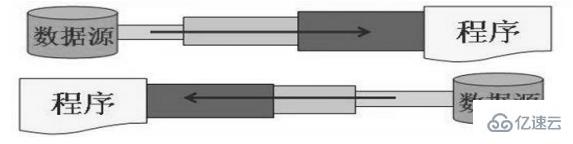
按数据流的流向不同分为:输入流,输出流
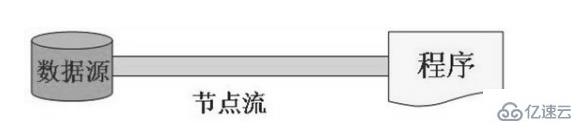
按流的角色的不同分为:节点流,处理流
节点流:直接从数据源或目的地读写数据
处理流:不直接连接到数据源或目的地,而是“连接”在已存在的流(节点流或处理流)之上,通过对数据的处理为程序提供更为强大的读写功能。
Java的IO流共涉及40多个类,实际上非常规则,都是从以上4个抽象基类派生的,由这4个类派生出来的子类名称都是以其父类名作为子类名后缀。
| (抽象基类) | 字节流 | 字符流 |
|---|---|---|
| 输入流 | InputStream | Reader |
| 输出流 | OutputStream | Writer |
IO 流体系体系: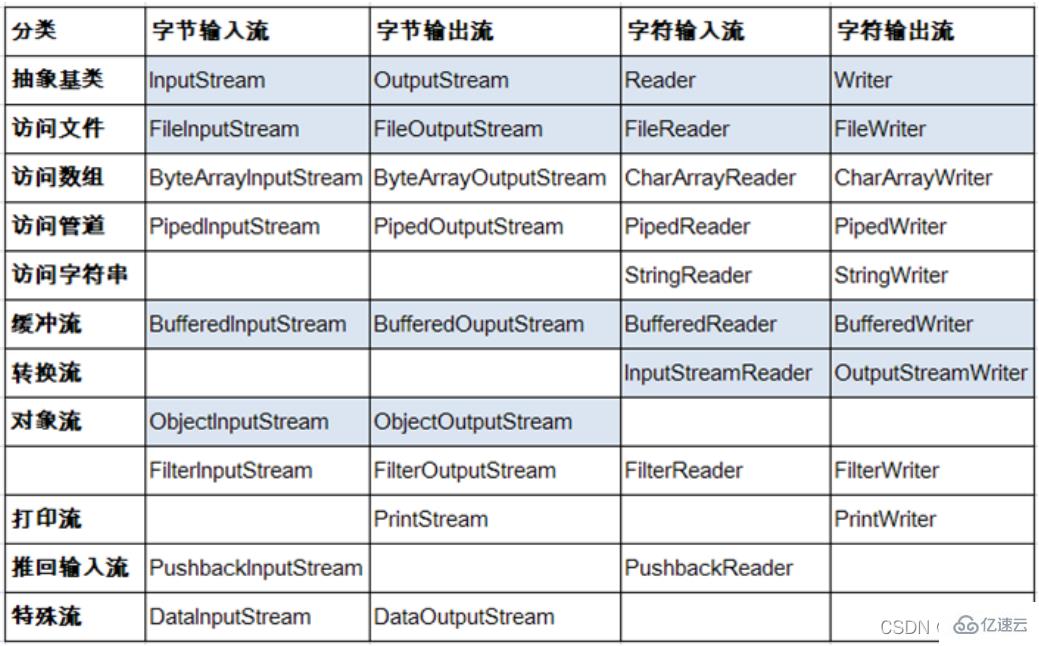
2. InputStream
概述
典型实现:
FileInputStream
方法
| 方法 | 描述 |
|---|---|
int read() | 从输入流中读取数据的下一个字节。返回 0 到 255 范围内的 int 字节值。如果因为已经到达流末尾而没有可用的字节,则返回值 -1。 |
int read(byte[] b) | 从此输入流中将最多 b.length 个字节的数据读入一个 byte 数组中。如果因为已经到达流末尾而没有可用的字节,则返回值 -1。否则以整数形式返回实际读取的字节数。 |
int read(byte[] b, int off,int len) | 将输入流中最多 len 个数据字节读入 byte 数组。尝试读取 len 个字节,但读取的字节也可能小于该值。以整数形式返回实际读取的字节数。如果因为流位于文件末尾而没有可用的字节,则返回值 -1。 |
public void close() throws IOException | 关闭此输入流并释放与该流关联的所有系统资源 |
典型实现类:FileInputStream
代码演示:
@Test
    public void testFileInputStream() {
        FileInputStream fis = null;
        try {
            //1. 造文件
            File file = new File("hello.txt");

            //2.造流
            fis = new FileInputStream(file);

            //3.读数据
            byte[] buffer = new byte[5];
            int len;//记录每次读取的字节的个数
            while((len = fis.read(buffer)) != -1){

                String str = new String(buffer,0,len);
                System.out.print(str);

            }
        } catch (IOException e) {
            e.printStackTrace();
        } finally {
            if(fis != null){
                //4.关闭资源
                try {
                    fis.close();
                } catch (IOException e) {
                    e.printStackTrace();
                }

            }
        }
    }
3. Reader
概述
典型实现类:
FileReader
方法
| 方法 | 描述 |
|---|---|
int read() | 读取单个字符。作为整数读取的字符,范围在 0 到 65535 之间 (0x00-0xffff)(2个字节的Unicode码),如果已到达流的末尾,则返回 -1 |
int read(char[] cbuf) | 将字符读入数组。如果已到达流的末尾,则返回 -1。否则返回本次读取的字符数。 |
int read(char[] cbuf,int off,int len) | 将字符读入数组的某一部分。存到数组cbuf中,从off处开始存储,最多读len个字符。如果已到达流的末尾,则返回 -1。否则返回本次读取的字符数。 |
public void close() throws IOException | 关闭此输入流并释放与该流关联的所有系统资源。 |
典型实现类:FileReader
@Test
    public void testFileReader(){
        FileReader fr = null;
        try {
            //1.实例化File类的对象,指明要操作的文件
            File file = new File("hello.txt");//相较于当前Module
            //2.提供具体的流
            fr = new FileReader(file);

            //3.数据的读入
            //read():返回读入的一个字符。如果达到文件末尾,返回-1
            //方式一://        int data = fr.read();//        while(data != -1){//            System.out.print((char)data);//            data = fr.read();//        }

            //方式二:语法上针对于方式一的修改
            int data;
            while((data = fr.read()) != -1){
                System.out.print((char)data);
            }
        } catch (IOException e) {
            e.printStackTrace();
        } finally {
            //4.流的关闭操作//            try {//                if(fr != null)//                    fr.close();//            } catch (IOException e) {//                e.printStackTrace();//            }
            //或
            if(fr != null){
                try {
                    fr.close();
                } catch (IOException e) {
                    e.printStackTrace();
                }
            }
        }

    }

    //对read()操作升级:使用read的重载方法
    @Test
    public void testFileReader1()  {
        FileReader fr = null;
        try {
            //1.File类的实例化
            File file = new File("hello.txt");

            //2.FileReader流的实例化
            fr = new FileReader(file);

            //3.读入的操作
            //read(char[] cbuf):返回每次读入cbuf数组中的字符的个数。如果达到文件末尾,返回-1
            char[] cbuf = new char[5];
            int len;
            while((len = fr.read(cbuf)) != -1){
                //方式一:
                //错误的写法//                for(int i = 0;i < cbuf.length;i++){//                    System.out.print(cbuf[i]);//                }
                //正确的写法//                for(int i = 0;i < len;i++){//                    System.out.print(cbuf[i]);//                }
                //方式二:
                //错误的写法,对应着方式一的错误的写法//                String str = new String(cbuf);//                System.out.print(str);
                //正确的写法
                String str = new String(cbuf,0,len);
                System.out.print(str);
            }
        } catch (IOException e) {
            e.printStackTrace();
        } finally {
            if(fr != null){
                //4.资源的关闭
                try {
                    fr.close();
                } catch (IOException e) {
                    e.printStackTrace();
                }

            }
        }

    }
4. OutputStream
概述
典型实现:
FileOutputStream
方法
| 方法 | 描述 |
|---|---|
void write(int b) | 将指定的字节写入此输出流。write 的常规协定是:向输出流写入一个字节。要写入的字节是参数 b 的八个低位。b 的 24 个高位将被忽略。 即写入0~255范围的。 |
void write(byte[] b) | 将 b.length 个字节从指定的 byte 数组写入此输出流。write(b) 的常规协定是:应该与调用 write(b, 0, b.length) 的效果完全相同。 |
void write(byte[] b,int off,int len) | 将指定 byte 数组中从偏移量 off 开始的 len 个字节写入此输出流。 |
public void flush()throws IOException | 刷新此输出流并强制写出所有缓冲的输出字节,调用此方法指示应将这些字节立即写入它们预期的目标。 |
public void close() throws IOException | 关闭此输出流并释放与该流关联的所有系统资源。 |
主要实现类:FileInputOutputStream
/*
    实现对图片的复制操作
     */
    @Test
    public void testFileInputOutputStream()  {
        FileInputStream fis = null;
        FileOutputStream fos = null;
        try {
            //
            File srcFile = new File("爱情与友情.jpg");
            File destFile = new File("爱情与友情2.jpg");

            //
            fis = new FileInputStream(srcFile);
            fos = new FileOutputStream(destFile);

            //复制的过程
            byte[] buffer = new byte[5];
            int len;
            while((len = fis.read(buffer)) != -1){
                fos.write(buffer,0,len);
            }

        } catch (IOException e) {
            e.printStackTrace();
        } finally {
            if(fos != null){
                //
                try {
                    fos.close();
                } catch (IOException e) {
                    e.printStackTrace();
                }
            }
            if(fis != null){
                try {
                    fis.close();
                } catch (IOException e) {
                    e.printStackTrace();
                }

            }
        }

    }
5. Writer
概述
典型实现:
FileWriter
方法
| 方法 | 描述 |
|---|---|
void write(int c) | 写入单个字符。要写入的字符包含在给定整数值的 16 个低位中,16 高位被忽略。 即写入0 到 65535 之间的Unicode码。 |
void write(char[] cbuf) | 写入字符数组。 |
void write(char[] cbuf,int off,int len) | 写入字符数组的某一部分。从off开始,写入len个字符 |
void write(String str) | 写入字符串。 |
void write(String str,int off,int len) | 写入字符串的某一部分。 |
void flush() | 刷新该流的缓冲,则立即将它们写入预期目标。 |
public void close() throws IOException | 关闭此输出流并释放与该流关联的所有系统资源。 |
主要实现类:FileWriter
概述
输出操作,对应的
File可以不存在的。并不会报异常
File对应的硬盘中的文件如果不存在,在输出的过程中,会自动创建此文件。
File对应的硬盘中的文件如果存在:
如果流使用的构造器是:
FileWriter(file,false) / FileWriter(file):对原有文件的覆盖如果流使用的构造器是:
FileWriter(file,true):不会对原有文件覆盖,而是在原有文件基础上追加内容
代码演示
//从内存中写出数据到硬盘的文件里。
    @Test
    public void testFileWriter() {
        FileWriter fw = null;
        try {
            //1.提供File类的对象,指明写出到的文件
            File file = new File("hello1.txt");

            //2.提供FileWriter的对象,用于数据的写出
            fw = new FileWriter(file,false);

            //3.写出的操作
            fw.write("I have a dream!\n");
            fw.write("you need to have a dream!");
        } catch (IOException e) {
            e.printStackTrace();
        } finally {
            //4.流资源的关闭
            if(fw != null){

                try {
                    fw.close();
                } catch (IOException e) {
                    e.printStackTrace();
                }
            }
        }
    }
6. 练习:复制操作
代码演示:
实现对文本的复制操作
 @Test
    public void testFileReaderFileWriter() {
        FileReader fr = null;
        FileWriter fw = null;
        try {
            //1.创建File类的对象,指明读入和写出的文件
            File srcFile = new File("hello.txt");
            File destFile = new File("hello2.txt");

            //不能使用字符流来处理图片等字节数据//            File srcFile = new File("爱情与友情.jpg");//            File destFile = new File("爱情与友情1.jpg");


            //2.创建输入流和输出流的对象
            fr = new FileReader(srcFile);
            fw = new FileWriter(destFile);


            //3.数据的读入和写出操作
            char[] cbuf = new char[5];
            int len;//记录每次读入到cbuf数组中的字符的个数
            while((len = fr.read(cbuf)) != -1){
                //每次写出len个字符
                fw.write(cbuf,0,len);

            }
        } catch (IOException e) {
            e.printStackTrace();
        } finally {
            //4.关闭流资源
            //方式一://            try {//                if(fw != null)//                    fw.close();//            } catch (IOException e) {//                e.printStackTrace();//            }finally{//                try {//                    if(fr != null)//                        fr.close();//                } catch (IOException e) {//                    e.printStackTrace();//                }//            }
            //方式二:
            try {
                if(fw != null)
                    fw.close();
            } catch (IOException e) {
                e.printStackTrace();
            }

            try {
                if(fr != null)
                    fr.close();
            } catch (IOException e) {
                e.printStackTrace();
            }
        }
    }}
实现对图片的复制操作
    @Test
    public void testFileInputOutputStream()  {
        FileInputStream fis = null;
        FileOutputStream fos = null;
        try {
            //
            File srcFile = new File("爱情与友情.jpg");
            File destFile = new File("爱情与友情2.jpg");

            //
            fis = new FileInputStream(srcFile);
            fos = new FileOutputStream(destFile);

            //复制的过程
            byte[] buffer = new byte[5];
            int len;
            while((len = fis.read(buffer)) != -1){
                fos.write(buffer,0,len);
            }

        } catch (IOException e) {
            e.printStackTrace();
        } finally {
            if(fos != null){
                //
                try {
                    fos.close();
                } catch (IOException e) {
                    e.printStackTrace();
                }
            }
            if(fis != null){
                try {
                    fis.close();
                } catch (IOException e) {
                    e.printStackTrace();
                }

            }
        }

    }

    //指定路径下文件的复制
    public void copyFile(String srcPath,String destPath){
        FileInputStream fis = null;
        FileOutputStream fos = null;
        try {
            //
            File srcFile = new File(srcPath);
            File destFile = new File(destPath);

            //
            fis = new FileInputStream(srcFile);
            fos = new FileOutputStream(destFile);

            //复制的过程
            byte[] buffer = new byte[1024];
            int len;
            while((len = fis.read(buffer)) != -1){
                fos.write(buffer,0,len);
            }

        } catch (IOException e) {
            e.printStackTrace();
        } finally {
            if(fos != null){
                //
                try {
                    fos.close();
                } catch (IOException e) {
                    e.printStackTrace();
                }
            }
            if(fis != null){
                try {
                    fis.close();
                } catch (IOException e) {
                    e.printStackTrace();
                }

            }
        }


    }

    @Test
    public void testCopyFile(){

        long start = System.currentTimeMillis();

        String srcPath = "C:\\Users\\Administrator\\Desktop\\01-视频.avi";
        String destPath = "C:\\Users\\Administrator\\Desktop\\02-视频.avi";//        String srcPath = "hello.txt";//        String destPath = "hello3.txt";

        copyFile(srcPath,destPath);


        long end = System.currentTimeMillis();

        System.out.println("复制操作花费的时间为:" + (end - start));//618
    }}
三、节点流(或文件流)
1. 概述
定义文件路径时,注意:可以用“
/”或者“\\”。
在写入一个文件时,如果使用构造器
FileOutputStream(file),则目录下有同名文 件将被覆盖。 如果使用构造器FileOutputStream(file,true),则目录下的同名文件不会被覆盖, 在文件内容末尾追加内容。
在读取文件时,必须保证该文件已存在,否则报异常。
字节流操作字节,比如:
.mp3,.avi,.rmvb,.mp4,.jpg,.doc,.ppt
字符流操作字符,只能操作普通文本文件。最常见的文本文件:
txt,.java,.c,.cpp等语言的源代码。尤其注意.doc,excel,ppt这些不是文本文件。
2. 读取文件
概述
1.建立一个流对象,将已存在的一个文件加载进流。
java FileReader fr = new FileReader(new File(“Test.txt”));2.创建一个临时存放数据的数组。
java char[] ch = new char[1024];3.调用流对象的读取方法将流中的数据读入到数组中。
java fr.read(ch);4.关闭资源。
java fr.close();
代码演示
FileReader fr = null;try {fr = new FileReader(new File("c:\\test.txt"));char[] buf = new char[1024];int len;while ((len = fr.read(buf)) != -1) {System.out.print(new String(buf, 0, len));}} catch (IOException e) {System.out.println("read-Exception :" + e.getMessage());} finally {if (fr != null) {try {fr.close();} catch (IOException e) {System.out.println("close-Exception :" + e.getMessage());} } }3. 写入文件
概述
1.创建流对象,建立数据存放文件
FileWriter fw = new FileWriter(new File(“Test.txt”));
2.调用流对象的写入方法,将数据写入流fw.write(“atguigu-songhongkang”);
3.关闭流资源,并将流中的数据清空到文件中。fw.close();
代码演示
FileWriter fw = null;try {fw = new FileWriter(new File("Test.txt"));fw.write("atguigu-songhongkang");} catch (IOException e) {e.printStackTrace();} finally {if (fw != null)try {fw.close();} catch (IOException e) {e.printStackTrace();} }四、缓冲流
1. 概述
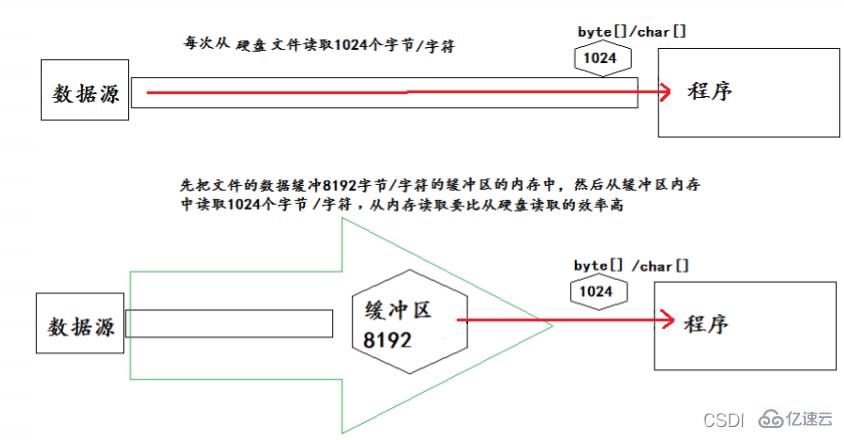
为了提高数据读写的速度,Java API提供了带缓冲功能的流类,在使用这些流类时,会创建一个内部缓冲区数组,缺省使用8192个字节(8Kb)的缓冲区。
缓冲流要“套接”在相应的节点流之上,根据数据操作单位可以把缓冲流分为:
BufferedInputStream和BufferedOutputStream
BufferedReader和BufferedWriter
当读取数据时,数据按块读入缓冲区,其后的读操作则直接访问缓冲区
当使用
BufferedInputStream读取字节文件时,BufferedInputStream会一次性从文件中读取8192个(8Kb),存在缓冲区中,直到缓冲区装满了,才重新从文件中读取下一个8192个字节数组。
向流中写入字节时,不会直接写到文件,先写到缓冲区中直到缓冲区写满,
BufferedOutputStream才会把缓冲区中的数据一次性写到文件里。使用方法flush()可以强制将缓冲区的内容全部写入输出流
关闭流的顺序和打开流的顺序相反。只要关闭最外层流即可,关闭最外层流也 会相应关闭内层节点流
flush()方法的使用:手动将buffer中内容写入文件
如果是带缓冲区的流对象的close()方法,不但会关闭流,还会在关闭流之前刷新缓冲区,关闭后不能再写出
2. 实现非文本文件的复制
    @Test
    public void BufferedStreamTest() throws FileNotFoundException {
        BufferedInputStream bis = null;
        BufferedOutputStream bos = null;

        try {
            //1.造文件
            File srcFile = new File("爱情与友情.jpg");
            File destFile = new File("爱情与友情3.jpg");
            //2.造流
            //2.1 造节点流
            FileInputStream fis = new FileInputStream((srcFile));
            FileOutputStream fos = new FileOutputStream(destFile);
            //2.2 造缓冲流
            bis = new BufferedInputStream(fis);
            bos = new BufferedOutputStream(fos);

            //3.复制的细节:读取、写入
            byte[] buffer = new byte[10];
            int len;
            while((len = bis.read(buffer)) != -1){
                bos.write(buffer,0,len);//                bos.flush();//刷新缓冲区

            }
        } catch (IOException e) {
            e.printStackTrace();
        } finally {
            //4.资源关闭
            //要求:先关闭外层的流,再关闭内层的流
            if(bos != null){
                try {
                    bos.close();
                } catch (IOException e) {
                    e.printStackTrace();
                }

            }
            if(bis != null){
                try {
                    bis.close();
                } catch (IOException e) {
                    e.printStackTrace();
                }

            }
            //说明:关闭外层流的同时,内层流也会自动的进行关闭。关于内层流的关闭,我们可以省略.//        fos.close();//        fis.close();
        }


    }
3. 实现文件复制
    @Test
    public void testCopyFileWithBuffered(){
        long start = System.currentTimeMillis();

        String srcPath = "C:\\Users\\Administrator\\Desktop\\01-视频.avi";
        String destPath = "C:\\Users\\Administrator\\Desktop\\03-视频.avi";


        copyFileWithBuffered(srcPath,destPath);


        long end = System.currentTimeMillis();

        System.out.println("复制操作花费的时间为:" + (end - start));//618 - 176
    }

 //实现文件复制的方法
    public void copyFileWithBuffered(String srcPath,String destPath){
        BufferedInputStream bis = null;
        BufferedOutputStream bos = null;

        try {
            //1.造文件
            File srcFile = new File(srcPath);
            File destFile = new File(destPath);
            //2.造流
            //2.1 造节点流
            FileInputStream fis = new FileInputStream((srcFile));
            FileOutputStream fos = new FileOutputStream(destFile);
            //2.2 造缓冲流
            bis = new BufferedInputStream(fis);
            bos = new BufferedOutputStream(fos);

            //3.复制的细节:读取、写入
            byte[] buffer = new byte[1024];
            int len;
            while((len = bis.read(buffer)) != -1){
                bos.write(buffer,0,len);
            }
        } catch (IOException e) {
            e.printStackTrace();
        } finally {
            //4.资源关闭
            //要求:先关闭外层的流,再关闭内层的流
            if(bos != null){
                try {
                    bos.close();
                } catch (IOException e) {
                    e.printStackTrace();
                }

            }
            if(bis != null){
                try {
                    bis.close();
                } catch (IOException e) {
                    e.printStackTrace();
                }

            }
            //说明:关闭外层流的同时,内层流也会自动的进行关闭。关于内层流的关闭,我们可以省略.//        fos.close();//        fis.close();
        }
    }

 /*
    使用BufferedReader和BufferedWriter实现文本文件的复制

     */
    @Test
    public void testBufferedReaderBufferedWriter(){
        BufferedReader br = null;
        BufferedWriter bw = null;
        try {
            //创建文件和相应的流
            br = new BufferedReader(new FileReader(new File("dbcp.txt")));
            bw = new BufferedWriter(new FileWriter(new File("dbcp1.txt")));

            //读写操作
            //方式一:使用char[]数组//            char[] cbuf = new char[1024];//            int len;//            while((len = br.read(cbuf)) != -1){//                bw.write(cbuf,0,len);//    //            bw.flush();//            }

            //方式二:使用String
            String data;
            while((data = br.readLine()) != null){
                //方法一://                bw.write(data + "\n");//data中不包含换行符
                //方法二:
                bw.write(data);//data中不包含换行符
                bw.newLine();//提供换行的操作

            }


        } catch (IOException e) {
            e.printStackTrace();
        } finally {
            //关闭资源
            if(bw != null){

                try {
                    bw.close();
                } catch (IOException e) {
                    e.printStackTrace();
                }
            }
            if(br != null){
                try {
                    br.close();
                } catch (IOException e) {
                    e.printStackTrace();
                }

            }
        }

    }}
五、 转换流
1. 概述
转换流提供了在字节流和字符流之间的转换
Java API提供了两个转换流:
InputStreamReader:将InputStream转换为Reader
OutputStreamWriter:将Writer转换为OutputStream
字节流中的数据都是字符时,转成字符流操作更高效。
很多时候我们使用转换流来处理文件乱码问题。实现编码和 解码的功能。
2. InputStreamReader
概述
实现将字节的输入流按指定字符集转换为字符的输入流。
需要和
InputStream“套接”。
构造器
public InputStreamReader(InputStream in) |
public InputSreamReader(InputStream in,String charsetName) |
3. OutputStreamWriter
概述
实现将字符的输出流按指定字符集转换为字节的输出流。
需要和
OutputStream“套接”。
(2)构造器
public OutputStreamWriter(OutputStream out) |
public OutputSreamWriter(OutputStream out,String charsetName) |
4. 代码演示
代码演示1:
  @Test
    public void test1() throws IOException {

        FileInputStream fis = new FileInputStream("dbcp.txt");//        InputStreamReader isr = new InputStreamReader(fis);//使用系统默认的字符集
        //参数2指明了字符集,具体使用哪个字符集,取决于文件dbcp.txt保存时使用的字符集
        InputStreamReader isr = new InputStreamReader(fis,"UTF-8");//使用系统默认的字符集

        char[] cbuf = new char[20];
        int len;
        while((len = isr.read(cbuf)) != -1){
            String str = new String(cbuf,0,len);
            System.out.print(str);
        }

        isr.close();

    }
代码演示2:
    @Test
    public void test2() throws Exception {
        //1.造文件、造流
        File file1 = new File("dbcp.txt");
        File file2 = new File("dbcp_gbk.txt");

        FileInputStream fis = new FileInputStream(file1);
        FileOutputStream fos = new FileOutputStream(file2);

        InputStreamReader isr = new InputStreamReader(fis,"utf-8");
        OutputStreamWriter osw = new OutputStreamWriter(fos,"gbk");

        //2.读写过程
        char[] cbuf = new char[20];
        int len;
        while((len = isr.read(cbuf)) != -1){
            osw.write(cbuf,0,len);
        }

        //3.关闭资源
        isr.close();
        osw.close();


    }}
六、标准输入、输出流
1. 概述
System.in和System.out分别代表了系统标准的输入和输出设备
默认输入设备是:键盘,输出设备是:显示器
System.in的类型是InputStream,System.out的类型是PrintStream,其是OutputStream的子类,FilterOutputStream的子类
重定向:通过System类的setIn,setOut方法对默认设备进行改变。
public static void setIn(InputStream in)
public static void setOut(PrintStream out)
2. 代码演示
/*
从键盘输入字符串,要求将读取到的整行字符串转成大写输出。然后继续进行输入操作,
直至当输入“e”或者“exit”时,退出程序。
 方法一:使用Scanner实现,调用next()返回一个字符串
 方法二:使用System.in实现。System.in  --->  转换流 ---> BufferedReader的readLine()

     */
    public static void main(String[] args) {
        BufferedReader br = null;
        try {
            InputStreamReader isr = new InputStreamReader(System.in);
            br = new BufferedReader(isr);

            while (true) {
                System.out.println("请输入字符串:");
                String data = br.readLine();
                if ("e".equalsIgnoreCase(data) || "exit".equalsIgnoreCase(data)) {
                    System.out.println("程序结束");
                    break;
                }

                String upperCase = data.toUpperCase();
                System.out.println(upperCase);

            }
        } catch (IOException e) {
            e.printStackTrace();
        } finally {
            if (br != null) {
                try {
                    br.close();
                } catch (IOException e) {
                    e.printStackTrace();
                }
            }
        }
    }
七. 打印流
1. 概述
实现将基本数据类型的数据格式转化为字符串输出
打印流:
PrintStream和PrintWriter
提供了一系列重载的
print()和println()方法,用于多种数据类型的输出
PrintStream和PrintWriter的输出不会抛出IOException异常
PrintStream和PrintWriter有自动flush功能
PrintStream打印的所有字符都使用平台的默认字符编码转换为字节。 在需要写入字符而不是写入字节的情况下,应该使用PrintWriter类。
System.out返回的是PrintStream的实例
2. 代码演示
 /*
    2. 打印流:PrintStream 和PrintWriter

    2.1 提供了一系列重载的print() 和 println()
    2.2 练习:


     */

    @Test
    public void test2() {
        PrintStream ps = null;
        try {
            FileOutputStream fos = new FileOutputStream(new File("D:\\IO\\text.txt"));
            // 创建打印输出流,设置为自动刷新模式(写入换行符或字节 '\n' 时都会刷新输出缓冲区)
            ps = new PrintStream(fos, true);
            if (ps != null) {// 把标准输出流(控制台输出)改成文件
                System.setOut(ps);
            }


            for (int i = 0; i <= 255; i++) { // 输出ASCII字符
                System.out.print((char) i);
                if (i % 50 == 0) { // 每50个数据一行
                    System.out.println(); // 换行
                }
            }


        } catch (FileNotFoundException e) {
            e.printStackTrace();
        } finally {
            if (ps != null) {
                ps.close();
            }
        }

    }
八、数据流
为了方便地操作Java语言的基本数据类型和String的数据,可以使用数据流。
数据流有两个类:(用于读取和写出基本数据类型、String类的数据)
DataInputStream
DataOutputStream分别“套接”在
InputStream和OutputStream子类的流上
DataInputStream中的方法:
boolean readBoolean() |
byte readByte() char |
readChar() |
float readFloat() |
double readDouble() |
long readLong() |
int readInt() |
short readShort() |
String readUTF() |
void readFully(byte[] b) |
补充:DataOutputStream中的方法:将上述的方法的read改为相应的write即可









火山引擎是字节跳动旗下企业级云与AI服务平台。聚焦大模型核心能力,依托字节自研豆包多模态大模型,凭借火山方舟一站式平台,提供模型精调、推理部署、智能应用搭建等全链路服务,结合高性能AI算力,助力各行业快速落地大模型数字化与智能化应用。








AirBuddy 3 是面向 macOS 的蓝牙外设增强工具,可集中查看 AirPods、Beats 与苹果设备电量,提供快速连接、播放控制、电量提醒、桌面小组件和多台 Mac 外设接力等功能。

AirServer macOS版可把 Mac 转换为无线投屏接收端,通过 AirPlay 或 Google Cast 接收手机、平板和电脑画面,并支持多设备同时连接、高清镜像及会话录制,适合家庭娱乐、课堂教学、会议演示和应用展示。

火山引擎是字节跳动旗下企业级云与AI服务平台。聚焦大模型核心能力,依托字节自研豆包多模态大模型,凭借火山方舟一站式平台,提供模型精调、推理部署、智能应用搭建等全链路服务,结合高性能AI算力,助力各行业快速落地大模型数字化与智能化应用。

PixTV 是一款在浏览器中使用的 AI 视觉内容创作平台,提供图片、视频、音频、文字生成、AI 分镜、局部重绘、提示词反推和无限画布等工具,适合短剧、漫剧、广告及社交媒体内容制作。


Autodesk Maya 是面向影视、电视、动画和游戏行业的专业三维制作软件,集多边形与 NURBS 建模、角色绑定、关键帧和动作捕捉动画、Bifrost 特效模拟、材质开发及 Arnold 渲染于一体,