


Java反射的示例分析
一、Class类与Java反射ClasstextFieldC=tetxField.getClass();//tetxField为JTextField类对象反射可访问的主要描述1、访问构造方法每个Constructor对象代表一个构造方法,利用Constructor对象可以操纵相应的构造方法。getConstructors()//获取公有getConstructor(Class...parameterTypes)//获取指定公有getDeclaredConstructors()//获取所有getDeclar
一、Class类与Java反射
Class textFieldC=tetxField.getClass(); //tetxField为JTextField类对象
反射可访问的主要描述
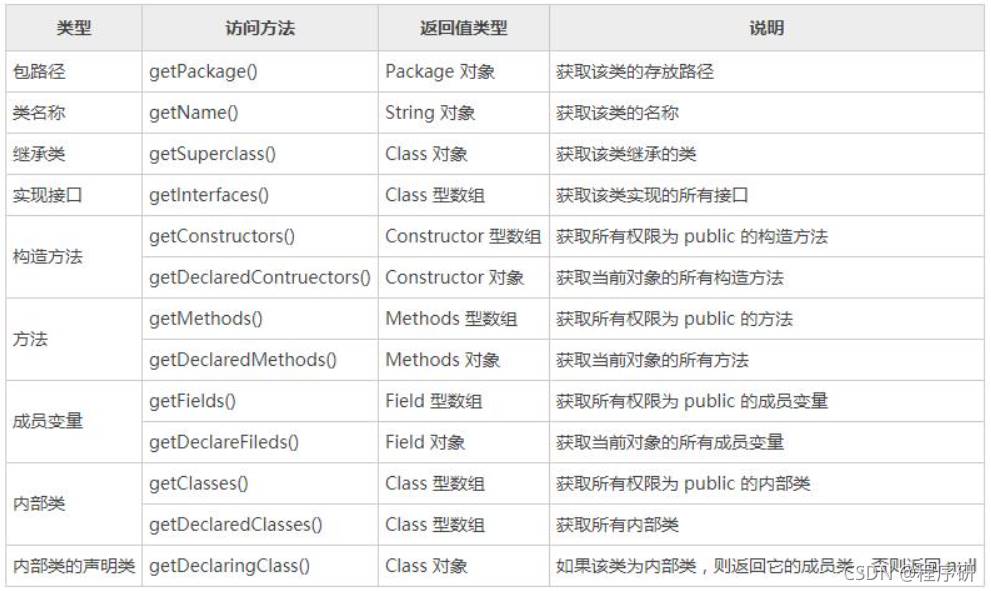
1、访问构造方法
每个Constructor对象代表一个构造方法,利用Constructor对象可以操纵相应的构造方法。
getConstructors()//获取公有getConstructor(Class... parameterTypes)//获取指定公有getDeclaredConstructors()//获取所有getDeclaredConstructor(Class... parameterTypes)//获取指定方法
创建Demo1类,声明String类型成员变量和3个int类型成员变量,并提供3个构造方法。
package bao;
public class Demo1{
String s;
int i,i2,i3;
private Demo1() {
}
protected Demo1(String s,int i) {
this.s=s;
this.i=i;
}
public Demo1(String... strings)throws NumberFormatException{
if(0package bao;
import java.lang.reflect.Constructor;
public class Main {
public static void main(String[] args) {
Demo1 demo=new Demo1("10","20","30");
ClassdemoC=demo.getClass();
//获得所有构造方法
Constructor[] declaredConstryctors=demoC.getDeclaredConstructors();
for(int i=0;i constructor=declaredConstryctors[i];
System.out.println("查看是否允许带有可变数量的参数:"+constructor.isVarArgs());
System.out.println("该构造方法的入口参数类型依次为:");
Class[]parameterTypes=constructor.getParameterTypes(); //获取所有参数类型
for(int j=0;j2、访问成员变量
每个Field对象代表一个成员变量,利用Field对象可以操纵相应的成员变量。
getFields()
getField(String name)
getDeclaredFields()
getDeclaredField(String name)
创建Demo1类依次声明int、fioat、boolean和String类型的成员变量,并设置不同的访问权。
package bao;
public class Demo1{
int i;
public float f;
protected boolean b;
private String s;
}通过反射访问Demo1类中的所有成员变量,将成成员变量的名称和类型信息输出。
package bao;
import java.lang.reflect.Field;
public class Main {
public static void main(String[] args) {
Demo1 demo=new Demo1();
Class demoC=demo.getClass();
//获得所有成员变量
Field[] declaredField=demoC.getDeclaredFields();
for(int i=0;i/*输出结果:
名称为:i
类型为:int
修改前的值为:0
利用方法setInt()修改成员变量的值
修改后的值为:168
名称为:f
类型为:float
修改前的值为:0.0
利用方法 setFloat()修改成员变量的值
修改后的值为:99.9
名称为:b
类型为:boolean
修改前的值为:false
利用方法 setBoolean()修改成员变量的值
修改后的值为:true
名称为:s
类型为:class java.lang.String
在设置成员变量值时抛出异常,下面执行setAccesssible()方法!
修改前的值为:null
利用方法 set()修改成员变量的值
修改后的值为:MWQ
*/
3、访问方法
每个Method对象代表一个方法,利用Method对象可以操纵相应的方法。
getMethods()
getMethod(String name, Class... parameterTypes)
getDeclaredMethods()
getDeclaredMethod(String name, Class... parameterTypes)
创建Demo1类,编写4个典型方法。
package bao;
public class Demo1{
static void staitcMethod() {
System.out.println("执行staitcMethod()方法");
}
public int publicMethod(int i) {
System.out.println("执行publicMethod()方法");
return i*100;
}
protected int protectedMethod(String s,int i)throws NumberFormatException {
System.out.println("执行protectedMethod()方法");
return Integer.valueOf(s)+i;
}
private String privateMethod(String...strings) {
System.out.println("执行privateMethod()方法");
StringBuffer stringBuffer=new StringBuffer();
for(int i=0;i反射访问Demm1类中的所有方法,将方法的名称、入口参数类型、返回值类型等信息输出
package bao;
import java.lang.reflect.Field;
import java.lang.reflect.Method;
public class Main {
public static void main(String[] args) {
Demo1 demo = new Demo1();
Class demoC = demo.getClass();
// 获得所有方法
Method[] declaredMethods = demoC.getDeclaredMethods();
for (int i = 0; i < declaredMethods.length; i++) {
Method method = declaredMethods[i]; // 遍历方法
System.out.println("名称为:" + method.getName()); // 获得方法名称
System.out.println("是否允许带有可变数量的参数:" + method.isVarArgs());
System.out.println("入口参数类型依次为:");
// 获得所有参数类型
Class[] parameterTypes = method.getParameterTypes();
for (int j = 0; j < parameterTypes.length; j++) {
System.out.println(" " + parameterTypes[j]);
}
// 获得方法返回值类型
System.out.println("返回值类型为:" + method.getReturnType());
System.out.println("可能抛出的异常类型有:");
// 获得方法可能抛出的所有异常类型
Class[] exceptionTypes = method.getExceptionTypes();
for (int j = 0; j < exceptionTypes.length; j++) {
System.out.println(" " + exceptionTypes[j]);
}
boolean isTurn = true;
while (isTurn) {
try {
isTurn = false;
if("staitcMethod".equals(method.getName())) {
method.invoke(demo); // 执行没有入口参数的方法
}else if("publicMethod".equals(method.getName())) {
System.out.println("返回值为:"+ method.invoke(demo, 168)); // 执行方法
}else if("protectedMethod".equals(method.getName())) {
System.out.println("返回值为:"+ method.invoke(demo, "7", 5)); // 执行方法
}else {
Object[] parameters = new Object[] { new String[] {"M", "W", "Q" } }; // 定义二维数组
System.out.println("返回值为:"+ method.invoke(demo, parameters));
}
}catch(Exception e) {
System.out.println("在执行方法时抛出异常,"
+ "下面执行setAccessible()方法!");
method.setAccessible(true); // 设置为允许访问
isTurn = true;
}
}
System.out.println();
}
}
}/*输出结果:
名称为:publicMethod
是否允许带有可变数量的参数:false
入口参数类型依次为:
int
返回值类型为:int
可能抛出的异常类型有:
执行publicMethod()方法
返回值为:16800
名称为:staitcMethod
是否允许带有可变数量的参数:false
入口参数类型依次为:
返回值类型为:void
可能抛出的异常类型有:
执行staitcMethod()方法
名称为:protectedMethod
是否允许带有可变数量的参数:false
入口参数类型依次为:
class java.lang.String
int
返回值类型为:int
可能抛出的异常类型有:
class java.lang.NumberFormatException
执行protectedMethod()方法
返回值为:12
名称为:privateMethod
是否允许带有可变数量的参数:true
入口参数类型依次为:
class [Ljava.lang.String;
返回值类型为:class java.lang.String
可能抛出的异常类型有:
在执行方法时抛出异常,下面执行setAccessible()方法!
执行privateMethod()方法
返回值为:
*/
二、使用Annotation功能
1、定义Annotation类型
在定义Annotation类型时,也需要用到用来定义接口的interface关键字,不过需要在interface关键字前加一个“@”符号,即定义Annotation类型的关键字为@interface,这个关键字的隐含意思是继承了java.lang.annotation.Annotation接口。
public @interface NoMemberAnnotation{
String value();
}
@interface:声明关键字。
NoMemberAnnotation:注解名称。
String:成员类型。
value:成员名称。
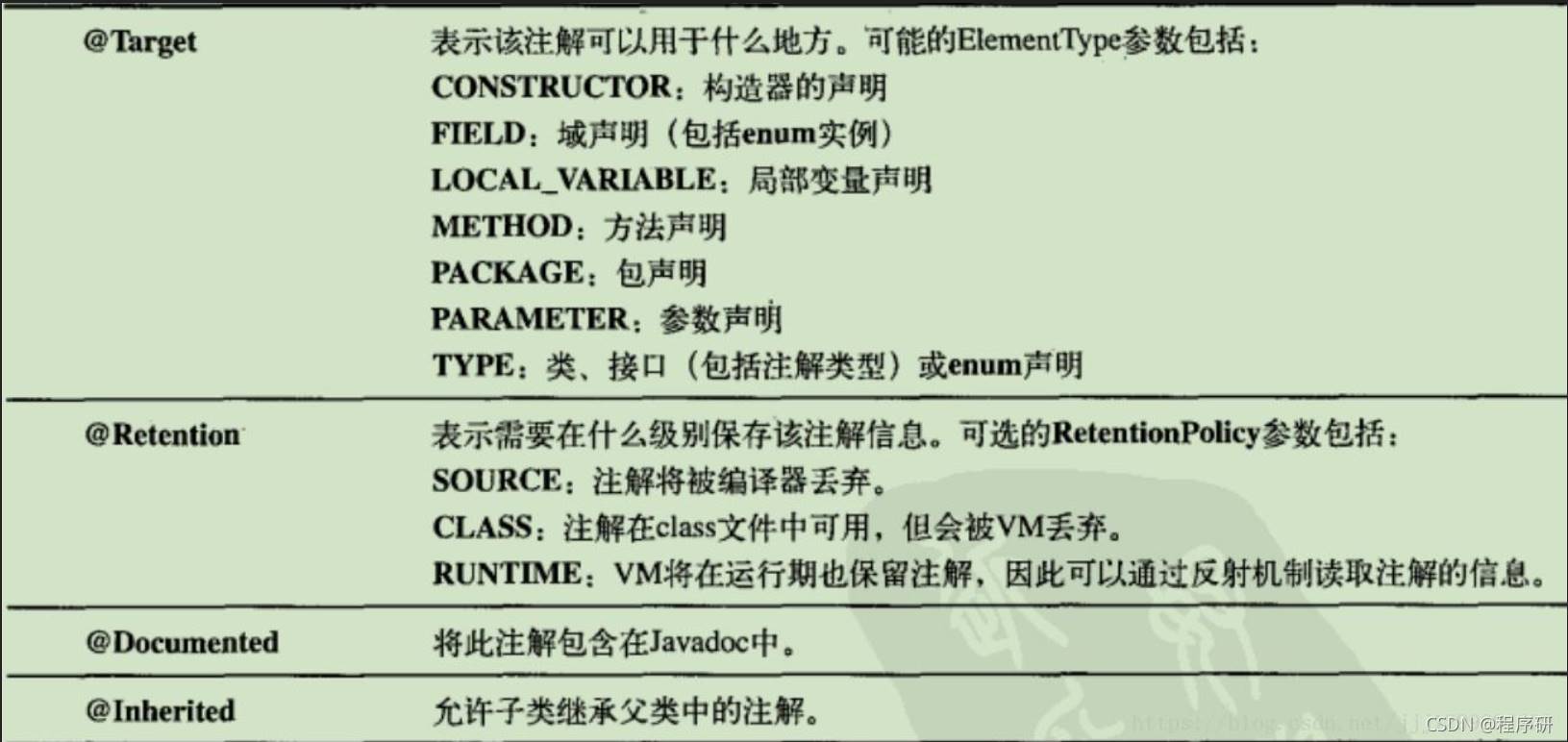
定义并使用Annotation类型
①定义Annotation类型@Constructor_Annotation的有效范围为运行时加载Annotation到JVM中。
package annotationbao;
import java.lang.annotation.ElementType;
import java.lang.annotation.Retention;
import java.lang.annotation.RetentionPolicy;
import java.lang.annotation.Target;
@Target(ElementType.CONSTRUCTOR) // 用于构造方法
@Retention(RetentionPolicy.RUNTIME) // 在运行时加载Annotation到JVM中
public @interface Constructor_Annotation{
String value() default "默认构造方法"; // 定义一个具有默认值的String型成员
}②定义一个来注释字段、方法和参数的Annotation类型@Field_Method_Parameter_Annotation的有效范围为运行时加载Annotation到JVM中
package annotationbao;
import java.lang.annotation.ElementType;
import java.lang.annotation.Retention;
import java.lang.annotation.RetentionPolicy;
import java.lang.annotation.Target;
@Target({ElementType.FIELD,ElementType.METHOD,ElementType.PARAMETER}) // 用于字段、方法和参数
@Retention(RetentionPolicy.RUNTIME) // 在运行时加载Annotation到JVM中
public @interface Field_Method_Parameter_Annotation{
String descrblic(); // 定义一个没有默认值的String型成员
Class type() default void.class; // 定义一个具有默认值的Class型成员
}③编写一个Record类,在该类中运用前面定义Annotation类型的@Constructor_Annotation和@Field_Method_Parameter_Annotation对构造方法、字段、方法和参数进行注释。
package annotationbao;
public class Record {
@Field_Method_Parameter_Annotation(describe = "编号", type = int.class)
int id;
@Field_Method_Parameter_Annotation(describe = "姓名", type = String.class)
String name;
@Constructor_Annotation()
public Record() {
}
@Constructor_Annotation("立即初始化构造方法")
public Record(
@Field_Method_Parameter_Annotation(describe = "编号", type = int.class)
int id,
@Field_Method_Parameter_Annotation(describe = "姓名", type = String.class)
String name) {
this.id = id;
this.name = name;
}
@Field_Method_Parameter_Annotation(describe = "获得编号", type = int.class)
public int getId() {
return id;
}
@Field_Method_Parameter_Annotation(describe = "设置编号")
public void setId(
@Field_Method_Parameter_Annotation(describe = "编号", type = int.class)int id) {
this.id = id;
}
@Field_Method_Parameter_Annotation(describe = "获得姓名", type = String.class)
public String getName() {
return name;
}
@Field_Method_Parameter_Annotation(describe = "设置姓名")
public void setName(
@Field_Method_Parameter_Annotation(describe = "姓名", type = String.class)String name) {
this.name = name;
}
}2、访问Annotation信息
如果在定义Annotation类型时将@Retention设置为RetentionPolicy.RUNTIME,那么在运行程序时通过反射就可以获取到相关的Annotation信息,如获取构造方法、字段和方法的Annotation信息。
联合以上的定义并使用Annotation类型,通过反射访问Record类中的Annotation信息。
package annotationbao;
import java.lang.annotation.*;
import java.lang.reflect.*;
public class Main_05 {
public static void main(String[] args) {
Class recordC = null;
try {
recordC = Class.forName("Record");
} catch (ClassNotFoundException e) {
e.printStackTrace();
}
System.out.println("------ 构造方法的描述如下 ------");
Constructor[] declaredConstructors = recordC
.getDeclaredConstructors(); // 获得所有构造方法
for (int i = 0; i < declaredConstructors.length; i++) {
Constructor constructor = declaredConstructors[i]; // 遍历构造方法
// 查看是否具有指定类型的注释
if (constructor
.isAnnotationPresent(Constructor_Annotation.class)) {
// 获得指定类型的注释
Constructor_Annotation ca = (Constructor_Annotation) constructor
.getAnnotation(Constructor_Annotation.class);
System.out.println(ca.value()); // 获得注释信息
}
Annotation[][] parameterAnnotations = constructor
.getParameterAnnotations(); // 获得参数的注释
for (int j = 0; j < parameterAnnotations.length; j++) {
// 获得指定参数注释的长度
int length = parameterAnnotations[j].length;
if (length == 0) // 如果长度为0则表示没有为该参数添加注释
System.out.println(" 未添加Annotation的参数");
else
for (int k = 0; k < length; k++) {
// 获得参数的注释
Field_Method_Parameter_Annotation pa = (Field_Method_Parameter_Annotation) parameterAnnotations[j][k];
System.out.print(" " + pa.describe()); // 获得参数描述
System.out.println(" " + pa.type()); // 获得参数类型
}
}
System.out.println();
}
System.out.println();
System.out.println("-------- 字段的描述如下 --------");
Field[] declaredFields = recordC.getDeclaredFields(); // 获得所有字段
for (int i = 0; i < declaredFields.length; i++) {
Field field = declaredFields[i]; // 遍历字段
// 查看是否具有指定类型的注释
if (field
.isAnnotationPresent(Field_Method_Parameter_Annotation.class)) {
// 获得指定类型的注释
Field_Method_Parameter_Annotation fa = field
.getAnnotation(Field_Method_Parameter_Annotation.class);
System.out.print(" " + fa.describe()); // 获得字段的描述
System.out.println(" " + fa.type()); // 获得字段的类型
}
}
System.out.println();
System.out.println("-------- 方法的描述如下 --------");
Method[] methods = recordC.getDeclaredMethods(); // 获得所有方法
for (int i = 0; i < methods.length; i++) {
Method method = methods[i]; // 遍历方法
// 查看是否具有指定类型的注释
if (method
.isAnnotationPresent(Field_Method_Parameter_Annotation.class)) {
// 获得指定类型的注释
Field_Method_Parameter_Annotation ma = method
.getAnnotation(Field_Method_Parameter_Annotation.class);
System.out.println(ma.describe()); // 获得方法的描述
System.out.println(ma.type()); // 获得方法的返回值类型
}
Annotation[][] parameterAnnotations = method
.getParameterAnnotations(); // 获得参数的注释
for (int j = 0; j < parameterAnnotations.length; j++) {
int length = parameterAnnotations[j].length; // 获得指定参数注释的长度
if (length == 0) // 如果长度为0表示没有为该参数添加注释
System.out.println(" 未添加Annotation的参数");
else
for (int k = 0; k < length; k++) {
// 获得指定类型的注释
Field_Method_Parameter_Annotation pa = (Field_Method_Parameter_Annotation) parameterAnnotations[j][k];
System.out.print(" " + pa.describe()); // 获得参数的描述
System.out.println(" " + pa.type()); // 获得参数的类型
}
}
System.out.println();
}
}
}/*输出结果:
------ 构造方法的描述如下 ------
默认构造方法
立即初始化构造方法
编号 int
姓名 class java.lang.String
-------- 字段的描述如下 --------
编号 int
姓名 class java.lang.String
-------- 方法的描述如下 --------
获得姓名
class java.lang.String
设置姓名
void
姓名 class java.lang.String
获得编号
int
设置编号
void
编号 int
*/












火山引擎是字节跳动旗下企业级云与AI服务平台。聚焦大模型核心能力,依托字节自研豆包多模态大模型,凭借火山方舟一站式平台,提供模型精调、推理部署、智能应用搭建等全链路服务,结合高性能AI算力,助力各行业快速落地大模型数字化与智能化应用。








AirBuddy 3 是面向 macOS 的蓝牙外设增强工具,可集中查看 AirPods、Beats 与苹果设备电量,提供快速连接、播放控制、电量提醒、桌面小组件和多台 Mac 外设接力等功能。

AirServer macOS版可把 Mac 转换为无线投屏接收端,通过 AirPlay 或 Google Cast 接收手机、平板和电脑画面,并支持多设备同时连接、高清镜像及会话录制,适合家庭娱乐、课堂教学、会议演示和应用展示。



Autodesk Maya 是面向影视、电视、动画和游戏行业的专业三维制作软件,集多边形与 NURBS 建模、角色绑定、关键帧和动作捕捉动画、Bifrost 特效模拟、材质开发及 Arnold 渲染于一体,

AirServer Windows版可把电脑变成AirPlay、Google Cast和Miracast无线投屏接收端,适合会议演示、课堂教学及家庭大屏分享。发送设备通常无需另装客户端,并可同时接收和智能排列多个镜像会话。