


Java怎么实现养老院管理系统
运行环境:JDK1.8、tomcat8、eclipse、mysql5.6、Navicat功能实现:用户:用户名,登录密码,姓名,性别,出生日期,用户照片,联系电话,邮箱,家庭地址,注册时间老人:老人编号,姓名,性别,年龄,老人照片,老人介绍,登记用户,登记时间房间类型:房间类型id,房间类型名称房间:房间编号,房间类型,房间名称,房间主图,房间价格,房间详情,房间状态订单:订单编号,入住房间,入住老人,入住日期,入住时间,订单总金额,订单状态,订单费用明细,订单时间老人看护:记录id,信息类别,信息标题,
运行环境:
JDK1.8、tomcat8、eclipse、mysql5.6、Navicat
功能实现:
用户: 用户名,登录密码,姓名,性别,出生日期,用户照片,联系电话,邮箱,家庭地址,注册时间
老人: 老人编号,姓名,性别,年龄,老人照片,老人介绍,登记用户,登记时间
房间类型: 房间类型id,房间类型名称
房间: 房间编号,房间类型,房间名称,房间主图,房间价格,房间详情,房间状态
订单: 订单编号,入住房间,入住老人,入住日期,入住时间,订单总金额,订单状态,订单费用明细,订单时间
老人看护: 记录id,信息类别,信息标题,信息内容,发布时间
接待: 接待记录id,接待类别,接待主题,接待内容,接待日期
部门: 部门编号,部门名称,成立日期,负责人
员工: 用户名,登录密码,所在部门,姓名,性别,出生日期,员工照片,联系电话,家庭地址
工资: 工资id,员工,工资年份,工资月份,工资金额,发放日期,工资备注
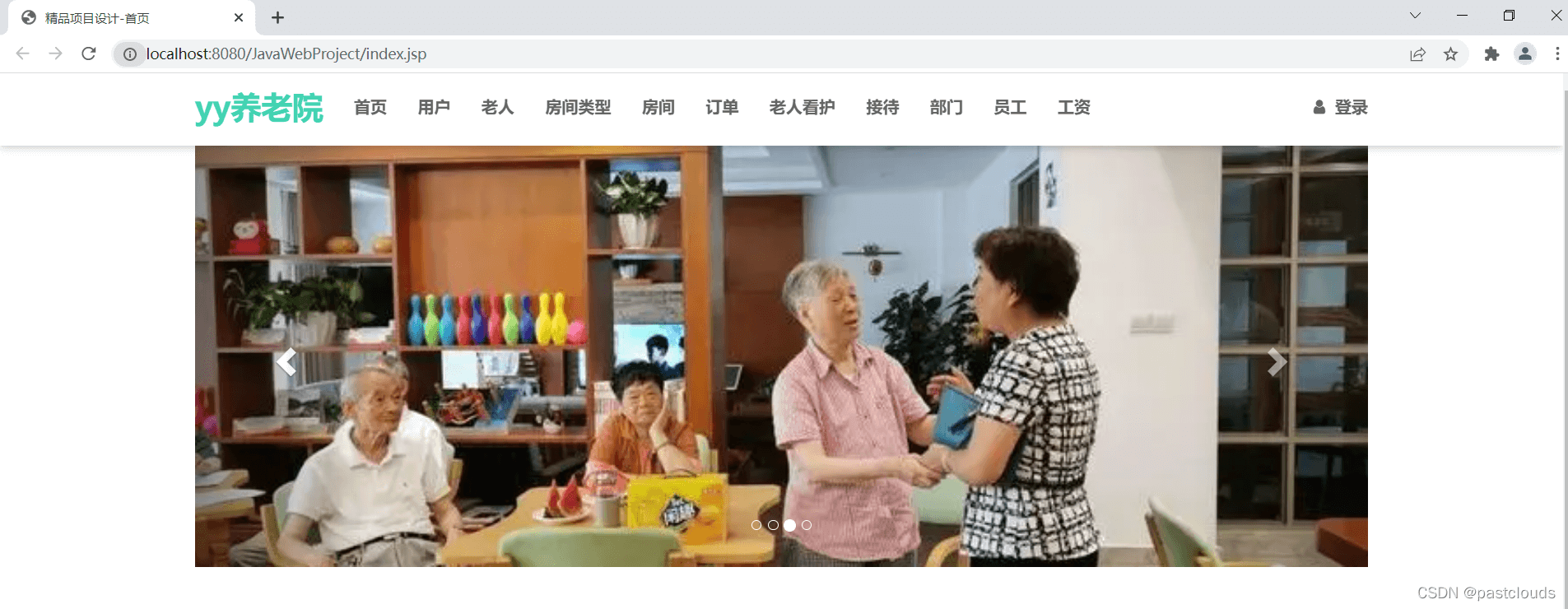
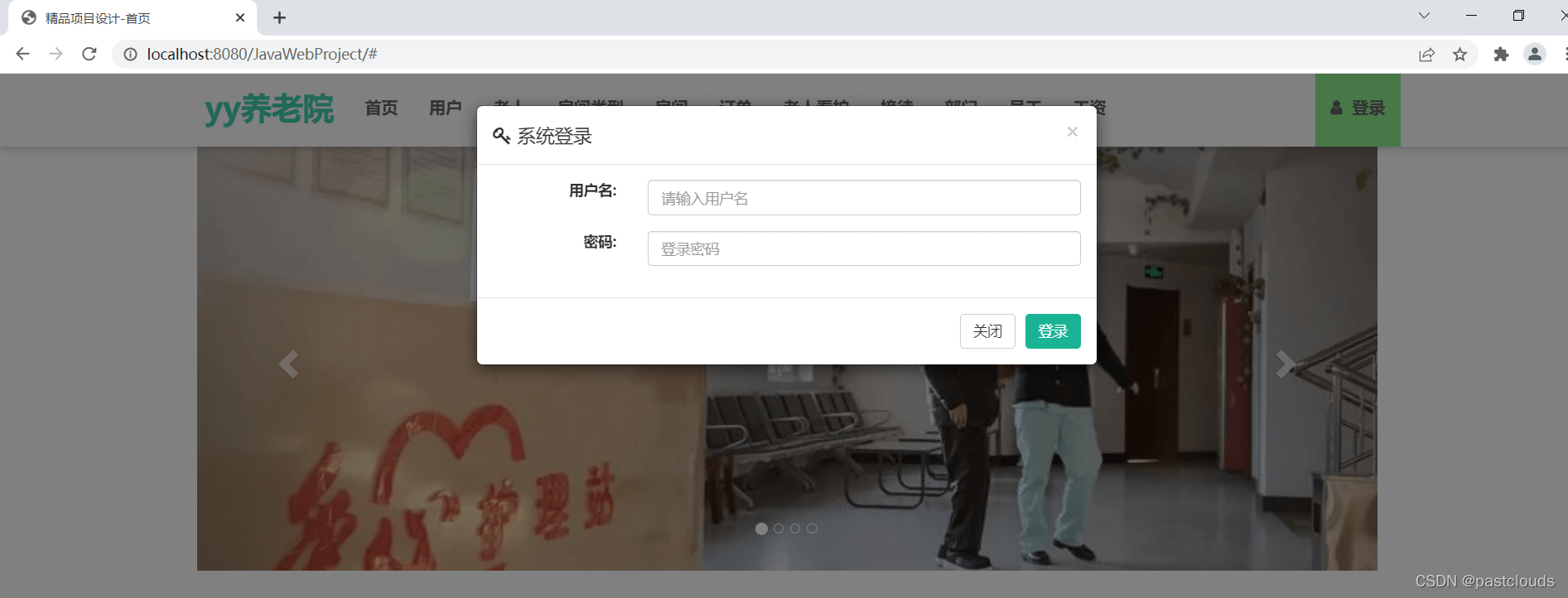
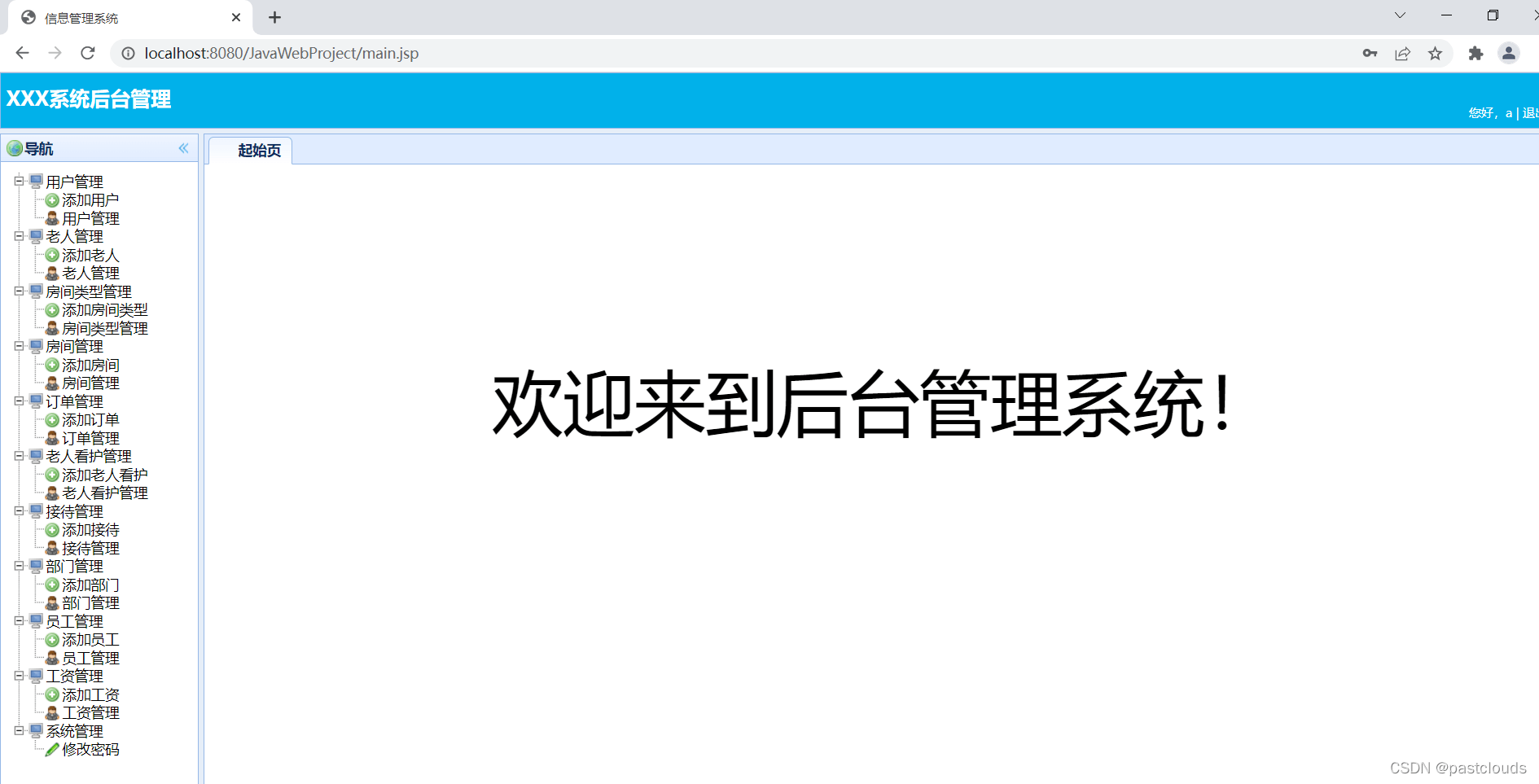
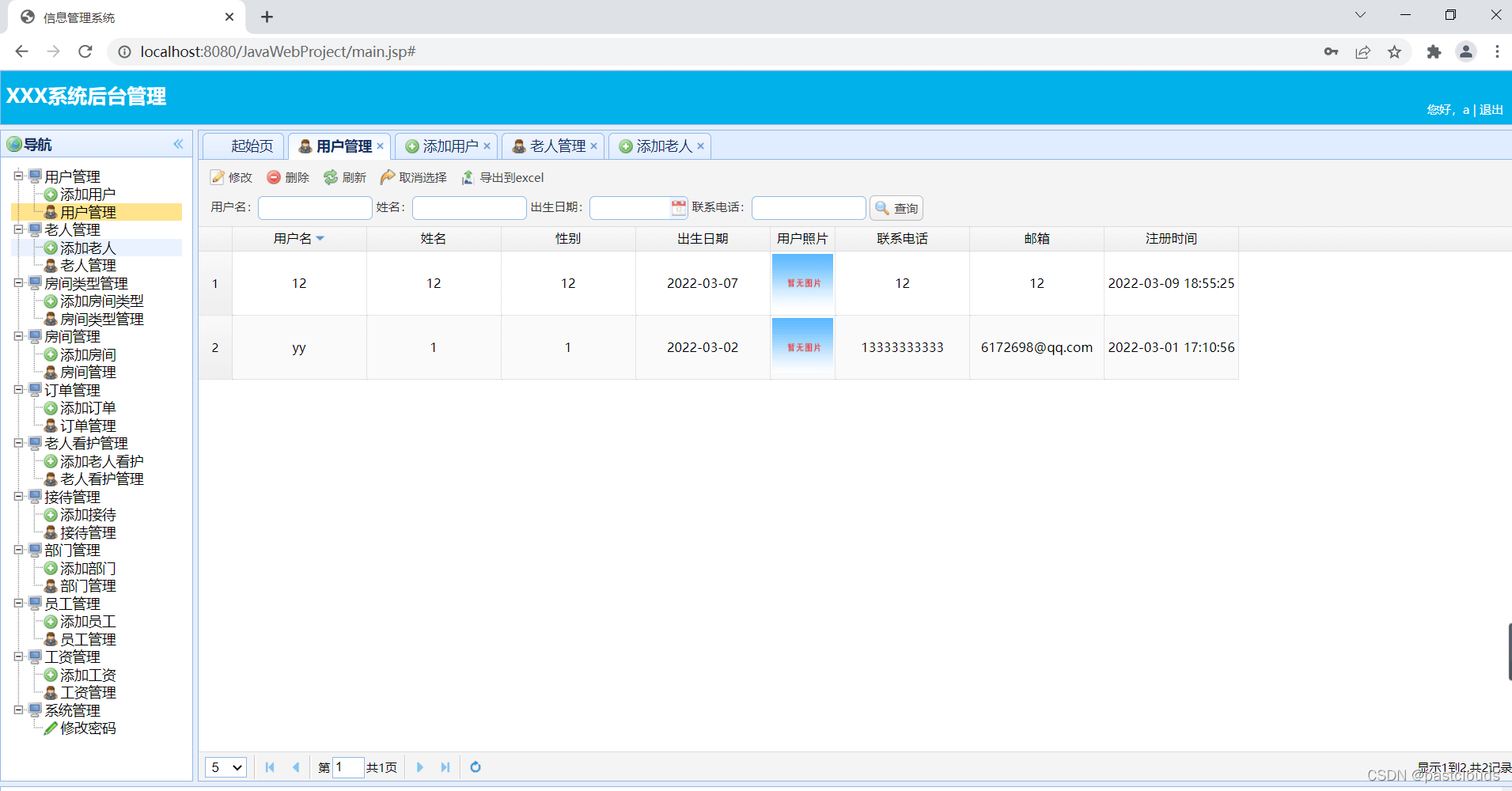
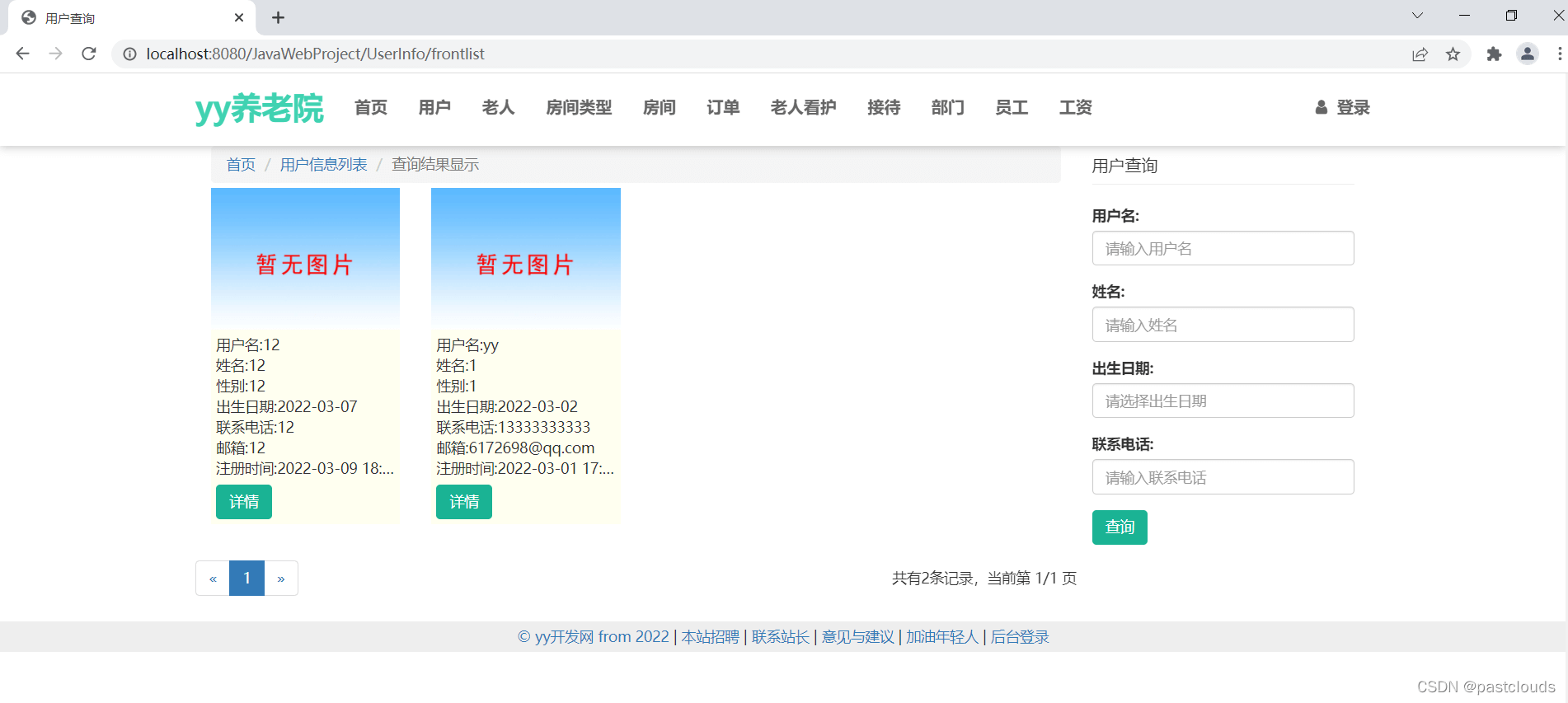
用户管理控制层:
//UserInfo管理控制层
@Controller
@RequestMapping("/UserInfo")
public class UserInfoController extends BaseController {
/*业务层对象*/
@Resource UserInfoService userInfoService;
@InitBinder("userInfo")
public void initBinderUserInfo(WebDataBinder binder) {
binder.setFieldDefaultPrefix("userInfo.");
}
/*跳转到添加UserInfo视图*/
@RequestMapping(value = "/add", method = RequestMethod.GET)
public String add(Model model,HttpServletRequest request) throws Exception {
model.addAttribute(new UserInfo());
return "UserInfo_add";
}
/*客户端ajax方式提交添加用户信息*/
@RequestMapping(value = "/add", method = RequestMethod.POST)
public void add(@Validated UserInfo userInfo, BindingResult br,
Model model, HttpServletRequest request,HttpServletResponse response) throws Exception {
String message = "";
boolean success = false;
if (br.hasErrors()) {
message = "输入信息不符合要求!";
writeJsonResponse(response, success, message);
return ;
}
if(userInfoService.getUserInfo(userInfo.getUser_name()) != null) {
message = "用户名已经存在!";
writeJsonResponse(response, success, message);
return ;
}
try {
userInfo.setUserPhoto(this.handlePhotoUpload(request, "userPhotoFile"));
} catch(UserException ex) {
message = "图片格式不正确!";
writeJsonResponse(response, success, message);
return ;
}
userInfoService.addUserInfo(userInfo);
message = "用户添加成功!";
success = true;
writeJsonResponse(response, success, message);
}
/*ajax方式按照查询条件分页查询用户信息*/
@RequestMapping(value = { "/list" }, method = {RequestMethod.GET,RequestMethod.POST})
public void list(String user_name,String name,String birthDate,String telephone,Integer page,Integer rows, Model model, HttpServletRequest request,HttpServletResponse response) throws Exception {
if (page==null || page == 0) page = 1;
if (user_name == null) user_name = "";
if (name == null) name = "";
if (birthDate == null) birthDate = "";
if (telephone == null) telephone = "";
if(rows != 0)userInfoService.setRows(rows);
List userInfoList = userInfoService.queryUserInfo(user_name, name, birthDate, telephone, page);
/*计算总的页数和总的记录数*/
userInfoService.queryTotalPageAndRecordNumber(user_name, name, birthDate, telephone);
/*获取到总的页码数目*/
int totalPage = userInfoService.getTotalPage();
/*当前查询条件下总记录数*/
int recordNumber = userInfoService.getRecordNumber();
response.setContentType("text/json;charset=UTF-8");
PrintWriter out = response.getWriter();
//将要被返回到客户端的对象
JSONObject jsonObj=new JSONObject();
jsonObj.accumulate("total", recordNumber);
JSONArray jsonArray = new JSONArray();
for(UserInfo userInfo:userInfoList) {
JSONObject jsonUserInfo = userInfo.getJsonObject();
jsonArray.put(jsonUserInfo);
}
jsonObj.accumulate("rows", jsonArray);
out.println(jsonObj.toString());
out.flush();
out.close();
}
/*ajax方式按照查询条件分页查询用户信息*/
@RequestMapping(value = { "/listAll" }, method = {RequestMethod.GET,RequestMethod.POST})
public void listAll(HttpServletResponse response) throws Exception {
List userInfoList = userInfoService.queryAllUserInfo();
response.setContentType("text/json;charset=UTF-8");
PrintWriter out = response.getWriter();
JSONArray jsonArray = new JSONArray();
for(UserInfo userInfo:userInfoList) {
JSONObject jsonUserInfo = new JSONObject();
jsonUserInfo.accumulate("user_name", userInfo.getUser_name());
jsonUserInfo.accumulate("name", userInfo.getName());
jsonArray.put(jsonUserInfo);
}
out.println(jsonArray.toString());
out.flush();
out.close();
}
/*前台按照查询条件分页查询用户信息*/
@RequestMapping(value = { "/frontlist" }, method = {RequestMethod.GET,RequestMethod.POST})
public String frontlist(String user_name,String name,String birthDate,String telephone,Integer currentPage, Model model, HttpServletRequest request) throws Exception {
if (currentPage==null || currentPage == 0) currentPage = 1;
if (user_name == null) user_name = "";
if (name == null) name = "";
if (birthDate == null) birthDate = "";
if (telephone == null) telephone = "";
List userInfoList = userInfoService.queryUserInfo(user_name, name, birthDate, telephone, currentPage);
/*计算总的页数和总的记录数*/
userInfoService.queryTotalPageAndRecordNumber(user_name, name, birthDate, telephone);
/*获取到总的页码数目*/
int totalPage = userInfoService.getTotalPage();
/*当前查询条件下总记录数*/
int recordNumber = userInfoService.getRecordNumber();
request.setAttribute("userInfoList", userInfoList);
request.setAttribute("totalPage", totalPage);
request.setAttribute("recordNumber", recordNumber);
request.setAttribute("currentPage", currentPage);
request.setAttribute("user_name", user_name);
request.setAttribute("name", name);
request.setAttribute("birthDate", birthDate);
request.setAttribute("telephone", telephone);
return "UserInfo/userInfo_frontquery_result";
}
/*前台查询UserInfo信息*/
@RequestMapping(value="/{user_name}/frontshow",method=RequestMethod.GET)
public String frontshow(@PathVariable String user_name,Model model,HttpServletRequest request) throws Exception {
/*根据主键user_name获取UserInfo对象*/
UserInfo userInfo = userInfoService.getUserInfo(user_name);
request.setAttribute("userInfo", userInfo);
return "UserInfo/userInfo_frontshow";
}
/*ajax方式显示用户修改jsp视图页*/
@RequestMapping(value="/{user_name}/update",method=RequestMethod.GET)
public void update(@PathVariable String user_name,Model model,HttpServletRequest request,HttpServletResponse response) throws Exception {
/*根据主键user_name获取UserInfo对象*/
UserInfo userInfo = userInfoService.getUserInfo(user_name);
response.setContentType("text/json;charset=UTF-8");
PrintWriter out = response.getWriter();
//将要被返回到客户端的对象
JSONObject jsonUserInfo = userInfo.getJsonObject();
out.println(jsonUserInfo.toString());
out.flush();
out.close();
}
/*ajax方式更新用户信息*/
@RequestMapping(value = "/{user_name}/update", method = RequestMethod.POST)
public void update(@Validated UserInfo userInfo, BindingResult br,
Model model, HttpServletRequest request,HttpServletResponse response) throws Exception {
String message = "";
boolean success = false;
if (br.hasErrors()) {
message = "输入的信息有错误!";
writeJsonResponse(response, success, message);
return;
}
String userPhotoFileName = this.handlePhotoUpload(request, "userPhotoFile");
if(!userPhotoFileName.equals("upload/NoImage.jpg"))userInfo.setUserPhoto(userPhotoFileName);
try {
userInfoService.updateUserInfo(userInfo);
message = "用户更新成功!";
success = true;
writeJsonResponse(response, success, message);
} catch (Exception e) {
e.printStackTrace();
message = "用户更新失败!";
writeJsonResponse(response, success, message);
}
}
/*删除用户信息*/
@RequestMapping(value="/{user_name}/delete",method=RequestMethod.GET)
public String delete(@PathVariable String user_name,HttpServletRequest request) throws UnsupportedEncodingException {
try {
userInfoService.deleteUserInfo(user_name);
request.setAttribute("message", "用户删除成功!");
return "message";
} catch (Exception e) {
e.printStackTrace();
request.setAttribute("error", "用户删除失败!");
return "error";
}
}
/*ajax方式删除多条用户记录*/
@RequestMapping(value="/deletes",method=RequestMethod.POST)
public void delete(String user_names,HttpServletRequest request,HttpServletResponse response) throws IOException, JSONException {
String message = "";
boolean success = false;
try {
int count = userInfoService.deleteUserInfos(user_names);
success = true;
message = count + "条记录删除成功";
writeJsonResponse(response, success, message);
} catch (Exception e) {
//e.printStackTrace();
message = "有记录存在外键约束,删除失败";
writeJsonResponse(response, success, message);
}
}
/*按照查询条件导出用户信息到Excel*/
@RequestMapping(value = { "/OutToExcel" }, method = {RequestMethod.GET,RequestMethod.POST})
public void OutToExcel(String user_name,String name,String birthDate,String telephone, Model model, HttpServletRequest request,HttpServletResponse response) throws Exception {
if(user_name == null) user_name = "";
if(name == null) name = "";
if(birthDate == null) birthDate = "";
if(telephone == null) telephone = "";
List userInfoList = userInfoService.queryUserInfo(user_name,name,birthDate,telephone);
ExportExcelUtil ex = new ExportExcelUtil();
String _title = "UserInfo信息记录";
String[] headers = { "用户名","姓名","性别","出生日期","用户照片","联系电话","邮箱","注册时间"};
List dataset = new ArrayList();
for(int i=0;i管理员管理控制层:
@Controller
@SessionAttributes("username")
public class SystemController {
@Resource AdminService adminService;
@Resource UserInfoService userInfoService;
@RequestMapping(value="/login",method=RequestMethod.GET)
public String login(Model model) {
model.addAttribute(new Admin());
return "login";
}
//前台用户登录
@RequestMapping(value="/frontLogin",method=RequestMethod.POST)
public void frontLogin(@RequestParam("userName")String userName,@RequestParam("password")String password,HttpServletResponse response,HttpSession session) throws Exception {
boolean success = true;
String msg = "";
if (!userInfoService.checkLogin(userName, password)) {
msg = userInfoService.getErrMessage();
success = false;
}
if(success) {
session.setAttribute("user_name", userName);
}
response.setContentType("text/json;charset=UTF-8");
PrintWriter out = response.getWriter();
//将要被返回到客户端的对象
JSONObject json=new JSONObject();
json.accumulate("success", success);
json.accumulate("msg", msg);
out.println(json.toString());
out.flush();
out.close();
}
@RequestMapping(value="/login",method=RequestMethod.POST)
public void login(@Validated Admin admin,BindingResult br,Model model,HttpServletRequest request,HttpServletResponse response,HttpSession session) throws Exception {
boolean success = true;
String msg = "";
if(br.hasErrors()) {
msg = br.getAllErrors().toString();
success = false;
}
if (!adminService.checkLogin(admin)) {
msg = adminService.getErrMessage();
success = false;
}
if(success) {
session.setAttribute("username", admin.getUsername());
}
response.setContentType("text/json;charset=UTF-8");
PrintWriter out = response.getWriter();
//将要被返回到客户端的对象
JSONObject json=new JSONObject();
json.accumulate("success", success);
json.accumulate("msg", msg);
out.println(json.toString());
out.flush();
out.close();
}
@RequestMapping("/logout")
public String logout(Model model,HttpSession session) {
model.asMap().remove("username");
session.invalidate();
return "redirect:/login";
}
@RequestMapping(value="/changePassword",method=RequestMethod.POST)
public String ChangePassword(String oldPassword,String newPassword,String newPassword2,HttpServletRequest request,HttpSession session) throws Exception {
if(oldPassword.equals("")) throw new UserException("请输入旧密码!");
if(newPassword.equals("")) throw new UserException("请输入新密码!");
if(!newPassword.equals(newPassword2)) throw new UserException("两次新密码输入不一致");
String username = (String)session.getAttribute("username");
if(username == null) throw new UserException("session会话超时,请重新登录系统!");
Admin admin = adminService.findAdminByUserName(username);
if(!admin.getPassword().equals(oldPassword)) throw new UserException("输入的旧密码不正确!");
try {
adminService.changePassword(username,newPassword);
request.setAttribute("message", java.net.URLEncoder.encode(
"密码修改成功!", "GBK"));
return "message";
} catch (Exception e) {
e.printStackTrace();
request.setAttribute("error", java.net.URLEncoder
.encode("密码修改失败!","GBK"));
return "error";
}
}
}房间管理控制层:
//Room管理控制层
@Controller
@RequestMapping("/Room")
public class RoomController extends BaseController {
/*业务层对象*/
@Resource RoomService roomService;
@Resource RoomTypeService roomTypeService;
@InitBinder("roomTypeObj")
public void initBinderroomTypeObj(WebDataBinder binder) {
binder.setFieldDefaultPrefix("roomTypeObj.");
}
@InitBinder("room")
public void initBinderRoom(WebDataBinder binder) {
binder.setFieldDefaultPrefix("room.");
}
/*跳转到添加Room视图*/
@RequestMapping(value = "/add", method = RequestMethod.GET)
public String add(Model model,HttpServletRequest request) throws Exception {
model.addAttribute(new Room());
/*查询所有的RoomType信息*/
List roomTypeList = roomTypeService.queryAllRoomType();
request.setAttribute("roomTypeList", roomTypeList);
return "Room_add";
}
/*客户端ajax方式提交添加房间信息*/
@RequestMapping(value = "/add", method = RequestMethod.POST)
public void add(@Validated Room room, BindingResult br,
Model model, HttpServletRequest request,HttpServletResponse response) throws Exception {
String message = "";
boolean success = false;
if (br.hasErrors()) {
message = "输入信息不符合要求!";
writeJsonResponse(response, success, message);
return ;
}
if(roomService.getRoom(room.getRoomNo()) != null) {
message = "房间编号已经存在!";
writeJsonResponse(response, success, message);
return ;
}
try {
room.setMainPhoto(this.handlePhotoUpload(request, "mainPhotoFile"));
} catch(UserException ex) {
message = "图片格式不正确!";
writeJsonResponse(response, success, message);
return ;
}
roomService.addRoom(room);
message = "房间添加成功!";
success = true;
writeJsonResponse(response, success, message);
}
/*ajax方式按照查询条件分页查询房间信息*/
@RequestMapping(value = { "/list" }, method = {RequestMethod.GET,RequestMethod.POST})
public void list(String roomNo,@ModelAttribute("roomTypeObj") RoomType roomTypeObj,String roomName,String roomState,Integer page,Integer rows, Model model, HttpServletRequest request,HttpServletResponse response) throws Exception {
if (page==null || page == 0) page = 1;
if (roomNo == null) roomNo = "";
if (roomName == null) roomName = "";
if (roomState == null) roomState = "";
if(rows != 0)roomService.setRows(rows);
List roomList = roomService.queryRoom(roomNo, roomTypeObj, roomName, roomState, page);
/*计算总的页数和总的记录数*/
roomService.queryTotalPageAndRecordNumber(roomNo, roomTypeObj, roomName, roomState);
/*获取到总的页码数目*/
int totalPage = roomService.getTotalPage();
/*当前查询条件下总记录数*/
int recordNumber = roomService.getRecordNumber();
response.setContentType("text/json;charset=UTF-8");
PrintWriter out = response.getWriter();
//将要被返回到客户端的对象
JSONObject jsonObj=new JSONObject();
jsonObj.accumulate("total", recordNumber);
JSONArray jsonArray = new JSONArray();
for(Room room:roomList) {
JSONObject jsonRoom = room.getJsonObject();
jsonArray.put(jsonRoom);
}
jsonObj.accumulate("rows", jsonArray);
out.println(jsonObj.toString());
out.flush();
out.close();
}
/*ajax方式按照查询条件分页查询房间信息*/
@RequestMapping(value = { "/listAll" }, method = {RequestMethod.GET,RequestMethod.POST})
public void listAll(HttpServletResponse response) throws Exception {
List roomList = roomService.queryAllRoom();
response.setContentType("text/json;charset=UTF-8");
PrintWriter out = response.getWriter();
JSONArray jsonArray = new JSONArray();
for(Room room:roomList) {
JSONObject jsonRoom = new JSONObject();
jsonRoom.accumulate("roomNo", room.getRoomNo());
jsonRoom.accumulate("roomName", room.getRoomName());
jsonArray.put(jsonRoom);
}
out.println(jsonArray.toString());
out.flush();
out.close();
}
/*前台按照查询条件分页查询房间信息*/
@RequestMapping(value = { "/frontlist" }, method = {RequestMethod.GET,RequestMethod.POST})
public String frontlist(String roomNo,@ModelAttribute("roomTypeObj") RoomType roomTypeObj,String roomName,String roomState,Integer currentPage, Model model, HttpServletRequest request) throws Exception {
if (currentPage==null || currentPage == 0) currentPage = 1;
if (roomNo == null) roomNo = "";
if (roomName == null) roomName = "";
if (roomState == null) roomState = "";
List roomList = roomService.queryRoom(roomNo, roomTypeObj, roomName, roomState, currentPage);
/*计算总的页数和总的记录数*/
roomService.queryTotalPageAndRecordNumber(roomNo, roomTypeObj, roomName, roomState);
/*获取到总的页码数目*/
int totalPage = roomService.getTotalPage();
/*当前查询条件下总记录数*/
int recordNumber = roomService.getRecordNumber();
request.setAttribute("roomList", roomList);
request.setAttribute("totalPage", totalPage);
request.setAttribute("recordNumber", recordNumber);
request.setAttribute("currentPage", currentPage);
request.setAttribute("roomNo", roomNo);
request.setAttribute("roomTypeObj", roomTypeObj);
request.setAttribute("roomName", roomName);
request.setAttribute("roomState", roomState);
List roomTypeList = roomTypeService.queryAllRoomType();
request.setAttribute("roomTypeList", roomTypeList);
return "Room/room_frontquery_result";
}
/*前台查询Room信息*/
@RequestMapping(value="/{roomNo}/frontshow",method=RequestMethod.GET)
public String frontshow(@PathVariable String roomNo,Model model,HttpServletRequest request) throws Exception {
/*根据主键roomNo获取Room对象*/
Room room = roomService.getRoom(roomNo);
List roomTypeList = roomTypeService.queryAllRoomType();
request.setAttribute("roomTypeList", roomTypeList);
request.setAttribute("room", room);
return "Room/room_frontshow";
}
/*ajax方式显示房间修改jsp视图页*/
@RequestMapping(value="/{roomNo}/update",method=RequestMethod.GET)
public void update(@PathVariable String roomNo,Model model,HttpServletRequest request,HttpServletResponse response) throws Exception {
/*根据主键roomNo获取Room对象*/
Room room = roomService.getRoom(roomNo);
response.setContentType("text/json;charset=UTF-8");
PrintWriter out = response.getWriter();
//将要被返回到客户端的对象
JSONObject jsonRoom = room.getJsonObject();
out.println(jsonRoom.toString());
out.flush();
out.close();
}
/*ajax方式更新房间信息*/
@RequestMapping(value = "/{roomNo}/update", method = RequestMethod.POST)
public void update(@Validated Room room, BindingResult br,
Model model, HttpServletRequest request,HttpServletResponse response) throws Exception {
String message = "";
boolean success = false;
if (br.hasErrors()) {
message = "输入的信息有错误!";
writeJsonResponse(response, success, message);
return;
}
String mainPhotoFileName = this.handlePhotoUpload(request, "mainPhotoFile");
if(!mainPhotoFileName.equals("upload/NoImage.jpg"))room.setMainPhoto(mainPhotoFileName);
try {
roomService.updateRoom(room);
message = "房间更新成功!";
success = true;
writeJsonResponse(response, success, message);
} catch (Exception e) {
e.printStackTrace();
message = "房间更新失败!";
writeJsonResponse(response, success, message);
}
}
/*删除房间信息*/
@RequestMapping(value="/{roomNo}/delete",method=RequestMethod.GET)
public String delete(@PathVariable String roomNo,HttpServletRequest request) throws UnsupportedEncodingException {
try {
roomService.deleteRoom(roomNo);
request.setAttribute("message", "房间删除成功!");
return "message";
} catch (Exception e) {
e.printStackTrace();
request.setAttribute("error", "房间删除失败!");
return "error";
}
}
/*ajax方式删除多条房间记录*/
@RequestMapping(value="/deletes",method=RequestMethod.POST)
public void delete(String roomNos,HttpServletRequest request,HttpServletResponse response) throws IOException, JSONException {
String message = "";
boolean success = false;
try {
int count = roomService.deleteRooms(roomNos);
success = true;
message = count + "条记录删除成功";
writeJsonResponse(response, success, message);
} catch (Exception e) {
//e.printStackTrace();
message = "有记录存在外键约束,删除失败";
writeJsonResponse(response, success, message);
}
}
/*按照查询条件导出房间信息到Excel*/
@RequestMapping(value = { "/OutToExcel" }, method = {RequestMethod.GET,RequestMethod.POST})
public void OutToExcel(String roomNo,@ModelAttribute("roomTypeObj") RoomType roomTypeObj,String roomName,String roomState, Model model, HttpServletRequest request,HttpServletResponse response) throws Exception {
if(roomNo == null) roomNo = "";
if(roomName == null) roomName = "";
if(roomState == null) roomState = "";
List roomList = roomService.queryRoom(roomNo,roomTypeObj,roomName,roomState);
ExportExcelUtil ex = new ExportExcelUtil();
String _title = "Room信息记录";
String[] headers = { "房间编号","房间类型","房间名称","房间主图","房间价格","房间状态"};
List dataset = new ArrayList();
for(int i=0;i 










火山引擎是字节跳动旗下企业级云与AI服务平台。聚焦大模型核心能力,依托字节自研豆包多模态大模型,凭借火山方舟一站式平台,提供模型精调、推理部署、智能应用搭建等全链路服务,结合高性能AI算力,助力各行业快速落地大模型数字化与智能化应用。








AirBuddy 3 是面向 macOS 的蓝牙外设增强工具,可集中查看 AirPods、Beats 与苹果设备电量,提供快速连接、播放控制、电量提醒、桌面小组件和多台 Mac 外设接力等功能。

AirServer macOS版可把 Mac 转换为无线投屏接收端,通过 AirPlay 或 Google Cast 接收手机、平板和电脑画面,并支持多设备同时连接、高清镜像及会话录制,适合家庭娱乐、课堂教学、会议演示和应用展示。

火山引擎是字节跳动旗下企业级云与AI服务平台。聚焦大模型核心能力,依托字节自研豆包多模态大模型,凭借火山方舟一站式平台,提供模型精调、推理部署、智能应用搭建等全链路服务,结合高性能AI算力,助力各行业快速落地大模型数字化与智能化应用。

PixTV 是一款在浏览器中使用的 AI 视觉内容创作平台,提供图片、视频、音频、文字生成、AI 分镜、局部重绘、提示词反推和无限画布等工具,适合短剧、漫剧、广告及社交媒体内容制作。


Autodesk Maya 是面向影视、电视、动画和游戏行业的专业三维制作软件,集多边形与 NURBS 建模、角色绑定、关键帧和动作捕捉动画、Bifrost 特效模拟、材质开发及 Arnold 渲染于一体,