


基于Java怎么实现经典蜘蛛纸牌游戏
效果展示前面的导入过程这里就不多说了,不会的可以自己去问度娘。导入后,选择Spider.java类直接运行就可以了,下面是游戏运行的截图:游戏结构核心代码AboutDialog.java类importjavax.swing.*;importjava.awt.*;/***“关于”窗口*/publicclassAboutDialogextendsJDialog{JPaneljMainPane=newJPanel();JTabbedPanejTabbedPane=newJTabbedPane();private
效果展示
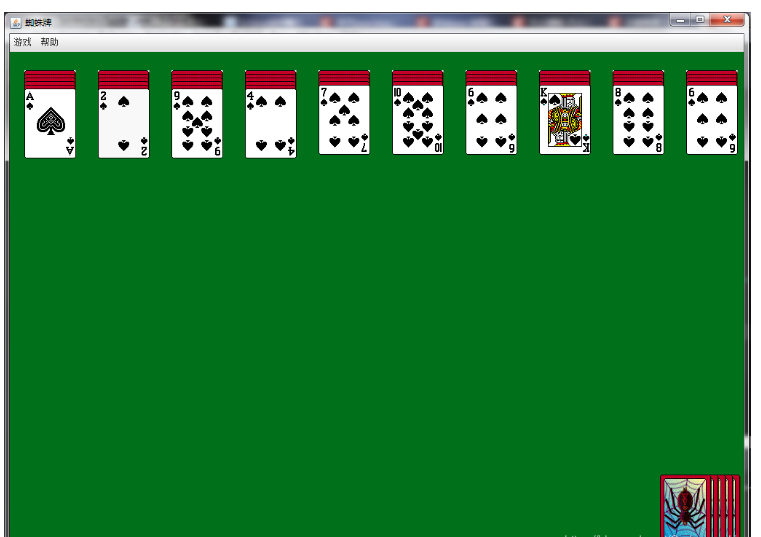
前面的导入过程这里就不多说了,不会的可以自己去问度娘。导入后,选择Spider.java类直接运行就可以了,下面是游戏运行的截图:
游戏结构
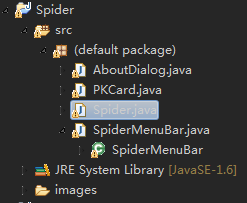
核心代码
AboutDialog.java类
import javax.swing.*;
import java.awt.*;


/*
 **“关于”窗口
 */
public class AboutDialog extends JDialog
{
	JPanel jMainPane = new JPanel();

	JTabbedPane jTabbedPane = new JTabbedPane();
	private JPanel jPanel1 = new JPanel();
	private JPanel jPanel2 = new JPanel();

	private JTextArea jt1 = new JTextArea("将电脑多次分发给你的牌按照相同的花色由大至小排列起来。直到桌面上的牌全都消失。");
	private JTextArea jt2 = new JTextArea("该游戏中,纸牌的图片来自于Windows XP的纸牌游戏,图片权属于原作者所有!");

	/*
	 **构造函数
	 */
	public AboutDialog()
	{
		setTitle("蜘蛛牌");
		setSize(300,200);
		setResizable(false);
		setDefaultCloseOperation (WindowConstants.DISPOSE_ON_CLOSE);

		Container c = this.getContentPane();

		jt1.setSize(260,200);
		jt2.setSize(260,200);

		jt1.setEditable(false);
		jt2.setEditable(false);

		jt1.setLineWrap(true);
		jt2.setLineWrap(true);

		jt1.setFont(new Font("楷体_GB2312", java.awt.Font.BOLD, 13));
		jt1.setForeground(Color.blue);

		jt2.setFont(new Font("楷体_GB2312", java.awt.Font.BOLD, 13));
		jt2.setForeground(Color.black);

		jPanel1.add(jt1);
		jPanel2.add(jt2);

		jTabbedPane.setSize(300,200);
		jTabbedPane.addTab("游戏规则", null, jPanel1, null);
		jTabbedPane.addTab("声明", null, jPanel2, null);

		jMainPane.add(jTabbedPane);
		c.add(jMainPane);

		pack();
		this.setVisible(true);
	}
}
PKCard.java类
import java.awt.*;
import java.awt.event.*;
import javax.swing.*;

public class PKCard extends JLabel implements MouseListener,
        MouseMotionListener{

    //纸牌的位置
	Point point = null;
    Point initPoint = null;

	int value = 0;
    int type = 0;

	String name = null;
    Container pane = null;

	Spider main = null;

	boolean canMove = false;
    boolean isFront = false;
    PKCard previousCard = null;

    public void mouseClicked(MouseEvent arg0){
	}

    public void flashCard(PKCard card){
		//启动Flash线程
		new Flash(card).start();
		//不停的获得下一张牌,直到完成
		if(main.getNextCard(card) != null){
			card.flashCard(main.getNextCard(card));
		}
	}

    class Flash extends Thread{
		private PKCard card = null;

		public Flash(PKCard card){
			this.card = card;
		}

		/*
		 **线程的run()方法
		 **为纸牌的正面设置白色图片
		 */
		public void run(){
			boolean is = false;
			ImageIcon icon = new ImageIcon("images/white.gif");
			for (int i = 0; i < 4; i++){
				try{
					Thread.sleep(200);
				}
				catch (InterruptedException e){
					e.printStackTrace();
				}

				if (is){
					this.card.turnFront();
					is = !is;
				}
				else{
					this.card.setIcon(icon);
					is = !is;
				}
				// 根据当前外观将card的UI属性重置
				card.updateUI();
			}
		}
	}

    /**
	 **点击鼠标
	 */
	public void mousePressed(MouseEvent mp){
        point = mp.getPoint();
        main.setNA();
        this.previousCard = main.getPreviousCard(this);
    }

    /**
	 **释放鼠标
	 */
	public void mouseReleased(MouseEvent mr){
		Point point = ((JLabel) mr.getSource()).getLocation();
		//判断可行列
		int n = this.whichColumnAvailable(point);
		if (n == -1 || n == this.whichColumnAvailable(this.initPoint)){
			this.setNextCardLocation(null);
			main.table.remove(this.getLocation());
			this.setLocation(this.initPoint);
			main.table.put(this.initPoint, this);
			return;
		}

		point = main.getLastCardLocation(n);
		boolean isEmpty = false;
		PKCard card = null;
		if (point == null){
			point = main.getGroundLabelLocation(n);
			isEmpty = true;
		}
		else{
			card = (PKCard) main.table.get(point);
		}

		if (isEmpty || (this.value + 1 == card.getCardValue())){
			point.y += 40;
			if (isEmpty) point.y -= 20;
			this.setNextCardLocation(point);
			main.table.remove(this.getLocation());
			point.y -= 20;
			this.setLocation(point);
			main.table.put(point, this);
			this.initPoint = point;
			if (this.previousCard != null){
				this.previousCard.turnFront();
				this.previousCard.setCanMove(true);
			}

			this.setCanMove(true);
		}
		else{
			this.setNextCardLocation(null);
			main.table.remove(this.getLocation());
			this.setLocation(this.initPoint);
			main.table.put(this.initPoint, this);
			return;
		}
        point = main.getLastCardLocation(n);
        card = (PKCard) main.table.get(point);
        if (card.getCardValue() == 1){
			point.y -= 240;
			card = (PKCard) main.table.get(point);
			if (card != null && card.isCardCanMove()){
				main.haveFinish(n);
			}
		}
	}

	/*
	 **方法:放置纸牌
	 */
	public void setNextCardLocation(Point point){
		PKCard card = main.getNextCard(this);
		if (card != null){
			if (point == null){
				card.setNextCardLocation(null);
				main.table.remove(card.getLocation());
				card.setLocation(card.initPoint);
				main.table.put(card.initPoint, card);
			}
			else{
				point = new Point(point);
				point.y += 20;
				card.setNextCardLocation(point);
				point.y -= 20;
				main.table.remove(card.getLocation());
				card.setLocation(point);
				main.table.put(card.getLocation(), card);
				card.initPoint = card.getLocation();
			}
		}
	}

    /**
	 **返回值:int
	 **方法:判断可用列
	 */
	public int whichColumnAvailable(Point point){
		int x = point.x;
		int y = point.y;
		int a = (x - 20) / 101;
		int b = (x - 20) % 101;
		if (a != 9){
			if (b > 30 && b <= 71){
				a = -1;
			}
			else if (b > 71){
				a++;
			}
		}
		else if (b > 71){
			a = -1;
		}

		if (a != -1){
			Point p = main.getLastCardLocation(a);
			if (p == null) p = main.getGroundLabelLocation(a);
			b = y - p.y;
			if (b <= -96 || b >= 96){
				a = -1;
			}
		}
		return a;
	}

    public void mouseEntered(MouseEvent arg0){
    }

    public void mouseExited(MouseEvent arg0){
    }

    /**
	 **用鼠标拖动纸牌
	 */
	public void mouseDragged(MouseEvent arg0){
        if (canMove){
			int x = 0;
			int y = 0;
			Point p = arg0.getPoint();
			x = p.x - point.x;
			y = p.y - point.y;
			this.moving(x, y);
		}
	}

    /**
	 **返回值:void
	 **方法:移动(x,y)个位置
	 */
	public void moving(int x, int y){
        PKCard card = main.getNextCard(this);
        Point p = this.getLocation();

		//将组件移动到容器中指定的顺序索引。
		pane.setComponentZOrder(this, 1);

		//在Hashtable中保存新的节点信息
		main.table.remove(p);
        p.x += x;
        p.y += y;
        this.setLocation(p);
        main.table.put(p, this);
        if (card != null) card.moving(x, y);
    }

    public void mouseMoved(MouseEvent arg0){
    }

    /**
     **构造函数
     */
    public PKCard(String name, Spider spider){
        super();
        this.type = new Integer(name.substring(0, 1)).intValue();
        this.value = new Integer(name.substring(2)).intValue();
        this.name = name;
        this.main = spider;
        this.pane = this.main.getContentPane();
        this.addMouseListener(this);
        this.addMouseMotionListener(this);
        this.setIcon(new ImageIcon("images/rear.gif"));
        this.setSize(71, 96);
        this.setVisible(true);
    }

    /**
	 **返回值:void
	 **方法:令纸牌显示正面
	 */
	public void turnFront(){
        this.setIcon(new ImageIcon("images/" + name + ".gif"));
        this.isFront = true;
    }

    /**
	 **返回值:void
	 **方法:令纸牌显示背面
	 */
	public void turnRear(){
        this.setIcon(new ImageIcon("images/rear.gif"));
        this.isFront = false;
        this.canMove = false;
    }

    /**
	 **返回值:void
	 **方法:将纸牌移动到点point
	 */
	public void moveto(Point point){
        this.setLocation(point);
        this.initPoint = point;
    }

    /**
	 **返回值:void
	 **方法:判断牌是否能移动
	 */
	public void setCanMove(boolean can){
        this.canMove = can;
        PKCard card = main.getPreviousCard(this);
        if (card != null && card.isCardFront()){
            if (!can){
                if (!card.isCardCanMove()){
                    return;
				}
                else{
					card.setCanMove(can);
				}
			}
            else{
                if (this.value + 1 == card.getCardValue()
                        && this.type == card.getCardType()){
					card.setCanMove(can);
				}
				else{
					card.setCanMove(false);
				}
            }
        }
    }

    /**
	 **返回值:boolean
	 **方法:判断card是否是正面
	 */
	public boolean isCardFront(){
        return this.isFront;
    }

    /*
	 **返回值:boolean
	 **方法:返回是否能够移动
	 */
	public boolean isCardCanMove(){
        return this.canMove;
    }

    /**
	 **返回值:int
	 **方法:获得card的内容值
	 */
	public int getCardValue(){
        return value;
    }

    /**
	 **返回值:int
	 **方法:获得card的类型
	 */
	public int getCardType(){
        return type;
    }
}
SpiderMenuBar.java类
import javax.swing.JMenuBar;
import javax.swing.JMenu;
import javax.swing.JMenuItem;
import javax.swing.JRadioButtonMenuItem;
import javax.swing.ButtonGroup;

public class SpiderMenuBar extends JMenuBar{

	//生成spider框架对象
    Spider main = null;

    //生成菜单组
    JMenu jNewGame = new JMenu("游戏");
    JMenu jHelp = new JMenu("帮助");

    //生成菜单项
    JMenuItem jItemAbout = new JMenuItem("关于");
    JMenuItem jItemOpen = new JMenuItem("开局");
    JMenuItem jItemPlayAgain = new JMenuItem("重新发牌");

    //生成单选框
    JRadioButtonMenuItem jRMItemEasy = new JRadioButtonMenuItem("简单:单一花色");
    JRadioButtonMenuItem jRMItemNormal = new JRadioButtonMenuItem("中级:双花色");
    JRadioButtonMenuItem jRMItemHard = new JRadioButtonMenuItem("高级:四花色");;

    JMenuItem jItemExit = new JMenuItem("退出");
    JMenuItem jItemValid = new JMenuItem("显示可行操作");


    /**
     **构造函数,生成JMenuBar的图形界面
     */
    public SpiderMenuBar(Spider spider){

        this.main = spider;

        /**
         **初始化“游戏”菜单栏
         */
        jNewGame.add(jItemOpen);
        jNewGame.add(jItemPlayAgain);
        jNewGame.add(jItemValid);

        jNewGame.addSeparator();
        jNewGame.add(jRMItemEasy);
        jNewGame.add(jRMItemNormal);
        jNewGame.add(jRMItemHard);

        jNewGame.addSeparator();

        jNewGame.add(jItemExit);

        ButtonGroup group = new ButtonGroup();
        group.add(jRMItemEasy);
        group.add(jRMItemNormal);
        group.add(jRMItemHard);

        jHelp.add(jItemAbout);

        this.add(jNewGame);
        this.add(jHelp);

		//为组件添加事件监听并实现
        //“开局”
		jItemOpen.addActionListener(new java.awt.event.ActionListener() {
            public void actionPerformed(java.awt.event.ActionEvent e) {
                main.newGame();
            }
        });

        //“重新发牌”
		jItemPlayAgain.addActionListener(new java.awt.event.ActionListener() {
            public void actionPerformed(java.awt.event.ActionEvent e) {
                if(main.getC() < 60){
                    main.deal();
                }
            }
        });

        //"显示可行操作"
		jItemValid.addActionListener(new java.awt.event.ActionListener() {
            public void actionPerformed(java.awt.event.ActionEvent e) {
                new Show().start();
            }
        });

        //“退出”
		jItemExit.addActionListener(new java.awt.event.ActionListener() {
            public void actionPerformed(java.awt.event.ActionEvent e) {
                main.dispose();
                System.exit(0);
            }
        });

		//“简单级别”默认已选
		jRMItemEasy.setSelected(true);

		//“简单级别”
		jRMItemEasy.addActionListener(new java.awt.event.ActionListener() {
            public void actionPerformed(java.awt.event.ActionEvent e) {
                main.setGrade(Spider.EASY);
                main.initCards();
                main.newGame();
            }
        });

        //“中级”
		jRMItemNormal.addActionListener(new java.awt.event.ActionListener() {
            public void actionPerformed(java.awt.event.ActionEvent e) {
                main.setGrade(Spider.NATURAL);
                main.initCards();
                main.newGame();
            }
        });

        //“高级”
		jRMItemHard.addActionListener(new java.awt.event.ActionListener() {
            public void actionPerformed(java.awt.event.ActionEvent e) {
                main.setGrade(Spider.HARD);
                main.initCards();
                main.newGame();
            }
        });

		jNewGame.addMenuListener(new javax.swing.event.MenuListener() {
            public void menuSelected(javax.swing.event.MenuEvent e) {
                if(main.getC() < 60){
                    jItemPlayAgain.setEnabled(true);
                }
                else{
                    jItemPlayAgain.setEnabled(false);
                }
            }
            public void menuDeselected(javax.swing.event.MenuEvent e) {}
            public void menuCanceled(javax.swing.event.MenuEvent e) {}
        });

        //“关于”
		jItemAbout.addActionListener(new java.awt.event.ActionListener() {
            public void actionPerformed(java.awt.event.ActionEvent e) {
                new AboutDialog();
            }
        });
    }

    /**
     **构造线程:显示可以执行的操作
     */
    class Show extends Thread{
        public void run(){
            main.showEnableOperator();
        }
    }
 }
Spider.java 类
import java.awt.*;
import java.awt.event.*;
import javax.swing.*;
import java.util.*;

public class Spider extends JFrame{

	//整型变量,表示难度等级为:简单
	public static final int EASY = 1;
    //整型变量,表示难度等级为:普通
	public static final int NATURAL = 2;
    //整型变量,表示难度等级为:难
	public static final int HARD = 3;
    //设定初始难度等级为简单
	private int grade = Spider.EASY;
    private Container pane = null;
    //生成纸牌数组
	private PKCard cards[] = new PKCard[104];
    private JLabel clickLabel = null;
    private int c = 0;
    private int n = 0;
    private int a = 0;
    private int finish = 0;
    Hashtable table = null;
    private JLabel groundLabel[] = null;

    public static void main(String[] args){
        Spider spider = new Spider();
		spider.setVisible(true);
    }

    /**
     **构造函数
     */
    public Spider(){
    	//改变系统默认字体
		Font font = new Font("Dialog", Font.PLAIN, 12);
		java.util.Enumeration keys = UIManager.getDefaults().keys();
		while (keys.hasMoreElements()) {
			Object key = keys.nextElement();
			Object value = UIManager.get(key);
			if (value instanceof javax.swing.plaf.FontUIResource) {
				UIManager.put(key, font);
			}
		}
		setTitle("蜘蛛牌");
        setDefaultCloseOperation(javax.swing.JFrame.EXIT_ON_CLOSE);
        //设置框架的大小
		setSize(1024, 742);

		//生成SpiderMenuBar对象,并放置在框架之上
		setJMenuBar(new SpiderMenuBar(this));
        pane = this.getContentPane();
        //设置背景颜色
		pane.setBackground(new Color(0, 112, 26));
        //将布局管理器设置成为null
		pane.setLayout(null);
        clickLabel = new JLabel();
        clickLabel.setBounds(883, 606, 121, 96);
        pane.add(clickLabel);

		clickLabel.addMouseListener(new MouseAdapter(){
            public void mouseReleased(MouseEvent me){
                if (c < 60){
					Spider.this.deal();
				}
            }
        });

		this.initCards();
        this.randomCards();
        this.setCardsLocation();
        groundLabel = new JLabel[10];

		int x = 20;
        for (int i = 0; i < 10; i++)
        {
            groundLabel[i] = new JLabel();
            groundLabel[i]
                    .setBorder(javax.swing.BorderFactory
                            .createEtchedBorder(javax.swing.border.EtchedBorder.RAISED));
            groundLabel[i].setBounds(x, 25, 71, 96);
            x += 101;
            this.pane.add(groundLabel[i]);
        }

		this.setVisible(true);
        this.deal();

		this.addKeyListener(new KeyAdapter(){
            class Show extends Thread{
                public void run(){
                    Spider.this.showEnableOperator();
                }
            }

            public void keyPressed(KeyEvent e){
                if (finish != 8) if (e.getKeyCode() == KeyEvent.VK_D && c < 60){
                    Spider.this.deal();
                }
                else if (e.getKeyCode() == KeyEvent.VK_M){
                    new Show().start();
                }
            }
        });
    }

    /**
	 **开始新游戏
	 */
	public void newGame(){
        this.randomCards();
        this.setCardsLocation();
        this.setGroundLabelZOrder();
        this.deal();
    }

    /**
	 **返回值:int
	 **返回牌的数量
	  */
	public int getC(){
        return c;
    }

    /**
	 **设置等级
	 */
	public void setGrade(int grade){
        this.grade = grade;
    }

    /**
	 **纸牌初始化
	 */
	public void initCards(){
        //如果纸牌已被赋值,即将其从框架的面板中移去
		if (cards[0] != null){
            for (int i = 0; i < 104; i++){
                pane.remove(cards[i]);
            }
        }

		int n = 0;
        //通过难度等级,为n赋值
		if (this.grade == Spider.EASY){
            n = 1;
        }
        else if (this.grade == Spider.NATURAL){
            n = 2;
        }
        else{
            n = 4;
        }
      //为card赋值
		for (int i = 1; i <= 8; i++){
            for (int j = 1; j <= 13; j++){
                cards[(i - 1) * 13 + j - 1] = new PKCard((i % n + 1) + "-" + j,
                        this);
            }
        }

		//随机纸牌初始化
		this.randomCards();
    }

    /**
	 **纸牌随机分配
	 */
	public void randomCards(){
        PKCard temp = null;
        //随机生成牌号
		for (int i = 0; i < 52; i++){
            int a = (int) (Math.random() * 104);
            int b = (int) (Math.random() * 104);
            temp = cards[a];
            cards[a] = cards[b];
            cards[b] = temp;
        }
    }

    /**
	 **设置还原
	 */
	public void setNA(){
        a = 0;
        n = 0;
    }

    /**
	 **设置纸牌的位置
	 */
	public void setCardsLocation(){
        table = new Hashtable();
        c = 0;
        finish = 0;
        n = 0;
        a = 0;
        int x = 883;
        int y = 580;
		//初始化待展开的纸牌
        for (int i = 0; i < 6; i++){
            for (int j = 0; j < 10; j++){
                int n = i * 10 + j;
                pane.add(cards[n]);
                //将card转向背面
				cards[n].turnRear();
                //将card放在固定的位置上
				cards[n].moveto(new Point(x, y));
                //将card的位置及相关信息存入
				table.put(new Point(x, y), cards[n]);
            }
            x += 10;
        }

		x = 20;
        y = 45;
        //初始化表面显示的纸牌
		for (int i = 10; i > 5; i--){
            for (int j = 0; j < 10; j++){
                int n = i * 10 + j;
                if (n >= 104) continue;
                pane.add(cards[n]);
                cards[n].turnRear();
                cards[n].moveto(new Point(x, y));
                table.put(new Point(x, y), cards[n]);
                x += 101;
            }
            x = 20;
            y -= 5;
        }
    }

    /**
	 **返回值:void
	 **方法:显示可移动的操作
	 */
	public void showEnableOperator(){
        int x = 0;
        out: while (true){
            Point point = null;
            PKCard card = null;
            do{
                if (point != null){
					n++;
				}
                point = this.getLastCardLocation(n);
                while (point == null){
                    point = this.getLastCardLocation(++n);
                    if (n == 10) n = 0;
                    x++;
                    if (x == 10) break out;
                }
                card = (PKCard) this.table.get(point);
            }
            while (!card.isCardCanMove());
            while (this.getPreviousCard(card) != null
                    && this.getPreviousCard(card).isCardCanMove()){
                card = this.getPreviousCard(card);
            }
            if (a == 10){
				a = 0;
			}
            for (; a < 10; a++){
                if (a != n){
                    Point p = null;
                    PKCard c = null;
                    do{
                        if (p != null){
							a++;
						}
						p = this.getLastCardLocation(a);
                        int z = 0;
                        while (p == null){
                            p = this.getLastCardLocation(++a);
                            if (a == 10) a = 0;
                            if (a == n) a++;
                            z++;
                            if (z == 10) break out;
                        }
                        c = (PKCard) this.table.get(p);
                    }
                    while (!c.isCardCanMove());
                    if (c.getCardValue() == card.getCardValue() + 1){
                        card.flashCard(card);
                        try{
                            Thread.sleep(800);
                        }
                        catch (InterruptedException e){
                            e.printStackTrace();
                        }
                        c.flashCard(c);
                        a++;
                        if (a == 10){
							n++;
						}
                        break out;
                    }
                }
            }
            n++;
            if (n == 10){
				n = 0;
			}
            x++;
            if (x == 10){
				break out;
			}
        }
    }

    /*
	 **返回值:void
	 **方法:游戏运行
	 */
	public void deal()
    {
        this.setNA();
        //判断10列中是否空列
		for (int i = 0; i < 10; i++){
            if (this.getLastCardLocation(i) == null){
                JOptionPane.showMessageDialog(this, "有空位不能发牌!", "提示",
                        JOptionPane.WARNING_MESSAGE);
                return;
            }
        }
        int x = 20;

		for (int i = 0; i < 10; i++){
            Point lastPoint = this.getLastCardLocation(i);
            //这张牌应“背面向上”
			if (c == 0){
                lastPoint.y += 5;
			}
            //这张牌应“正面向上”
			else{
                lastPoint.y += 20;
			}

			table.remove(cards[c + i].getLocation());
            cards[c + i].moveto(lastPoint);
            table.put(new Point(lastPoint), cards[c + i]);
            cards[c + i].turnFront();
            cards[c + i].setCanMove(true);

			//将组件card移动到容器中指定的顺序索引。
			this.pane.setComponentZOrder(cards[c + i], 1);

			Point point = new Point(lastPoint);
            if (cards[c + i].getCardValue() == 1){
                int n = cards[c + i].whichColumnAvailable(point);
                point.y -= 240;
                PKCard card = (PKCard) this.table.get(point);
                if (card != null && card.isCardCanMove()){
                    this.haveFinish(n);
                }
            }
            x += 101;
        }
        c += 10;
    }

	/*
	 **返回值:PKCard对象
	 **方法:获得card上面的那张牌
	 */
	public PKCard getPreviousCard(PKCard card){
        Point point = new Point(card.getLocation());
        point.y -= 5;
        card = (PKCard) table.get(point);
        if (card != null){
			return card;
		}
        point.y -= 15;
        card = (PKCard) table.get(point);
        return card;
    }

    /**
	 **返回值:PKCard对象
	 **方法:取得card下面的一张牌
	 */
	public PKCard getNextCard(PKCard card){
        Point point = new Point(card.getLocation());
        point.y += 5;
        card = (PKCard) table.get(point);
        if (card != null)
			return card;
        point.y += 15;
        card = (PKCard) table.get(point);
        return card;
    }

    /**
	 **返回值:Point对象
	 **方法:取得第column列最后一张牌的位置
	 */
	public Point getLastCardLocation(int column){
        Point point = new Point(20 + column * 101, 25);
        PKCard card = (PKCard) this.table.get(point);
        if (card == null) return null;
        while (card != null){
            point = card.getLocation();
            card = this.getNextCard(card);
        }
        return point;
    }

    public Point getGroundLabelLocation(int column){
        return new Point(groundLabel[column].getLocation());
    }

    /*
	 **返回值:void
	 **方法:放置groundLable组件
	 */
	public void setGroundLabelZOrder(){
        for (int i = 0; i < 10; i++){
            //将组件groundLable移动到容器中指定的顺序索引。顺序(105+i)确定了绘制组件的顺序;具有最高顺序的组件将第一个绘制,而具有最低顺序的组件将最后一个绘制。在组件重叠的地方,具有较低顺序的组件将覆盖具有较高顺序的组件。
			pane.setComponentZOrder(groundLabel[i], 105 + i);
        }
    }

    /*
	 **返回值:void
	 **方法:判断纸牌的摆放是否完成
	 */
	public void haveFinish(int column){
        Point point = this.getLastCardLocation(column);
        PKCard card = (PKCard) this.table.get(point);
        do{
            this.table.remove(point);
            card.moveto(new Point(20 + finish * 10, 580));
            //将组件移动到容器中指定的顺序索引。
			pane.setComponentZOrder(card, 1);
            //将纸牌新的相关信息存入Hashtable
			this.table.put(card.getLocation(), card);
            card.setCanMove(false);
            point = this.getLastCardLocation(column);
            if (point == null)
                card = null;
            else
                card = (PKCard) this.table.get(point);
        }
        while (card != null && card.isCardCanMove());
        finish++;
        //如果8付牌全部组合成功,则显示成功的对话框
		if (finish == 8){
            JOptionPane.showMessageDialog(this, "恭喜你,顺利通过!", "成功",
                    JOptionPane.PLAIN_MESSAGE);
        }
        if (card != null){
            card.turnFront();
            card.setCanMove(true);
        }
    }
} 














火山引擎是字节跳动旗下企业级云与AI服务平台。聚焦大模型核心能力,依托字节自研豆包多模态大模型,凭借火山方舟一站式平台,提供模型精调、推理部署、智能应用搭建等全链路服务,结合高性能AI算力,助力各行业快速落地大模型数字化与智能化应用。








AirBuddy 3 是面向 macOS 的蓝牙外设增强工具,可集中查看 AirPods、Beats 与苹果设备电量,提供快速连接、播放控制、电量提醒、桌面小组件和多台 Mac 外设接力等功能。

AirServer macOS版可把 Mac 转换为无线投屏接收端,通过 AirPlay 或 Google Cast 接收手机、平板和电脑画面,并支持多设备同时连接、高清镜像及会话录制,适合家庭娱乐、课堂教学、会议演示和应用展示。



Autodesk Maya 是面向影视、电视、动画和游戏行业的专业三维制作软件,集多边形与 NURBS 建模、角色绑定、关键帧和动作捕捉动画、Bifrost 特效模拟、材质开发及 Arnold 渲染于一体,

AirServer Windows版可把电脑变成AirPlay、Google Cast和Miracast无线投屏接收端,适合会议演示、课堂教学及家庭大屏分享。发送设备通常无需另装客户端,并可同时接收和智能排列多个镜像会话。