


SpringBoot如何查看与SpringCloud的对应版本
1、访问Spring官方网站 要获取最权威的版本对应信息,最直接的办法就是访问Spring的官方项目网站。通常,你只需要在页面上找到并点击查看版本的链接即可。 2、解读返回的JSON元数据 访问后,网站会返回一份结构清晰的JSON数据,里面包含了构建信息、Git提交记录,以及我们最关心的——各个组件
1、访问Spring官方网站
要获取最权威的版本对应信息,最直接的办法就是访问Spring的官方项目网站。通常,你只需要在页面上找到并点击查看版本的链接即可。
2、解读返回的JSON元数据
访问后,网站会返回一份结构清晰的JSON数据,里面包含了构建信息、Git提交记录,以及我们最关心的——各个组件与Spring Boot版本的对应关系。这份数据是动态生成的,可以说是最准确的参考依据。
{
	"git": {
		"branch": "f108974763241b29b1ccca808fb51b845aef6872",
		"commit": {
			"id": "f108974",
			"time": "2022-11-18T17:14:23Z"
		}
	},
	"build": {
		"version": "0.0.1-SNAPSHOT",
		"artifact": "start-site",
		"versions": {
			"spring-boot": "2.7.5",
			"initializr": "0.20.0-SNAPSHOT"
		},
		"name": "start.spring.io website",
		"time": "2022-11-18T17:26:09.482Z",
		"group": "io.spring.start"
	},
	"bom-ranges": {
		"codecentric-spring-boot-admin": {
			"2.4.3": "Spring Boot >=2.3.0.M1 and <2.5.0-M1",
			"2.5.6": "Spring Boot >=2.5.0.M1 and <2.6.0-M1",
			"2.6.8": "Spring Boot >=2.6.0.M1 and <2.7.0-M1",
			"2.7.4": "Spring Boot >=2.7.0.M1 and <3.0.0-M1",
			"3.0.0-M4": "Spring Boot >=3.0.0-M1 and <3.1.0-M1"
		},
		"solace-spring-boot": {
			"1.1.0": "Spring Boot >=2.3.0.M1 and <2.6.0-M1",
			"1.2.2": "Spring Boot >=2.6.0.M1 and <3.0.0-M1"
		},
		"solace-spring-cloud": {
			"1.1.1": "Spring Boot >=2.3.0.M1 and <2.4.0-M1",
			"2.1.0": "Spring Boot >=2.4.0.M1 and <2.6.0-M1",
			"2.3.2": "Spring Boot >=2.6.0.M1 and <3.0.0-M1"
		},
		"spring-cloud": {
			"Hoxton.SR12": "Spring Boot >=2.2.0.RELEASE and <2.4.0.M1",
			"2020.0.6": "Spring Boot >=2.4.0.M1 and <2.6.0-M1",
			"2021.0.0-M1": "Spring Boot >=2.6.0-M1 and <2.6.0-M3",
			"2021.0.0-M3": "Spring Boot >=2.6.0-M3 and <2.6.0-RC1",
			"2021.0.0-RC1": "Spring Boot >=2.6.0-RC1 and <2.6.1",
			"2021.0.5": "Spring Boot >=2.6.1 and <3.0.0-M1",
			"2022.0.0-M1": "Spring Boot >=3.0.0-M1 and <3.0.0-M2",
			"2022.0.0-M2": "Spring Boot >=3.0.0-M2 and <3.0.0-M3",
			"2022.0.0-M3": "Spring Boot >=3.0.0-M3 and <3.0.0-M4",
			"2022.0.0-M4": "Spring Boot >=3.0.0-M4 and <3.0.0-M5",
			"2022.0.0-M5": "Spring Boot >=3.0.0-M5 and <3.0.0-RC1",
			"2022.0.0-RC1": "Spring Boot >=3.0.0-RC1 and <3.1.0-M1"
		},
		"spring-cloud-azure": {
			"4.3.0": "Spring Boot >=2.5.0.M1 and <2.7.0-M1",
			"4.4.1": "Spring Boot >=2.7.0-M1 and <3.0.0-M1",
			"6.0.0-beta.3": "Spring Boot >=3.0.0-M1 and <3.1.0-M1"
		},
		"spring-cloud-gcp": {
			"2.0.11": "Spring Boot >=2.4.0-M1 and <2.6.0-M1",
			"3.4.0": "Spring Boot >=2.6.0-M1 and <3.0.0-M1"
		},
		"spring-cloud-services": {
			"2.3.0.RELEASE": "Spring Boot >=2.3.0.RELEASE and <2.4.0-M1",
			"2.4.1": "Spring Boot >=2.4.0-M1 and <2.5.0-M1",
			"3.3.0": "Spring Boot >=2.5.0-M1 and <2.6.0-M1",
			"3.4.0": "Spring Boot >=2.6.0-M1 and <2.7.0-M1",
			"3.5.0": "Spring Boot >=2.7.0-M1 and <3.0.0-M1"
		},
		"spring-shell": {
			"2.1.3": "Spring Boot >=2.7.0 and <3.0.0-M1",
			"3.0.0-M2": "Spring Boot >=3.0.0-M1 and <3.1.0-M1"
		},
		"vaadin": {
			"14.9.1": "Spring Boot >=2.1.0.RELEASE and <2.6.0-M1",
			"23.2.7": "Spring Boot >=2.6.0-M1 and <2.8.0-M1"
		},
		"wa vefront": {
			"2.0.2": "Spring Boot >=2.1.0.RELEASE and <2.4.0-M1",
			"2.1.1": "Spring Boot >=2.4.0-M1 and <2.5.0-M1",
			"2.2.2": "Spring Boot >=2.5.0-M1 and <2.7.0-M1",
			"2.3.1": "Spring Boot >=2.7.0-M1 and <3.0.0-M1"
		}
	},
	"dependency-ranges": {
		"native": {
			"0.9.0": "Spring Boot >=2.4.3 and <2.4.4",
			"0.9.1": "Spring Boot >=2.4.4 and <2.4.5",
			"0.9.2": "Spring Boot >=2.4.5 and <2.5.0-M1",
			"0.10.0": "Spring Boot >=2.5.0-M1 and <2.5.2",
			"0.10.1": "Spring Boot >=2.5.2 and <2.5.3",
			"0.10.2": "Spring Boot >=2.5.3 and <2.5.4",
			"0.10.3": "Spring Boot >=2.5.4 and <2.5.5",
			"0.10.4": "Spring Boot >=2.5.5 and <2.5.6",
			"0.10.5": "Spring Boot >=2.5.6 and <2.5.9",
			"0.10.6": "Spring Boot >=2.5.9 and <2.6.0-M1",
			"0.11.0-M1": "Spring Boot >=2.6.0-M1 and <2.6.0-RC1",
			"0.11.0-M2": "Spring Boot >=2.6.0-RC1 and <2.6.0",
			"0.11.0-RC1": "Spring Boot >=2.6.0 and <2.6.1",
			"0.11.0": "Spring Boot >=2.6.1 and <2.6.2",
			"0.11.1": "Spring Boot >=2.6.2 and <2.6.3",
			"0.11.2": "Spring Boot >=2.6.3 and <2.6.4",
			"0.11.3": "Spring Boot >=2.6.4 and <2.6.6",
			"0.11.5": "Spring Boot >=2.6.6 and <2.7.0-M1",
			"0.12.0": "Spring Boot >=2.7.0-M1 and <2.7.1",
			"0.12.1": "Spring Boot >=2.7.1 and <3.0.0-M1"
		},
		"okta": {
			"1.4.0": "Spring Boot >=2.2.0.RELEASE and <2.4.0-M1",
			"1.5.1": "Spring Boot >=2.4.0-M1 and <2.4.1",
			"2.0.1": "Spring Boot >=2.4.1 and <2.5.0-M1",
			"2.1.6": "Spring Boot >=2.5.0-M1 and <3.0.0-M1"
		},
		"mybatis": {
			"2.1.4": "Spring Boot >=2.1.0.RELEASE and <2.5.0-M1",
			"2.2.2": "Spring Boot >=2.5.0-M1"
		},
		"camel": {
			"3.5.0": "Spring Boot >=2.3.0.M1 and <2.4.0-M1",
			"3.10.0": "Spring Boot >=2.4.0-M1 and <2.5.0-M1",
			"3.13.0": "Spring Boot >=2.5.0.M1 and <2.6.0-M1",
			"3.17.0": "Spring Boot >=2.6.0.M1 and <2.7.0-M1",
			"3.19.0": "Spring Boot >=2.7.0.M1 and <3.0.0-M1"
		},
		"picocli": {
			"4.6.3": "Spring Boot >=2.4.0.RELEASE and <3.0.0-M1"
		},
		"open-service-broker": {
			"3.2.0": "Spring Boot >=2.3.0.M1 and <2.4.0-M1",
			"3.3.1": "Spring Boot >=2.4.0-M1 and <2.5.0-M1",
			"3.4.1": "Spring Boot >=2.5.0-M1 and <2.6.0-M1",
			"3.5.0": "Spring Boot >=2.6.0-M1 and <2.7.0-M1"
		}
	}
}
3、如何解读具体的对应关系
关键在于看懂JSON结构。以最常用的 `spring-cloud` 为例,我们来看具体怎么解读:
"spring-cloud": {
			"Hoxton.SR12": "Spring Boot >=2.2.0.RELEASE and <2.4.0.M1",
			"2020.0.6": "Spring Boot >=2.4.0.M1 and <2.6.0-M1",
			"2021.0.0-M1": "Spring Boot >=2.6.0-M1 and <2.6.0-M3",
			"2021.0.0-M3": "Spring Boot >=2.6.0-M3 and <2.6.0-RC1",
			"2021.0.0-RC1": "Spring Boot >=2.6.0-RC1 and <2.6.1",
			"2021.0.5": "Spring Boot >=2.6.1 and <3.0.0-M1",
			"2022.0.0-M1": "Spring Boot >=3.0.0-M1 and <3.0.0-M2",
			"2022.0.0-M2": "Spring Boot >=3.0.0-M2 and <3.0.0-M3",
			"2022.0.0-M3": "Spring Boot >=3.0.0-M3 and <3.0.0-M4",
			"2022.0.0-M4": "Spring Boot >=3.0.0-M4 and <3.0.0-M5",
			"2022.0.0-M5": "Spring Boot >=3.0.0-M5 and <3.0.0-RC1",
			"2022.0.0-RC1": "Spring Boot >=3.0.0-RC1 and <3.1.0-M1"
		}
这里能看出:
“Hoxton.SR12": "Spring Boot >=2.2.0.RELEASE and <2.4.0.M1”
这行数据的含义非常明确:如果你希望使用 Spring Cloud 的 `Hoxton.SR12` 版本,那么你的 Spring Boot 版本必须满足 **大于等于 2.2.0.RELEASE 且小于 2.4.0.M1** 这个范围。其他版本的对应关系,依此类推即可。
4、第二种查询办法
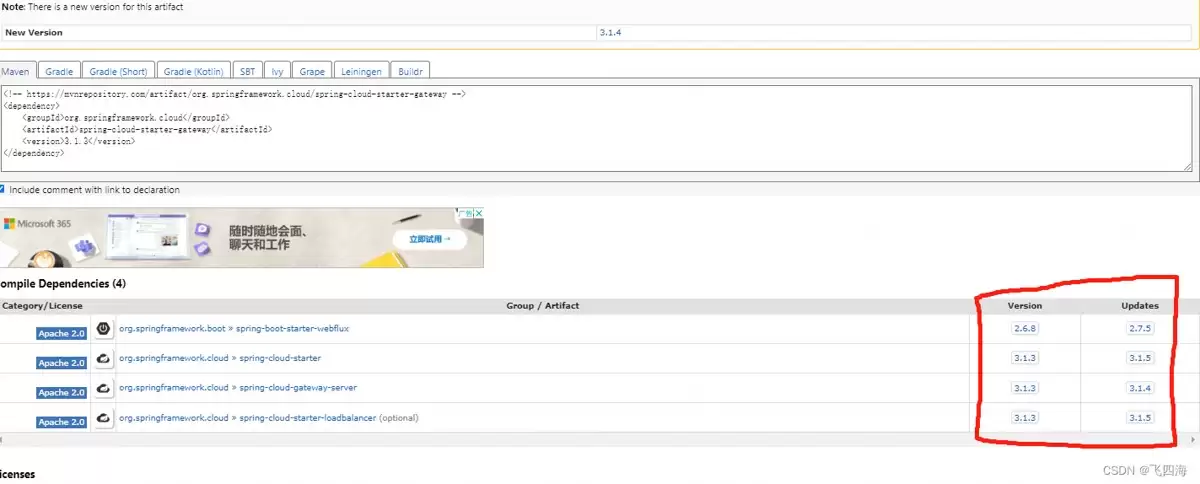
查看Ma ven中央仓库:除了官方JSON,还有一个更直观的途径,那就是直接访问Ma ven仓库。比如,打开 https://mvnrepository.com/artifact/org.springframework.cloud/,在对应组件的版本页面上,通常也会明确列出其兼容的Spring Boot版本范围。
总结
总的来说,掌握版本对应关系是保证Spring技术栈项目稳定性的第一步。上面介绍的两种方法——查询官方元数据和查看Ma ven仓库——都是经过验证的可靠途径,希望能为大家在技术选型和依赖管理时提供一个清晰的参考。














火山引擎是字节跳动旗下企业级云与AI服务平台。聚焦大模型核心能力,依托字节自研豆包多模态大模型,凭借火山方舟一站式平台,提供模型精调、推理部署、智能应用搭建等全链路服务,结合高性能AI算力,助力各行业快速落地大模型数字化与智能化应用。








AirBuddy 3 是面向 macOS 的蓝牙外设增强工具,可集中查看 AirPods、Beats 与苹果设备电量,提供快速连接、播放控制、电量提醒、桌面小组件和多台 Mac 外设接力等功能。

AirServer macOS版可把 Mac 转换为无线投屏接收端,通过 AirPlay 或 Google Cast 接收手机、平板和电脑画面,并支持多设备同时连接、高清镜像及会话录制,适合家庭娱乐、课堂教学、会议演示和应用展示。

火山引擎是字节跳动旗下企业级云与AI服务平台。聚焦大模型核心能力,依托字节自研豆包多模态大模型,凭借火山方舟一站式平台,提供模型精调、推理部署、智能应用搭建等全链路服务,结合高性能AI算力,助力各行业快速落地大模型数字化与智能化应用。

PixTV 是一款在浏览器中使用的 AI 视觉内容创作平台,提供图片、视频、音频、文字生成、AI 分镜、局部重绘、提示词反推和无限画布等工具,适合短剧、漫剧、广告及社交媒体内容制作。


Autodesk Maya 是面向影视、电视、动画和游戏行业的专业三维制作软件,集多边形与 NURBS 建模、角色绑定、关键帧和动作捕捉动画、Bifrost 特效模拟、材质开发及 Arnold 渲染于一体,