


Can‘t find Python executable \“python2.7\“, you can set the PYTHON env variable
执行yarninstall因缺少Python2.7报错,根源在于node-sass编译需Python环境。无需安装Python,只需指定淘宝镜像二进制下载地址(如npminstallnode-sass--sass_binary_site=...),重新安装即可解决。
在实际项目开发中,yarn install 报错算是家常便饭了,但有一个坑特别容易让人卡壳——明明项目本身跟 Python 没什么关系,结果安装依赖时冷不丁弹出一句找不到 Python 2.7。来看看这个经典错误长什么样:
gyp ERR! stack Error: Can't find Python executable "python2.7", you can set the PYTHON env variable.
gyp verb check python checking for Python executable "python2.7" in the PATH
gyp ERR! stack Error: Can't find Python executable "python2.7", you can set the PYTHON env variable.
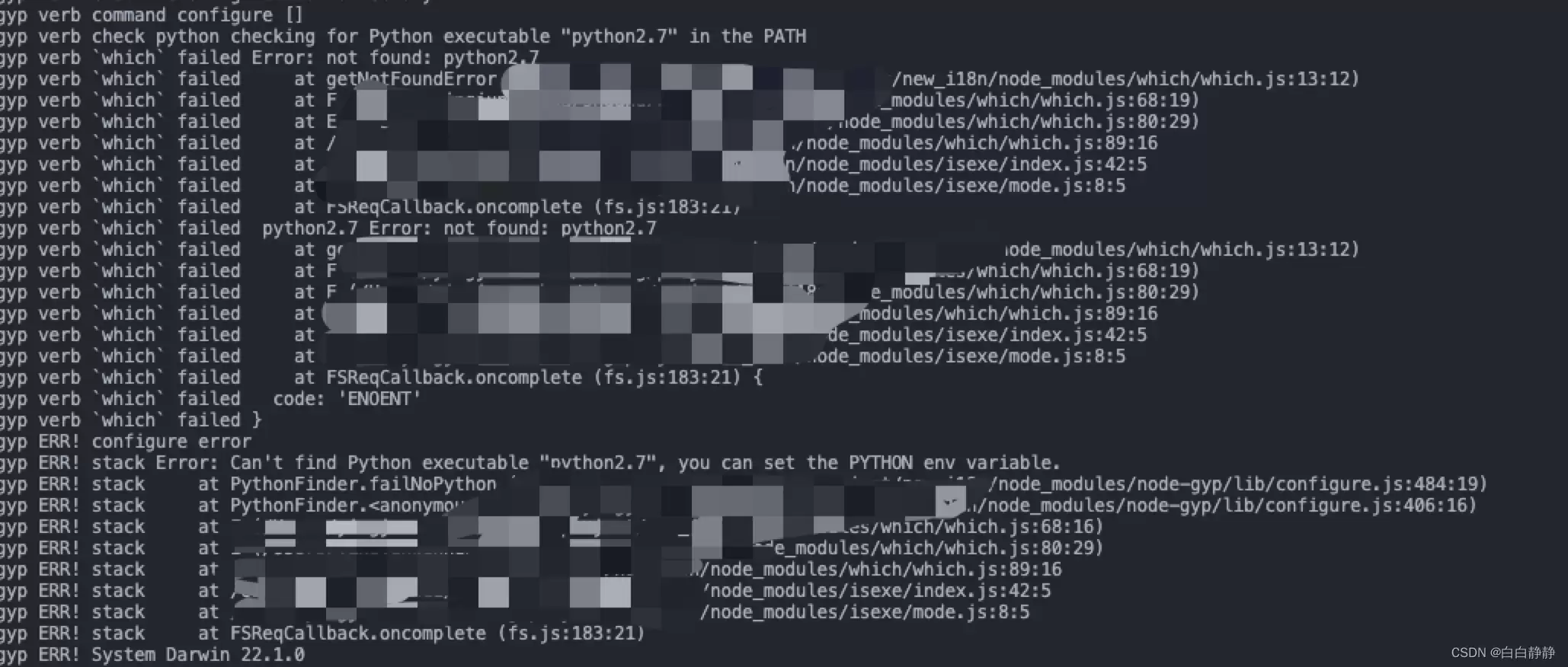
看到这种报错先别慌。问题的根源在于 node-sass 这个包在编译原生模块时需要依赖 Python 环境,而系统里没有指定版本的 Python 2.7。不过,大多数情况下你完全没必要真的去装一个 Python 2.7,因为 node-sass 提供了预编译的二进制文件,直接换源下载就行了。
解决方案很简单——指定淘宝镜像的二进制下载地址:
npm i node-sass --sass_binary_site=https://npm.taobao.org/mirrors/node-sass/如果用的是 cnpm 或者已经在 .npmrc 里配置了镜像源,也可以直接修改 sass_binary_site 参数。之后重新跑 yarn install,通常就能顺利通过了。这个小技巧能省下不少折腾 Python 环境的功夫。













火山引擎是字节跳动旗下企业级云与AI服务平台。聚焦大模型核心能力,依托字节自研豆包多模态大模型,凭借火山方舟一站式平台,提供模型精调、推理部署、智能应用搭建等全链路服务,结合高性能AI算力,助力各行业快速落地大模型数字化与智能化应用。








AirBuddy 3 是面向 macOS 的蓝牙外设增强工具,可集中查看 AirPods、Beats 与苹果设备电量,提供快速连接、播放控制、电量提醒、桌面小组件和多台 Mac 外设接力等功能。

AirServer macOS版可把 Mac 转换为无线投屏接收端,通过 AirPlay 或 Google Cast 接收手机、平板和电脑画面,并支持多设备同时连接、高清镜像及会话录制,适合家庭娱乐、课堂教学、会议演示和应用展示。



Autodesk Maya 是面向影视、电视、动画和游戏行业的专业三维制作软件,集多边形与 NURBS 建模、角色绑定、关键帧和动作捕捉动画、Bifrost 特效模拟、材质开发及 Arnold 渲染于一体,

AirServer Windows版可把电脑变成AirPlay、Google Cast和Miracast无线投屏接收端,适合会议演示、课堂教学及家庭大屏分享。发送设备通常无需另装客户端,并可同时接收和智能排列多个镜像会话。