


怎么使用SpringBoot+SpringSecurity+jwt实现验证
环境springBoot2.3.3springSecurity5.0jjwt0.91pox.xml文件主要信息io.jsonwebtokenjjwt0.9.1org.springframework.bootspring-boot-starter-securityorg.springframework.bootspring-boot-starter-web目录结构信息请忽略文件命名jwtAccessDeniedHandler和JwtAuthenticationEntryPoint这两个类的作用是用户访问没有
环境
springBoot 2.3.3
springSecurity 5.0
jjwt 0.91
pox.xml 文件主要信息
            io.jsonwebtoken
            jjwt
            0.9.1


            org.springframework.boot
            spring-boot-starter-security


            org.springframework.boot
            spring-boot-starter-web
目录结构信息
请忽略文件命名
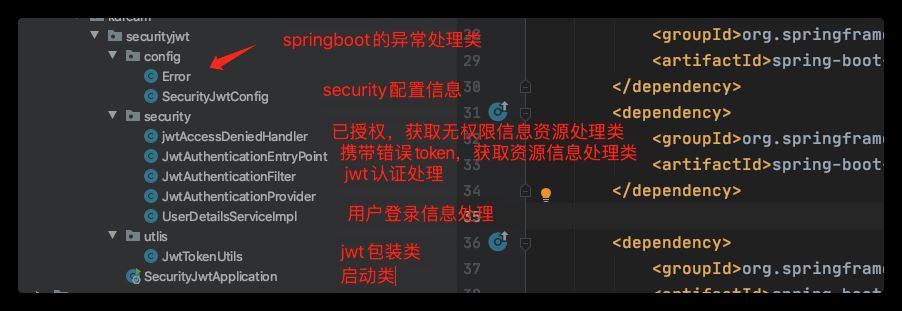
jwtAccessDeniedHandler 和 JwtAuthenticationEntryPoint
这两个类的作用是用户访问没有授权资源和携带错误token的错误返回处理信息类,要使用这两个类只需要在security的配置文件中配置一下就可以只用了
/**
 * @author Bxsheng
 * @blogAddress www.kdream.cn
 * @createTIme 2020/9/17
 * since JDK 1.8
 * 当用户在没有授权的时候,返回的指定信息
 */
@Component
public class jwtAccessDeniedHandler implements AccessDeniedHandler {
    @Override
    public void handle(HttpServletRequest httpServletRequest, HttpServletResponse httpServletResponse, AccessDeniedException e) throws IOException, ServletException {
        System.out.println("用户访问没有授权资源");
        System.out.println(e.getMessage());
        httpServletResponse.sendError(HttpServletResponse.SC_UNAUTHORIZED, e==null?"用户访问没有授权资源":e.getMessage());

    }
}
/**
* @author Bxsheng
* @blogAddress www.kdream.cn
* @createTIme 2020/9/17
* since JDK 1.8
*/
@Component
public class JwtAuthenticationEntryPoint implements AuthenticationEntryPoint {
@Override
public void commence(HttpServletRequest httpServletRequest, HttpServletResponse httpServletResponse, AuthenticationException e) throws IOException, ServletException {
System.out.println("用户访问资源没有携带正确的token");
System.out.println(e.getMessage());
httpServletResponse.sendError(HttpServletResponse.SC_UNAUTHORIZED, e==null?"用户访问资源没有携带正确的token":e.getMessage());
}
}UserDetailsServiceImpl 登录信息验证
该类直接继承UserDetailsService 进行登录信息验证,在输入账户密码进行登录的时候,会进入这个类进行验证信息。
当然我这里是直接使用了写死的密码,正常应该从数据库中获取用户的信息和权限信息
@Service
public class UserDetailsServiceImpl implements UserDetailsService {
    @Override
    public UserDetails loadUserByUsername(String s) throws UsernameNotFoundException {

        //直接写死数据信息,可以在这里获取数据库的信息并进行验证

        UserDetails userDetails  = User.withUsername(s).password(new BCryptPasswordEncoder().encode("123456"))
                .authorities("bxsheng").build();
        return userDetails;
    }
}
JwtTokenUtils jwt包装类
该类直接使用 slyh 的 [SpringBoot+JWT实现登录权限控制(代码))](( https://www.yisu.com/article/257119.htm)的文章里面的类。
package cn.kdream.securityjwt.utlis;

import io.jsonwebtoken.*;

import java.util.Date;
import java.util.HashMap;
import java.util.Map;

/**
 * @author Bxsheng
 * @blogAddress www.kdream.cn
 * @createTIme 2020/9/16
 * since JDK 1.8
 */
public class JwtTokenUtils {
    public static final String TOKEN_HEADER = "Authorization";
    public static final String TOKEN_PREFIX = "Bearer ";
    public static final String SECRET = "jwtsecret";
    public static final String ISS = "echisan";

    private static final Long EXPIRATION = 60 * 60 * 3L; //过期时间3小时

    private static final String ROLE = "role";

    //创建token
    public static String createToken(String username, String role, boolean isRememberMe){
        Map map = new HashMap();
        map.put(ROLE, role);
        return Jwts.builder()
                .signWith(SignatureAlgorithm.HS512, SECRET)
                .setClaims(map)
                .setIssuer(ISS)
                .setSubject(username)
                .setIssuedAt(new Date())
                .setExpiration(new Date(System.currentTimeMillis() + EXPIRATION * 1000))
                .compact();
    }

    //从token中获取用户名(此处的token是指去掉前缀之后的)
    public static String getUserName(String token){
        String username;
        try {
            username = getTokenBody(token).getSubject();
        } catch (    Exception e){
            username = null;
        }
        return username;
    }

    public static String getUserRole(String token){
        return (String) getTokenBody(token).get(ROLE);
    }

    private static Claims getTokenBody(String token){
        Claims claims = null;
        try{
            claims = Jwts.parser().setSigningKey(SECRET).parseClaimsJws(token).getBody();
        } catch(ExpiredJwtException e){
            e.printStackTrace();
        } catch(UnsupportedJwtException e){
            e.printStackTrace();
        } catch(MalformedJwtException e){
            e.printStackTrace();
        } catch(SignatureException e){
            e.printStackTrace();
        } catch(IllegalArgumentException e){
            e.printStackTrace();
        }
        return claims;
    }

    //是否已过期
    public static boolean isExpiration(String token){
        try{
            return getTokenBody(token).getExpiration().before(new Date());
        } catch(Exception e){
            System.out.println(e.getMessage());
        }
        return true;
    }
}
JwtAuthenticationFilter 自定义验证jwt
该类直接使用 slyh 的 [SpringBoot+JWT实现登录权限控制(代码))](( https://www.yisu.com/article/257119.htm))的文章里面的类。
这个类主要的作用是验证jwt信息 ,主要携带了token请求过来,解析jwt并设置在security的上下文中。这样做的其中一个目的是你获得了token中携带的权限信息,并保存在上下文中。你就可以对用户进行权限认证了
/**
 * @author Bxsheng
 * @blogAddress www.kdream.cn
 * @createTIme 2020/9/16
 * since JDK 1.8
 */
public class JwtAuthenticationFilter extends BasicAuthenticationFilter {

    public JwtAuthenticationFilter(AuthenticationManager authenticationManager) {
        super(authenticationManager);
    }

    @Override
    protected void doFilterInternal(HttpServletRequest request, HttpServletResponse response, FilterChain chain) throws IOException, ServletException {
        String tokenHeader = request.getHeader(JwtTokenUtils.TOKEN_HEADER);
        //如果请求头中没有Authorization信息则直接放行了
        if(tokenHeader == null || !tokenHeader.startsWith(JwtTokenUtils.TOKEN_PREFIX)){
            chain.doFilter(request, response);
            return;
        }
        //如果请求头中有token,则进行解析,并且设置认证信息
        if(!JwtTokenUtils.isExpiration(tokenHeader.replace(JwtTokenUtils.TOKEN_PREFIX,""))){
            //设置上下文
            UsernamePasswordAuthenticationToken authentication = getAuthentication(tokenHeader);
            SecurityContextHolder.getContext().setAuthentication(authentication);
        }
        super.doFilterInternal(request, response, chain);
    }

    //获取用户信息
    private UsernamePasswordAuthenticationToken getAuthentication(String tokenHeader){
        String token = tokenHeader.replace(JwtTokenUtils.TOKEN_PREFIX, "");
        String username = JwtTokenUtils.getUserName(token);
        // 获得权限 添加到权限上去
        String role = JwtTokenUtils.getUserRole(token);
        List roles = new ArrayList();
        roles.add(new GrantedAuthority() {
            @Override
            public String getAuthority() {
                return role;
            }
        });
        if(username != null){
            return new UsernamePasswordAuthenticationToken(username, null,roles);
        }
        return null;
    }

}
security的配置信息
@EnableGlobalMethodSecurity(prePostEnabled = true) 开启prePostEnabled注解方式授权
@Configuration
@EnableWebSecurity
@EnableGlobalMethodSecurity(prePostEnabled = true)
public class SecurityJwtConfig extends WebSecurityConfigurerAdapter {


    @Autowired
    private jwtAccessDeniedHandler jwtAccessDeniedHandler;

    @Autowired
    private JwtAuthenticationEntryPoint jwtAuthenticationEntryPoint;

    @Override
    protected void configure(HttpSecurity http) throws Exception {
       http.cors().and().csrf().disable().authorizeRequests()
               .antMatchers(HttpMethod.OPTIONS,"/**")
               .permitAll()
               .antMatchers("/").permitAll()
               //login 不拦截
               .antMatchers("/login").permitAll()
               .anyRequest().authenticated()
               //授权
               .and()
               // 禁用session
               .sessionManagement().sessionCreationPolicy(SessionCreationPolicy.STATELESS);
       // 使用自己定义的拦截机制,拦截jwt
        http.addFilterBefore(new JwtAuthenticationFilter(authenticationManager()), UsernamePasswordAuthenticationFilter.class)
        //授权错误信息处理
                .exceptionHandling()
                //用户访问资源没有携带正确的token
                .authenticationEntryPoint(jwtAuthenticationEntryPoint)
                //用户访问没有授权资源
                .accessDeniedHandler(jwtAccessDeniedHandler);
    }

    @Bean
    public PasswordEncoder passwordEncoder(){
        //使用的密码比较方式
        return  new BCryptPasswordEncoder();
    }

}
启动类
我在启动类中配置了三个方法,一个是用来进行登录信息的,另外两个设置了需要权限访问
@SpringBootApplication
@RestController
public class SecurityJwtApplication {

    private final AuthenticationManagerBuilder authenticationManagerBuilder;

    public SecurityJwtApplication(AuthenticationManagerBuilder authenticationManagerBuilder) {
        this.authenticationManagerBuilder = authenticationManagerBuilder;
    }

    public static void main(String[] args) {
        SpringApplication.run(SecurityJwtApplication.class, args);
    }


    @GetMapping("/")
    public String index(){
        return "security jwt";
    }

    @PostMapping("/login")
    public String login(@RequestParam String u,@RequestParam String p){
        // 登陆验证
        UsernamePasswordAuthenticationToken token =
                new UsernamePasswordAuthenticationToken(u, p);
        Authentication authentication = authenticationManagerBuilder.getObject().authenticate(token);
        SecurityContextHolder.getContext().setAuthentication(authentication);
        //创建jwt信息
        String token1 = JwtTokenUtils.createToken(u,"bxsheng", true);
        return token1;
    }

    @GetMapping("/role")
    @PreAuthorize("hasAnyAuthority('bxsheng')")
    public String roleInfo(){
        return "需要获得bxsheng权限,才可以访问";
    }

    @GetMapping("/roles")
    @PreAuthorize("hasAnyAuthority('kdream')")
    public String rolekdream(){
        return "需要获得kdream权限,才可以访问";
    }
}
效果
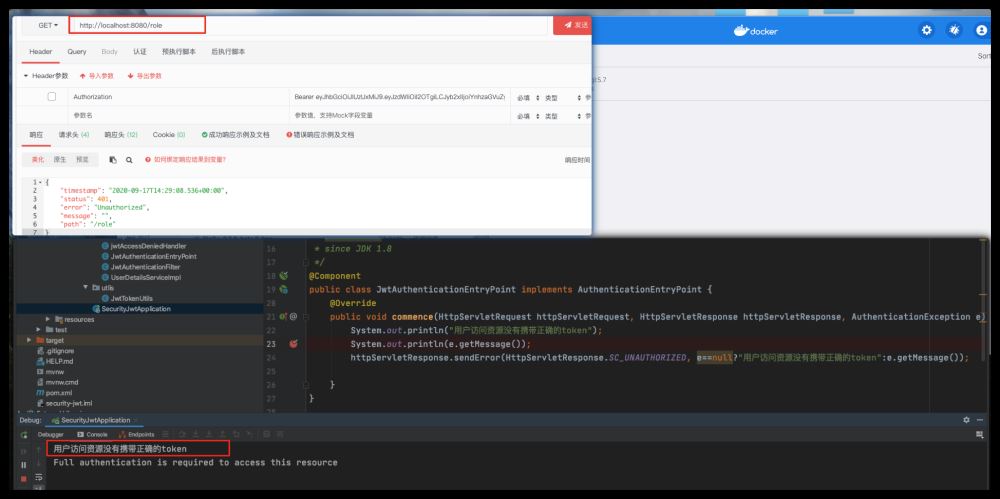
直接访问需要授权的用户信息
直接没有使用token直接访问只要授权的资源信息,会进入JwtAuthenticationEntryPoint 类
获取token
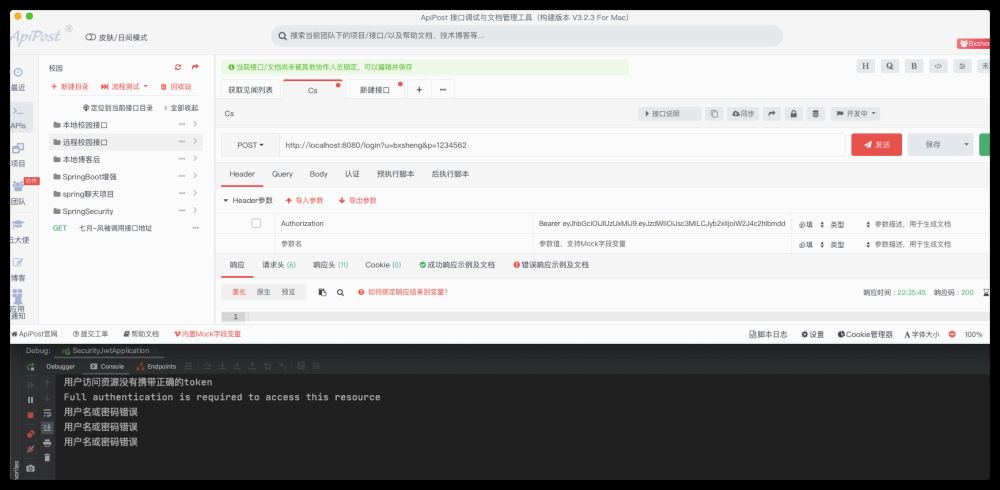
访问在启动类中的login方法,获取token信息
因为我使用了固定的密码,所以在使用错误的密码访问的时候,可以在springboot的全局异常处理中捕获到异常信息
/**
 * @author Bxsheng
 * @blogAddress www.kdream.cn
 * @createTIme 2020/9/17
 * since JDK 1.8
 */
@RestControllerAdvice
public class Error {
    @ExceptionHandler(BadCredentialsException.class)
    public void badCredentialsException(BadCredentialsException e){
        System.out.println(e.getMessage());//用户名或密码错误

       // throw new  BadCredentialsException(e.getMessage());
    }
}
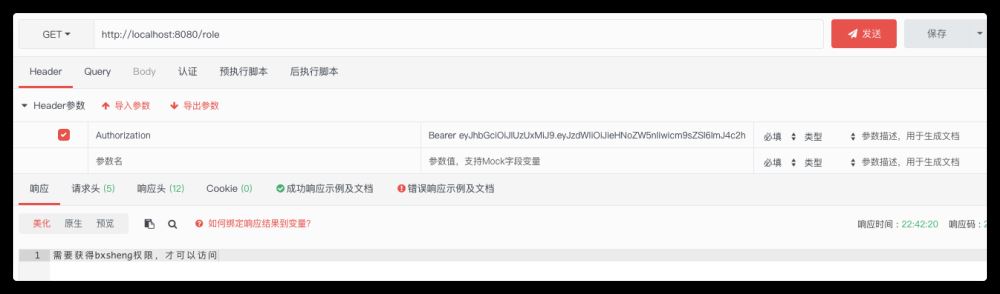
正确的获取token,并进行受保护的资源访问
里面有写死的bxsheng权限信息,所以正常是可以获取bxsheng标识的资源信息的。
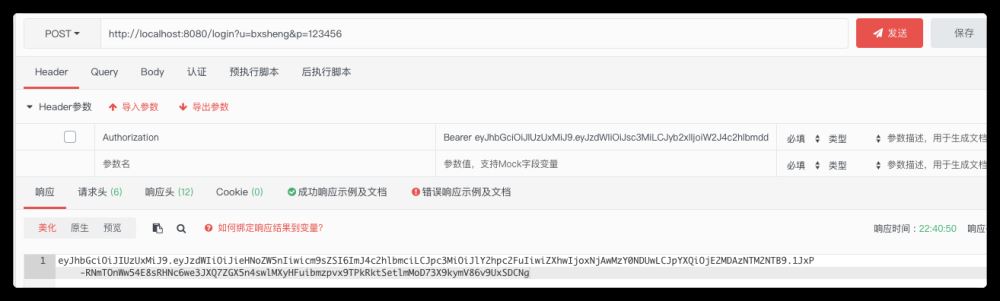
成功获取信息
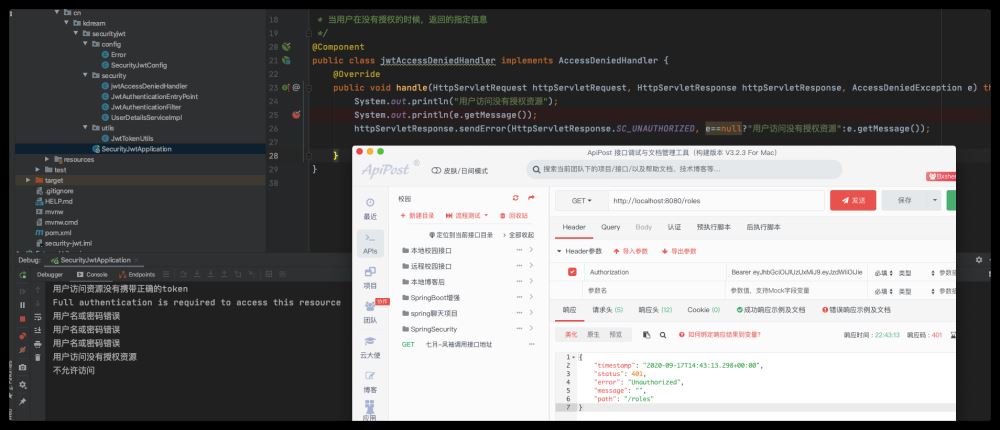
尝试获取无权限资源信息
使用token直接访问无权限资源信息,会进入jwtAccessDeniedHandler 类











火山引擎是字节跳动旗下企业级云与AI服务平台。聚焦大模型核心能力,依托字节自研豆包多模态大模型,凭借火山方舟一站式平台,提供模型精调、推理部署、智能应用搭建等全链路服务,结合高性能AI算力,助力各行业快速落地大模型数字化与智能化应用。








AirBuddy 3 是面向 macOS 的蓝牙外设增强工具,可集中查看 AirPods、Beats 与苹果设备电量,提供快速连接、播放控制、电量提醒、桌面小组件和多台 Mac 外设接力等功能。

AirServer macOS版可把 Mac 转换为无线投屏接收端,通过 AirPlay 或 Google Cast 接收手机、平板和电脑画面,并支持多设备同时连接、高清镜像及会话录制,适合家庭娱乐、课堂教学、会议演示和应用展示。



Autodesk Maya 是面向影视、电视、动画和游戏行业的专业三维制作软件,集多边形与 NURBS 建模、角色绑定、关键帧和动作捕捉动画、Bifrost 特效模拟、材质开发及 Arnold 渲染于一体,

AirServer Windows版可把电脑变成AirPlay、Google Cast和Miracast无线投屏接收端,适合会议演示、课堂教学及家庭大屏分享。发送设备通常无需另装客户端,并可同时接收和智能排列多个镜像会话。