


Meta官方Prompt工程指南:优化Llama 2的使用方式
随着大型语言模型(LLM)技术日渐成熟,提示工程(PromptEngineering)变得越来越重要。一些研究机构发布了LLM提示工程指南,包括微软、OpenAI等等。最近,Meta提供了一份交互式提示工程指南,专门针对他们的Llama2开源模型。这份指南涵盖了使用Llama2进行快速工程和最佳实践的知识。以下是这份指南的核心内容。Llama模型2023年,Meta推出了Llama、Llama2模型。较小的模型部署和运行成本较低,而更大的模型能力更强。Llama2系列模型参数规模如下:CodeLlama是
随着大型语言模型(LLM)技术日渐成熟,提示工程(Prompt Engineering)变得越来越重要。一些研究机构发布了 LLM 提示工程指南,包括微软、OpenAI 等等。
最近,Meta 提供了一份交互式提示工程指南,专门针对他们的 Llama 2 开源模型。这份指南涵盖了使用 Llama 2 进行快速工程和最佳实践的知识。
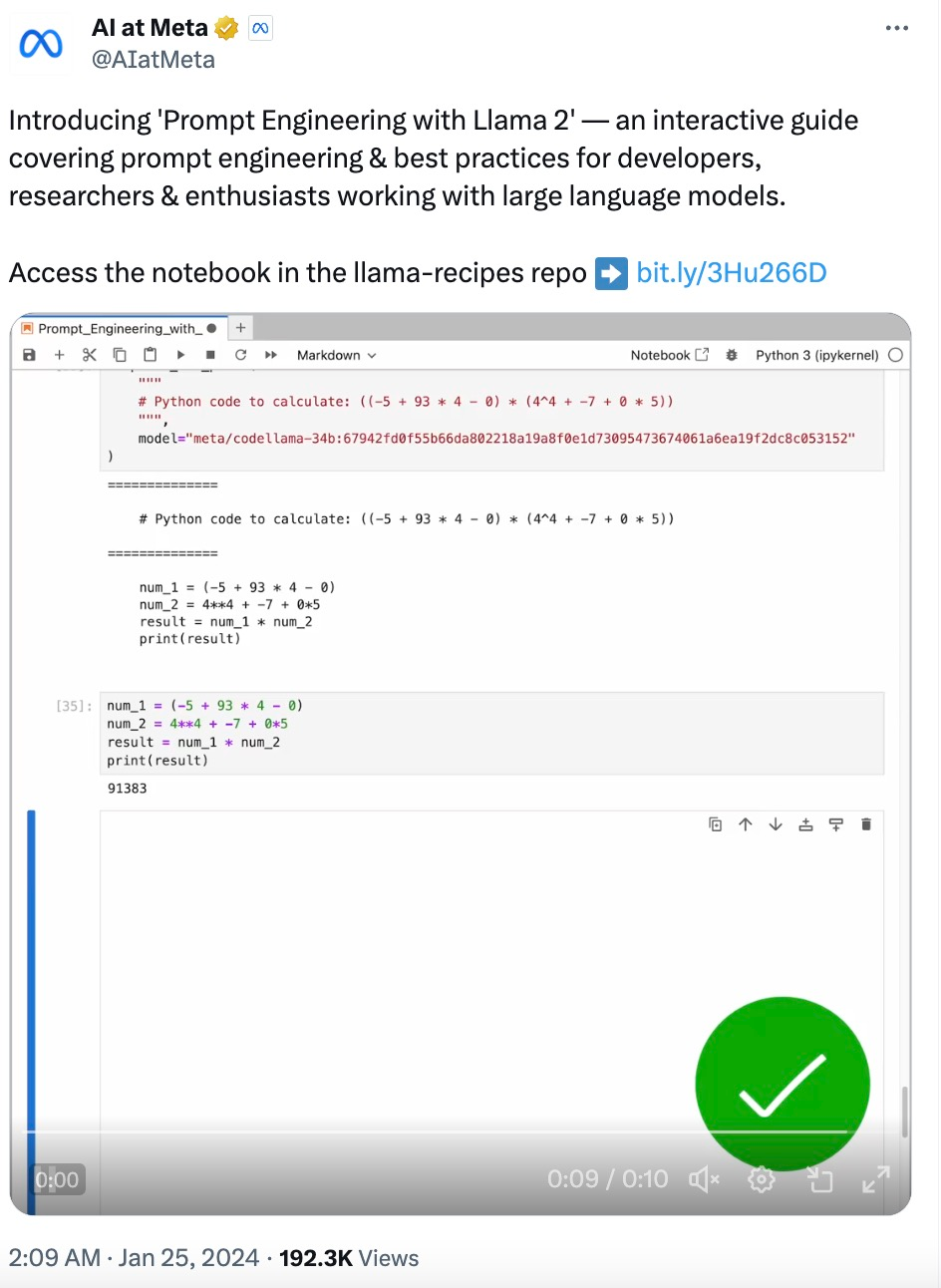
以下是这份指南的核心内容。
Llama 模型
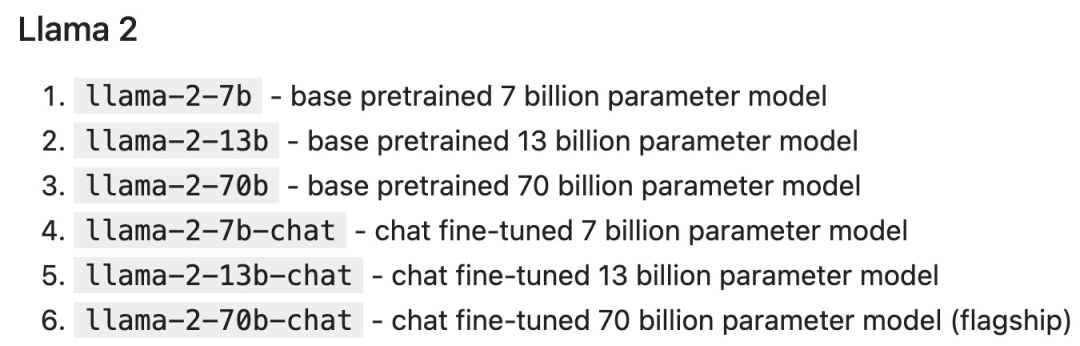
2023 年,Meta 推出了 Llama 、Llama 2 模型。较小的模型部署和运行成本较低,而更大的模型能力更强。
Llama 2 系列模型参数规模如下:
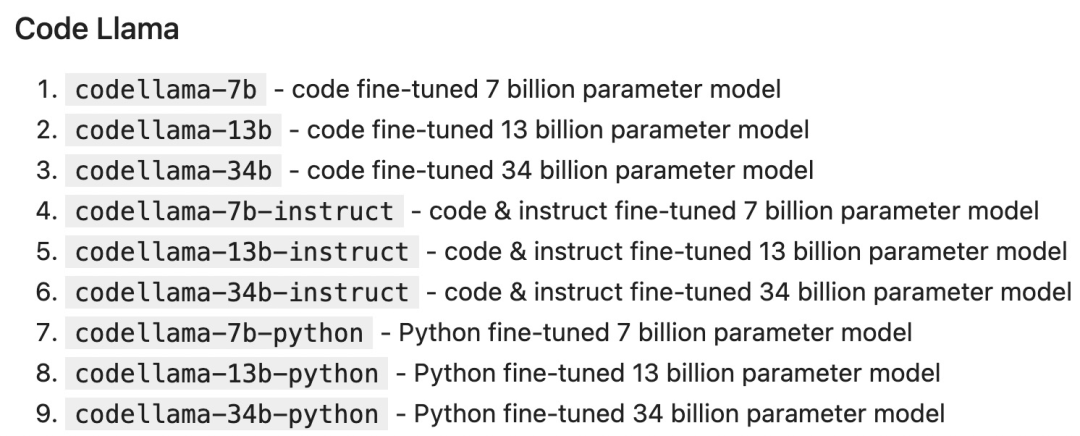
Code Llama 是一个以代码为中心的 LLM,建立在 Llama 2 的基础上,也有各种参数规模和微调变体:
部署 LLM
LLM 可以通过多种方式部署和访问,包括:
自托管(Self-hosting):使用本地硬件来运行推理,例如使用 llama.cpp 在 Macbook Pro 上运行 Llama 2。优势:自托管最适合有隐私 / 安全需要的情况,或者您拥有足够的 GPU。
云托管:依靠云提供商来部署托管特定模型的实例,例如通过 AWS、Azure、GCP 等云提供商来运行 Llama 2。优势:云托管是最适合自定义模型及其运行时的方式。
托管 API:通过 API 直接调用 LLM。有许多公司提供 Llama 2 推理 API,包括 AWS Bedrock、Replicate、Anyscale、Together 等。优势:托管 API 是总体上最简单的选择。
托管 API
托管 API 通常有两个主要端点(endpoint):
1. completion:生成对给定 prompt 的响应。
2. chat_completion:生成消息列表中的下一条消息,为聊天机器人等用例提供更明确的指令和上下文。
token
LLM 以称为 token 的块的形式来处理输入和输出,每个模型都有自己的 tokenization 方案。比如下面这句话:
Our destiny is written in the stars.
Llama 2 的 tokenization 为 ["our", "dest", "iny", "is", "writing", "in", "the", "stars"]。考虑 API 定价和内部行为(例如超参数)时,token 显得尤为重要。每个模型都有一个 prompt 不能超过的最大上下文长度,Llama 2 是 4096 个 token,而 Code Llama 是 100K 个 token。
Notebook 设置
作为示例,我们使用 Replicate 调用 Llama 2 chat,并使用 LangChain 轻松设置 chat completion API。
首先安装先决条件:
pip install langchain replicate
from typing import Dict, Listfrom langchain.llms import Replicatefrom langchain.memory import ChatMessageHistoryfrom langchain.schema.messages import get_buffer_stringimport os# Get a free API key from https://replicate.com/account/api-tokensos.environ ["REPLICATE_API_TOKEN"] = "YOUR_KEY_HERE"LLAMA2_70B_CHAT = "meta/llama-2-70b-chat:2d19859030ff705a87c746f7e96eea03aefb71f166725aee39692f1476566d48"LLAMA2_13B_CHAT = "meta/llama-2-13b-chat:f4e2de70d66816a838a89eeeb621910adffb0dd0baba3976c96980970978018d"# We'll default to the smaller 13B model for speed; change to LLAMA2_70B_CHAT for more advanced (but slower) generationsDEFAULT_MODEL = LLAMA2_13B_CHATdef completion (prompt: str,model: str = DEFAULT_MODEL,temperature: float = 0.6,top_p: float = 0.9,) -> str:llm = Replicate (model=model,model_kwargs={"temperature": temperature,"top_p": top_p, "max_new_tokens": 1000})return llm (prompt)def chat_completion (messages: List [Dict],model = DEFAULT_MODEL,temperature: float = 0.6,top_p: float = 0.9,) -> str:history = ChatMessageHistory ()for message in messages:if message ["role"] == "user":history.add_user_message (message ["content"])elif message ["role"] == "assistant":history.add_ai_message (message ["content"])else:raise Exception ("Unknown role")return completion (get_buffer_string (history.messages,human_prefix="USER",ai_prefix="ASSISTANT",),model,temperature,top_p,)def assistant (content: str):return { "role": "assistant", "content": content }def user (content: str):return { "role": "user", "content": content }def complete_and_print (prompt: str, model: str = DEFAULT_MODEL):print (f'==============\n {prompt}\n==============')response = completion (prompt, model)print (response, end='\n\n')Completion API
complete_and_print ("The typical color of the sky is:")complete_and_print ("which model version are you?")Chat Completion 模型提供了与 LLM 互动的额外结构,将结构化消息对象数组而不是单个文本发送到 LLM。此消息列表为 LLM 提供了一些可以继续进行的「背景」或「历史」信息。
通常,每条消息都包含角色和内容:
具有系统角色的消息用于开发人员向 LLM 提供核心指令。
具有用户角色的消息通常是人工提供的消息。
具有助手角色的消息通常由 LLM 生成。
response = chat_completion (messages=[user ("My favorite color is blue."),assistant ("That's great to hear!"),user ("What is my favorite color?"),])print (response)# "Sure, I can help you with that! Your favorite color is blue."LLM 超参数
LLM API 通常会采用影响输出的创造性和确定性的参数。在每一步中,LLM 都会生成 token 及其概率的列表。可能性最小的 token 会从列表中「剪切」(基于 top_p),然后从剩余候选者中随机(温度参数 temperature)选择一个 token。换句话说:top_p 控制生成中词汇的广度,温度控制词汇的随机性,温度参数 temperature 为 0 会产生几乎确定的结果。
def print_tuned_completion (temperature: float, top_p: float):response = completion ("Write a haiku about llamas", temperature=temperature, top_p=top_p)print (f'[temperature: {temperature} | top_p: {top_p}]\n {response.strip ()}\n')print_tuned_completion (0.01, 0.01)print_tuned_completion (0.01, 0.01)# These two generations are highly likely to be the sameprint_tuned_completion (1.0, 1.0)print_tuned_completion (1.0, 1.0)# These two generations are highly likely to be differentprompt 技巧
详细、明确的指令会比开放式 prompt 产生更好的结果:
complete_and_print (prompt="Describe quantum physics in one short sentence of no more than 12 words")# Returns a succinct explanation of quantum physics that mentions particles and states existing simultaneously.
我们可以给定使用规则和限制,以给出明确的指令。
- 风格化,例如:
- 向我解释一下这一点,就像儿童教育网络节目中教授小学生一样;
- 我是一名软件工程师,使用大型语言模型进行摘要。用 250 字概括以下文字;
- 像私家侦探一样一步步追查案件,给出你的答案。
- 格式化
使用要点;
以 JSON 对象形式返回;
使用较少的技术术语并用于工作交流中。
- 限制
- 仅使用学术论文;
- 切勿提供 2020 年之前的来源;
- 如果你不知道答案,就说你不知道。
以下是给出明确指令的例子:
complete_and_print ("Explain the latest advances in large language models to me.")# More likely to cite sources from 2017complete_and_print ("Explain the latest advances in large language models to me. Always cite your sources. Never cite sources older than 2020.")# Gives more specific advances and only cites sources from 2020零样本 prompting
一些大型语言模型(例如 Llama 2)能够遵循指令并产生响应,而无需事先看过任务示例。没有示例的 prompting 称为「零样本 prompting(zero-shot prompting)」。例如:
complete_and_print ("Text: This was the best movie I've ever seen! \n The sentiment of the text is:")# Returns positive sentimentcomplete_and_print ("Text: The director was trying too hard. \n The sentiment of the text is:")# Returns negative sentiment少样本 prompting
添加所需输出的具体示例通常会产生更加准确、一致的输出。这种方法称为「少样本 prompting(few-shot prompting)」。例如:
def sentiment (text):response = chat_completion (messages=[user ("You are a sentiment classifier. For each message, give the percentage of positive/netural/negative."),user ("I liked it"),assistant ("70% positive 30% neutral 0% negative"),user ("It could be better"),assistant ("0% positive 50% neutral 50% negative"),user ("It's fine"),assistant ("25% positive 50% neutral 25% negative"),user (text),])return responsedef print_sentiment (text):print (f'INPUT: {text}')print (sentiment (text))print_sentiment ("I thought it was okay")# More likely to return a balanced mix of positive, neutral, and negativeprint_sentiment ("I loved it!")# More likely to return 100% positiveprint_sentiment ("Terrible service 0/10")# More likely to return 100% negativeRole Prompting
Llama 2 在指定角色时通常会给出更一致的响应,角色为 LLM 提供了所需答案类型的背景信息。
例如,让 Llama 2 对使用 PyTorch 的利弊问题创建更有针对性的技术回答:
complete_and_print ("Explain the pros and cons of using PyTorch.")# More likely to explain the pros and cons of PyTorch covers general areas like documentation, the PyTorch community, and mentions a steep learning curvecomplete_and_print ("Your role is a machine learning expert who gives highly technical advice to senior engineers who work with complicated datasets. Explain the pros and cons of using PyTorch.")# Often results in more technical benefits and drawbacks that provide more technical details on how model layers思维链
简单地添加一个「鼓励逐步思考」的短语可以显著提高大型语言模型执行复杂推理的能力(Wei et al. (2022)),这种方法称为 CoT 或思维链 prompting:
complete_and_print ("Who lived longer Elvis Presley or Mozart?")# Often gives incorrect answer of "Mozart"complete_and_print ("Who lived longer Elvis Presley or Mozart? Let's think through this carefully, step by step.")# Gives the correct answer "Elvis"自洽性(Self-Consistency)
LLM 是概率性的,因此即使使用思维链,一次生成也可能会产生不正确的结果。自洽性通过从多次生成中选择最常见的答案来提高准确性(以更高的计算成本为代价):
import refrom statistics import modedef gen_answer ():response = completion ("John found that the average of 15 numbers is 40.""If 10 is added to each number then the mean of the numbers is?""Report the answer surrounded by three backticks, for example:```123```",model = LLAMA2_70B_CHAT)match = re.search (r'```(\d+)```', response)if match is None:return Nonereturn match.group (1)answers = [gen_answer () for i in range (5)]print (f"Answers: {answers}\n",f"Final answer: {mode (answers)}",)# Sample runs of Llama-2-70B (all correct):# [50, 50, 750, 50, 50]-> 50# [130, 10, 750, 50, 50] -> 50# [50, None, 10, 50, 50] -> 50检索增强生成
有时我们可能希望在应用程序中使用事实知识,那么可以从开箱即用(即仅使用模型权重)的大模型中提取常见事实:
complete_and_print ("What is the capital of the California?", model = LLAMA2_70B_CHAT)# Gives the correct answer "Sacramento"然而,LLM 往往无法可靠地检索更具体的事实或私人信息。模型要么声明它不知道,要么幻想出一个错误的答案:
complete_and_print ("What was the temperature in Menlo Park on December 12th, 2023?")# "I'm just an AI, I don't have access to real-time weather data or historical weather records."complete_and_print ("What time is my dinner reservation on Saturday and what should I wear?")# "I'm not able to access your personal information [..] I can provide some general guidance"检索增强生成(RAG)是指在 prompt 中包含从外部数据库检索的信息(Lewis et al. (2020))。RAG 是将事实纳入 LLM 应用的有效方法,并且比微调更经济实惠,微调可能成本高昂并对基础模型的功能产生负面影响。
MENLO_PARK_TEMPS = {"2023-12-11": "52 degrees Fahrenheit","2023-12-12": "51 degrees Fahrenheit","2023-12-13": "51 degrees Fahrenheit",}def prompt_with_rag (retrived_info, question):complete_and_print (f"Given the following information: '{retrived_info}', respond to: '{question}'")def ask_for_temperature (day):temp_on_day = MENLO_PARK_TEMPS.get (day) or "unknown temperature"prompt_with_rag (f"The temperature in Menlo Park was {temp_on_day} on {day}'",# Retrieved factf"What is the temperature in Menlo Park on {day}?",# User question)ask_for_temperature ("2023-12-12")# "Sure! The temperature in Menlo Park on 2023-12-12 was 51 degrees Fahrenheit."ask_for_temperature ("2023-07-18")# "I'm not able to provide the temperature in Menlo Park on 2023-07-18 as the information provided states that the temperature was unknown."程序辅助语言模型
LLM 本质上不擅长执行计算,例如:
complete_and_print ("""Calculate the answer to the following math problem:((-5 + 93 * 4 - 0) * (4^4 + -7 + 0 * 5))""")# Gives incorrect answers like 92448, 92648, 95463Gao et al. (2022) 提出「程序辅助语言模型(Program-aided Language Models,PAL)」的概念。虽然 LLM 不擅长算术,但它们非常擅长代码生成。PAL 通过指示 LLM 编写代码来解决计算任务。
complete_and_print ("""# Python code to calculate: ((-5 + 93 * 4 - 0) * (4^4 + -7 + 0 * 5))""",model="meta/codellama-34b:67942fd0f55b66da802218a19a8f0e1d73095473674061a6ea19f2dc8c053152")# The following code was generated by Code Llama 34B:num1 = (-5 + 93 * 4 - 0)num2 = (4**4 + -7 + 0 * 5)answer = num1 * num2print (answer)













火山引擎是字节跳动旗下企业级云与AI服务平台。聚焦大模型核心能力,依托字节自研豆包多模态大模型,凭借火山方舟一站式平台,提供模型精调、推理部署、智能应用搭建等全链路服务,结合高性能AI算力,助力各行业快速落地大模型数字化与智能化应用。








AirBuddy 3 是面向 macOS 的蓝牙外设增强工具,可集中查看 AirPods、Beats 与苹果设备电量,提供快速连接、播放控制、电量提醒、桌面小组件和多台 Mac 外设接力等功能。

AirServer macOS版可把 Mac 转换为无线投屏接收端,通过 AirPlay 或 Google Cast 接收手机、平板和电脑画面,并支持多设备同时连接、高清镜像及会话录制,适合家庭娱乐、课堂教学、会议演示和应用展示。

火山引擎是字节跳动旗下企业级云与AI服务平台。聚焦大模型核心能力,依托字节自研豆包多模态大模型,凭借火山方舟一站式平台,提供模型精调、推理部署、智能应用搭建等全链路服务,结合高性能AI算力,助力各行业快速落地大模型数字化与智能化应用。

PixTV 是一款在浏览器中使用的 AI 视觉内容创作平台,提供图片、视频、音频、文字生成、AI 分镜、局部重绘、提示词反推和无限画布等工具,适合短剧、漫剧、广告及社交媒体内容制作。


Autodesk Maya 是面向影视、电视、动画和游戏行业的专业三维制作软件,集多边形与 NURBS 建模、角色绑定、关键帧和动作捕捉动画、Bifrost 特效模拟、材质开发及 Arnold 渲染于一体,