


Flex 自定义DataGrid实现根据条目某一属性值改变背景颜色
通过重写DataGrid的drawRowBackground方法,自定义组件可根据回调函数返回的颜色动态改变行背景色。示例中,回调函数比较每条记录的act与stand字段,若act小于stand则将行底色设为浅蓝色,否则保留默认白色。
package czgh.components {
    import flash.display.Sprite;
    import mx.controls.DataGrid;
    import mx.core.UIComponent;

    public class OptionalDataGrid extends DataGrid {
        private var _rowColorFunction:Function;
        private var _customed:Boolean;
        private var _customerColor:uint=0;

        public function OptionalDataGrid() {
            super();
        }

        override protected function drawRowBackground(s:Sprite, rowIndex:int, y:Number, height:Number, color:uint, dataIndex:int):void {
            color=0XFFFFFF;
            if(this._rowColorFunction != null) {
                if (dataIndex < this.dataProvider.length) {
                    var item:Object=this.dataProvider.getItemAt(dataIndex);
                    color=this._rowColorFunction.call(this, item, color);
                }
            }
            super.drawRowBackground(s, rowIndex, y, height, color, dataIndex);
        }

        override protected function drawHeaderBackground(headerBG:UIComponent):void {
            headerBG.setStyle("borderVisible","false");
        }

        public function set rowColorFunction(rowColorFunction:Function):void {
            this._rowColorFunction=rowColorFunction;
        }

        public function get rowColorFunction():Function {
            return this._rowColorFunction;
        }
    }
}
那么,在MXML里用起来也很直观。这里用了一个简单的回调函数,通过比较每条记录里`act`和`stand`字段的值,来决定这一行的背景色。
// 如果act的值小于stand,就把这一行的底色设成浅蓝色,否则就保留默认颜色
private function setCustomColor(item:Object, color:uint):uint {
    if (Number(item["act"])

这样一来,你就有了一个可以根据数据自动变色的DataGrid,非常实用。 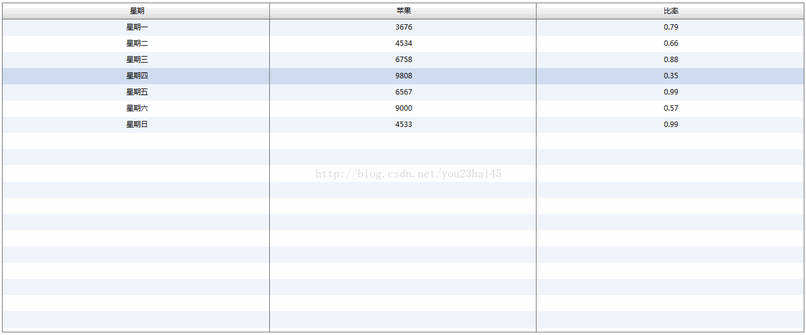
















LibreOffice桌面版提供Writer、Calc、Impress等办公组件,可本地处理文档并交换Office格式。了解实际功能、商用许可、兼容性检查和企业支持的区别。




火山引擎是字节跳动旗下企业级云与AI服务平台。聚焦大模型核心能力,依托字节自研豆包多模态大模型,凭借火山方舟一站式平台,提供模型精调、推理部署、智能应用搭建等全链路服务,结合高性能AI算力,助力各行业快速落地大模型数字化与智能化应用。







LibreOffice桌面版提供Writer、Calc、Impress等办公组件,可本地处理文档并交换Office格式。了解实际功能、商用许可、兼容性检查和企业支持的区别。
火山引擎是字节跳动旗下企业级云与AI服务平台。聚焦大模型核心能力,依托字节自研豆包多模态大模型,凭借火山方舟一站式平台,提供模型精调、推理部署、智能应用搭建等全链路服务,结合高性能AI算力,助力各行业快速落地大模型数字化与智能化应用。

PixTV 是一款在浏览器中使用的 AI 视觉内容创作平台,提供图片、视频、音频、文字生成、AI 分镜、局部重绘、提示词反推和无限画布等工具,适合短剧、漫剧、广告及社交媒体内容制作。


Autodesk Maya 是面向影视、电视、动画和游戏行业的专业三维制作软件,集多边形与 NURBS 建模、角色绑定、关键帧和动作捕捉动画、Bifrost 特效模拟、材质开发及 Arnold 渲染于一体,