


iOS 实现类似抖音滚动效果
基于UITableView实现抖音式滚动效果,通过设置contentInet上下各一个屏幕高度作为缓冲,在scrollViewWillEndDragging方法获取手指离开速度,于scrollViewDidEndDragging中根据速度绝对值是否大于0.4决定切换临界偏移量(8或60点),结合手势方向判断上下滑动,最后用UIView动画快速翻页至目标cel
效果图
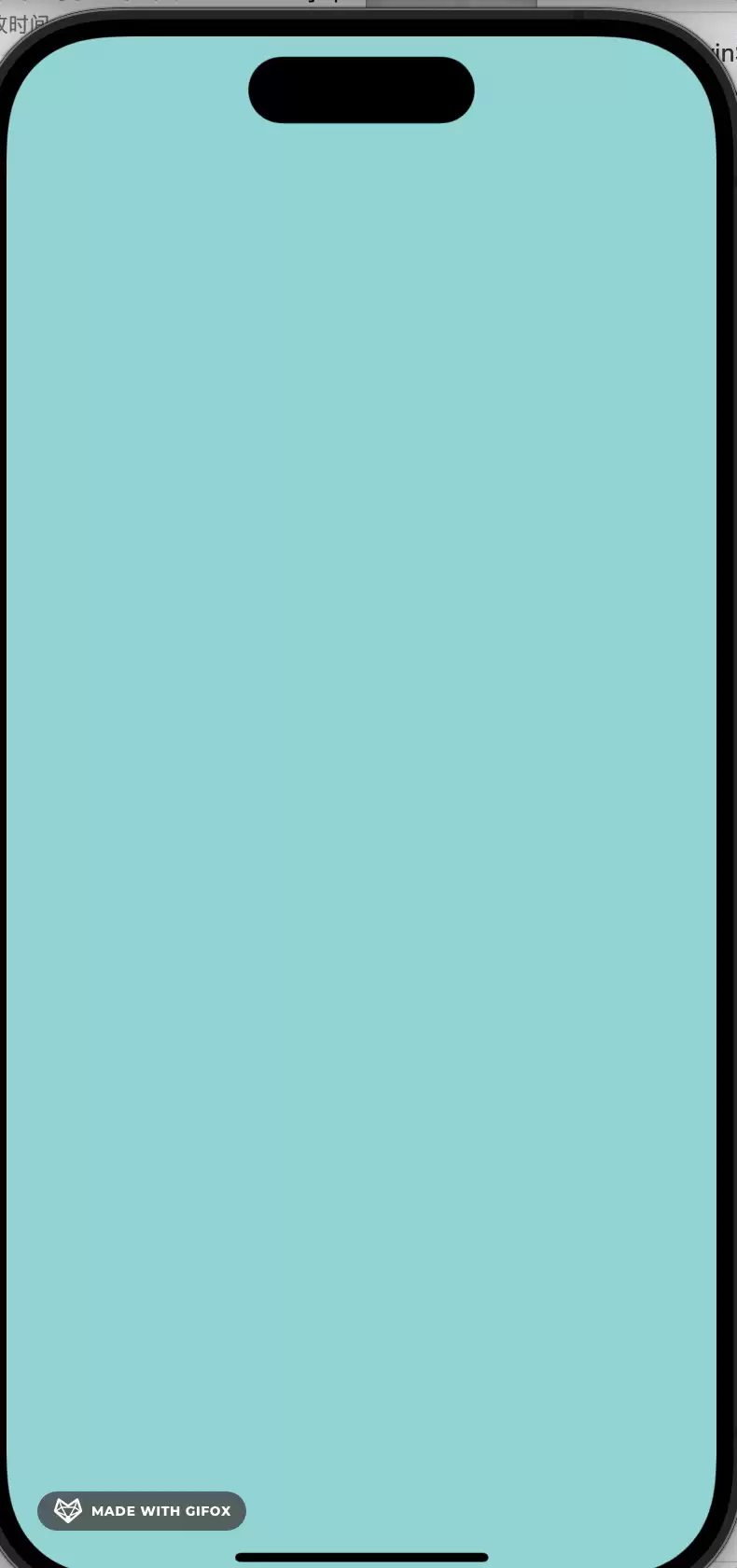
思路
整体思路其实不难——直接拿tableView来撑。为了让内容有足够的缓冲空间,我们把tableView的contentInset设成上下各一个屏幕的高度,左右留0。这样在滚动时,内容其实早就准备好了,不会出现临时加载的尴尬。
滑动效果的实现是重头戏。关键是在scrollViewWillEndDragging方法里拿到手指离开屏幕那一瞬间的速度,然后在scrollViewDidEndDragging方法里通过translationInView判断滑动的方向。
速度这个值怎么用?很简单:当手指离开时的速度绝对值大于0.4,切换页面的临界偏移量就设成8个点;否则就放宽到60个点。方向判断靠translatedPoint.y的正负,正数往上滑,负数往下滑。方向确定之后,直接用UIView animateWithDuration做一个快速翻页动画,效果就出来了。
代码
//
//  ViewController.m
//  LBDouyinScroll
//
//  Created by mac on 2024/6/26.
//
#import "ViewController.h"
#import "DouyinScrollTableViewCell.h"
#define kScreenWidth  [UIScreen mainScreen].bounds.size.width
#define kScreenHeight [UIScreen mainScreen].bounds.size.height
@interface ViewController ()
@property (nonatomic, strong) UITableView *tableView;
@property (nonatomic, assign) NSInteger currentIndex;
@property (nonatomic, assign) CGFloat velocity;
@property (nonatomic, strong) NSMutableArray *colorArray;
@end
@implementation ViewController
- (BOOL)prefersStatusBarHidden
{
    return YES;
}
- (void)viewDidLoad {
    [super viewDidLoad];
    [self.view addSubview:self.tableView];
    self.colorArray = [NSMutableArray array];
    for (int i = 0; i < 10; i ++) {
        int r = arc4random() % 255;
        int g = arc4random() % 255;
        int b = arc4random() % 255;
        CGFloat rr = r / 255.0;
        CGFloat rg = g / 255.0;
        CGFloat rb = b / 255.0;
        UIColor *color = [[UIColor alloc]initWithRed:rr green:rg blue:rb alpha:1];
        [self.colorArray addObject:color];
    }
    [self.tableView reloadData];
    // Do any additional setup after loading the view.
}
#pragma mark - UITableViewDelegate, UITableViewDataSource
- (UITableViewCell *)tableView:(UITableView *)tableView cellForRowAtIndexPath:(NSIndexPath *)indexPath
{
    DouyinScrollTableViewCell *cell = [tableView dequeueReusableCellWithIdentifier:NSStringFromClass([DouyinScrollTableViewCell class])];
    [cell updateWithColor:self.colorArray[indexPath.row]];
    //    cell.textLabel.text = [NSString stringWithFormat:@"%ld",indexPath.row];
    //    cell.backgroundColor = self.colorArray[indexPath.row];
    //    if (!cell.contentView.backgroundColor) {
    //        cell.contentView.backgroundColor = self.colorArray[indexPath.row];
    //    }
    //    return cell;
    return cell;
}
- (NSInteger)tableView:(UITableView *)tableView numberOfRowsInSection:(NSInteger)section
{
    return 10;
}
- (CGFloat)tableView:(UITableView *)tableView heightForRowAtIndexPath:(NSIndexPath *)indexPath
{
    return kScreenHeight;
}
#pragma mark - scrolllVIewDelegate
- (void)scrollViewDidScroll:(UIScrollView *)scrollView
{
}
- (void)scrollViewWillEndDragging:(UIScrollView *)scrollView withVelocity:(CGPoint)velocity targetContentOffset:(inout CGPoint *)targetContentOffset
{
    self.velocity = velocity.y;
}
- (void)scrollViewDidEndDragging:(UIScrollView *)scrollView willDecelerate:(BOOL)decelerate
{
    dispatch_async(dispatch_get_main_queue(), ^{
        CGPoint translatedPoint = [scrollView.panGestureRecognizer translationInView:scrollView];
        //UITableView禁止响应其他滑动手势
        scrollView.panGestureRecognizer.enabled = NO;
        CGFloat translateCheck = 60;
        if (fabs(self.velocity) > 0.4) {
            translateCheck = 8;
        }
        if(translatedPoint.y < -translateCheck && self.currentIndex < 10) {
            self.currentIndex ++;   //向下滑动索引递增
        }
        if(translatedPoint.y > translateCheck && self.currentIndex > 0) {
            self.currentIndex --;   //向上滑动索引递减
        }
        if (self.currentIndex == 10) {
        } else {
            [UIView animateWithDuration:0.15      delay:0.0    options:UIViewAnimationOptionCurveEaseOut animations:^{
                //UITableView滑动到指定cell
                [self.tableView scrollToRowAtIndexPath:[NSIndexPath indexPathForRow:self.currentIndex inSection:0] atScrollPosition:UITableViewScrollPositionTop animated:NO];
            } completion:^(BOOL finished) {
                //UITableView可以响应其他滑动手势
                scrollView.panGestureRecognizer.enabled = YES;
            }];
        }
    });
}
#pragma - private
- (void)animationToIndex:(NSInteger)index
{
    [UIView animateWithDuration:0.2 delay:0 options:UIViewAnimationOptionCurveEaseOut animations:^{
        self.tableView.contentOffset = CGPointMake(0, kScreenHeight * index);
    } completion:^(BOOL finished) {
    }];
}
#pragma mark - lazy load
- (UITableView *)tableView
{
    if (!_tableView) {
        _tableView = [[UITableView alloc] initWithFrame:CGRectMake(0, - kScreenHeight, CGRectGetWidth(self.view.bounds), kScreenHeight * 3) style:UITableViewStylePlain];
        [_tableView registerClass:[DouyinScrollTableViewCell class] forCellReuseIdentifier:NSStringFromClass([DouyinScrollTableViewCell class])];
        _tableView.rowHeight = kScreenHeight;
        _tableView.contentInset = UIEdgeInsetsMake(kScreenHeight , 0, kScreenHeight, 0);
        _tableView.estimatedRowHeight = kScreenHeight;
        _tableView.delegate = self;
        _tableView.dataSource = self;
        _tableView.backgroundColor = [UIColor redColor];
        _tableView.contentInsetAdjustmentBeha vior = UIScrollViewContentInsetAdjustmentNever;
        _tableView.separatorInset = UIEdgeInsetsZero;
        _tableView.decelerationRate = UIScrollViewDecelerationRateFast;
    }
    return _tableView;
}
@end
其中最核心的逻辑在于下面这两段袋里方法:
- (void)scrollViewWillEndDragging:(UIScrollView *)scrollView withVelocity:(CGPoint)velocity targetContentOffset:(inout CGPoint *)targetContentOffset
{
    self.velocity = velocity.y;
}
- (void)scrollViewDidEndDragging:(UIScrollView *)scrollView willDecelerate:(BOOL)decelerate
{
    dispatch_async(dispatch_get_main_queue(), ^{
        CGPoint translatedPoint = [scrollView.panGestureRecognizer translationInView:scrollView];
        //UITableView禁止响应其他滑动手势
        scrollView.panGestureRecognizer.enabled = NO;
        CGFloat translateCheck = 60;
        if (fabs(self.velocity) > 0.4) {
            translateCheck = 8;
        }
        if(translatedPoint.y < -translateCheck && self.currentIndex < 10) {
            self.currentIndex ++;   //向下滑动索引递增
        }
        if(translatedPoint.y > translateCheck && self.currentIndex > 0) {
            self.currentIndex --;   //向上滑动索引递减
        }
        if (self.currentIndex == 10) {
        } else {
            [UIView animateWithDuration:0.15      delay:0.0    options:UIViewAnimationOptionCurveEaseOut animations:^{
                //UITableView滑动到指定cell
                [self.tableView scrollToRowAtIndexPath:[NSIndexPath indexPathForRow:self.currentIndex inSection:0] atScrollPosition:UITableViewScrollPositionTop animated:NO];
            } completion:^(BOOL finished) {
                //UITableView可以响应其他滑动手势
                scrollView.panGestureRecognizer.enabled = YES;
            }];
        }
    });
} 











Ollama 可在自己的电脑上下载和运行语言模型,并通过聊天界面、命令行或本地 API 使用。支持 macOS、Windows 与 Linux,模型大小、内存和上下文设置会影响运行体验,也提供独立的云模型入口。

GitHub Desktop 把 Git 仓库的改动对比、提交、分支切换和同步放进桌面窗口,适合不想频繁输入命令的开发者。支持 Windows 与 macOS,可连接 GitHub 仓库并配合编辑器完成日常协作。

Antinote 是 Mac 上的轻量草稿板,支持快捷唤出、清单、计算、单位换算和图片文字识别,也能把内容转到其他笔记工具。要求 macOS 14 以上,适合临时记事和桌面工作中的快速整理。

TCP Viewer 在原生 Mac 界面中提供实时抓包、协议字段、十六进制数据和 TCP/UDP 流查看,也可打开 PCAP 文件。面向 Apple Silicon 与 macOS 15 以上系统,适合定位应用连接和网络通信问题。

Notomo 在 macOS 上为 Apple Notes 补充 Markdown 输入、命令面板、快捷打开、模板与 AI 辅助。笔记仍保存在苹果备忘录中;需要 macOS 15 或更新系统,AI 服务使用自己的供应商配置。

FluxDown 将普通链接、磁力与种子等下载任务放进同一窗口,支持分段下载、续传和队列管理。可在 Windows、macOS、Linux 桌面使用,也提供适合 NAS 与服务器的无界面方案。


LibreOffice桌面版提供Writer、Calc、Impress等办公组件,可本地处理文档并交换Office格式。了解实际功能、商用许可、兼容性检查和企业支持的区别。


Ollama 可在自己的电脑上下载和运行语言模型,并通过聊天界面、命令行或本地 API 使用。支持 macOS、Windows 与 Linux,模型大小、内存和上下文设置会影响运行体验,也提供独立的云模型入口。
GitHub Desktop 把 Git 仓库的改动对比、提交、分支切换和同步放进桌面窗口,适合不想频繁输入命令的开发者。支持 Windows 与 macOS,可连接 GitHub 仓库并配合编辑器完成日常协作。
Golden 8 是 Benthic Software 的 Windows Oracle 数据库客户端,提供多标签 SQL 编辑、关联查询辅助、结果表格与导出。连接前需要安装与软件位数一致的 Oracle Client,可先使用 30 天试用版。

LibreOffice桌面版提供Writer、Calc、Impress等办公组件,可本地处理文档并交换Office格式。了解实际功能、商用许可、兼容性检查和企业支持的区别。