


NIO文件系统异常分析与解决方法
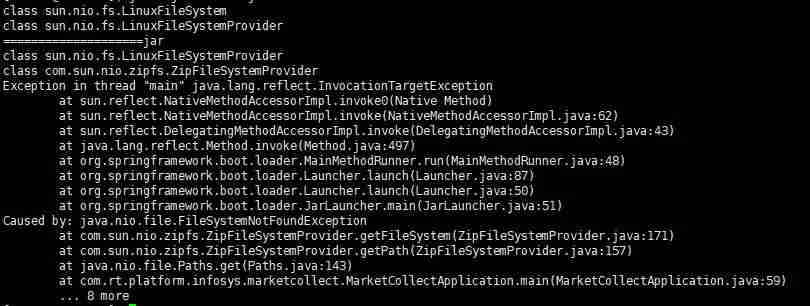
在使用nio加载文件时,在idea中运行没有问题,但打成jar包后在windows和linux下都有问题:代码语言:javascript代码运行次数:0运行复制publicstaticvoidmain(String[]args)throwsException{//SpringApplication.run(MarketCollectApplication.class,args);URIuri=MarketCollectApplication.cla
public static void main(String[] args) throws Exception{ // SpringApplication.run(MarketCollectApplication.class,args); URI uri = MarketCollectApplication.class.getClassLoader().getResource("conf/sh.txt").toURI(); FileSystem aDefault = FileSystems.getDefault(); System.out.println(aDefault.getClass()); FileSystemProvider provider = FileSystems.getDefault().provider(); System.out.println(provider.getClass()); System.out.println("====================" + uri.getScheme()); List fileSystemProviders = FileSystemProvider.installedProviders(); fileSystemProviders.forEach(p -> { System.out.println(p.getClass()); }); Path path = Paths.get(uri); } class sun.nio.fs.WindowsFileSystemclass sun.nio.fs.WindowsFileSystemProvider====================fileclass sun.nio.fs.WindowsFileSystemProviderclass com.sun.nio.zipfs.ZipFileSystemProvider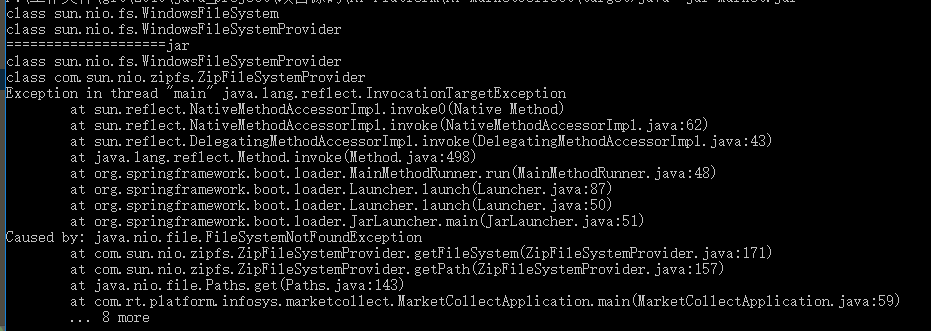
public static Path get(URI uri) { String scheme = uri.getScheme(); if (scheme == null) throw new IllegalArgumentException("Missing scheme"); // check for default provider to avoid loading of installed providers if (scheme.equalsIgnoreCase("file")) return FileSystems.getDefault().provider().getPath(uri); // try to find provider for (FileSystemProvider provider: FileSystemProvider.installedProviders()) { if (provider.getScheme().equalsIgnoreCase(scheme)) { return provider.getPath(uri); } } throw new FileSystemNotFoundException("Provider \"" + scheme + "\" not installed"); } Path path = null; try{ path = Paths.get(uri); }catch (Exception e){ //@see https://stackoverflow.com/questions/25032716/getting-filesystemnotfoundexception-from-zipfilesystemprovider-when-creating-a-p //@see http://docs.oracle.com/javase/7/docs/technotes/guides/io/fsp/zipfilesystemprovider.html FileSystem zipfs = FileSystems.newFileSystem(uri, env); path = Paths.get(uri); }或者使用其他办法加载资源文件:
代码语言:javascript代码运行次数:0运行复制byte[] data;try (InputStream in = getClass().getResourceAsStream("/elasticsearch/segmentsIndex.json")) { data = IOUtils.toByteArray(in);}












火山引擎是字节跳动旗下企业级云与AI服务平台。聚焦大模型核心能力,依托字节自研豆包多模态大模型,凭借火山方舟一站式平台,提供模型精调、推理部署、智能应用搭建等全链路服务,结合高性能AI算力,助力各行业快速落地大模型数字化与智能化应用。








AirBuddy 3 是面向 macOS 的蓝牙外设增强工具,可集中查看 AirPods、Beats 与苹果设备电量,提供快速连接、播放控制、电量提醒、桌面小组件和多台 Mac 外设接力等功能。

AirServer macOS版可把 Mac 转换为无线投屏接收端,通过 AirPlay 或 Google Cast 接收手机、平板和电脑画面,并支持多设备同时连接、高清镜像及会话录制,适合家庭娱乐、课堂教学、会议演示和应用展示。



Autodesk Maya 是面向影视、电视、动画和游戏行业的专业三维制作软件,集多边形与 NURBS 建模、角色绑定、关键帧和动作捕捉动画、Bifrost 特效模拟、材质开发及 Arnold 渲染于一体,

AirServer Windows版可把电脑变成AirPlay、Google Cast和Miracast无线投屏接收端,适合会议演示、课堂教学及家庭大屏分享。发送设备通常无需另装客户端,并可同时接收和智能排列多个镜像会话。