


Bokeh可视化在Django中部署指南
系统:Windows7语言版本:Anaconda3-4.3.0.1-Windows-x86_64编辑器:pycharm-community-2016.3.2bokeh:0.12.7本系列介绍可视化库bokeh,目标是在网站上使用今天讲讲如何在Django中使用Part1:使用场景介绍在前端显示一个柱状图柱状图的主体是在Django中完成的前端效果Part2:前端代码代码语言:javascript代码运行次数:0运行复制{%loadstaticfiles%}Bokeh-测
系统:Windows 7语言版本:Anaconda3-4.3.0.1-Windows-x86_64编辑器:pycharm-community-2016.3.2bokeh:0.12.7
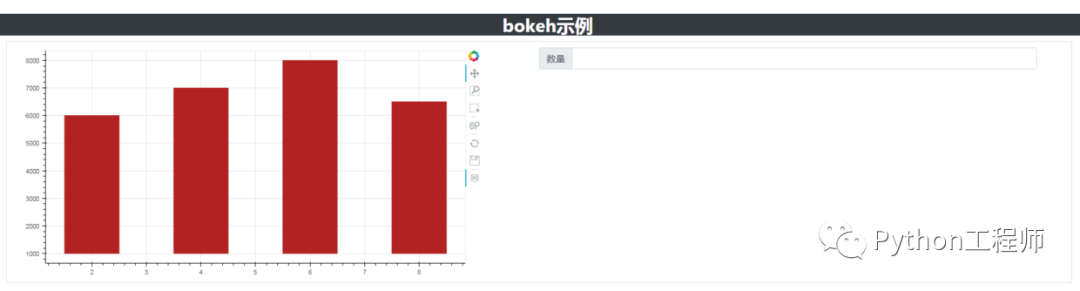
本系列介绍可视化库bokeh,目标是在网站上使用今天讲讲如何在Django中使用Part 1:使用场景介绍

前端效果
Part 2:前端代码
{% load staticfiles %} Bokeh-测试2 {{ script |safe }} bokeh示例
{{ graph |safe }} 数量 代码结构
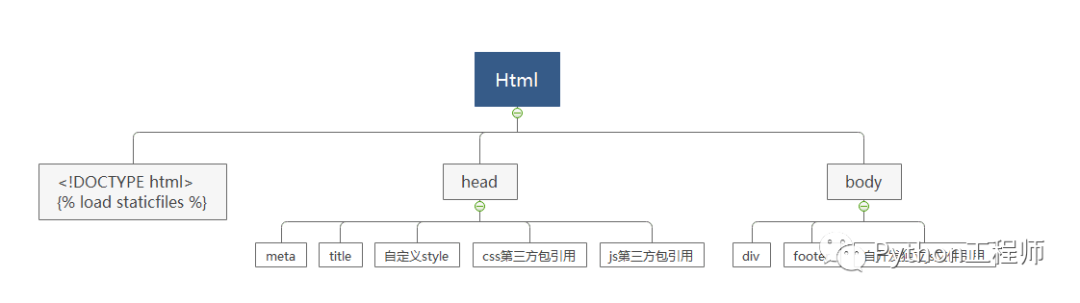
代码截图
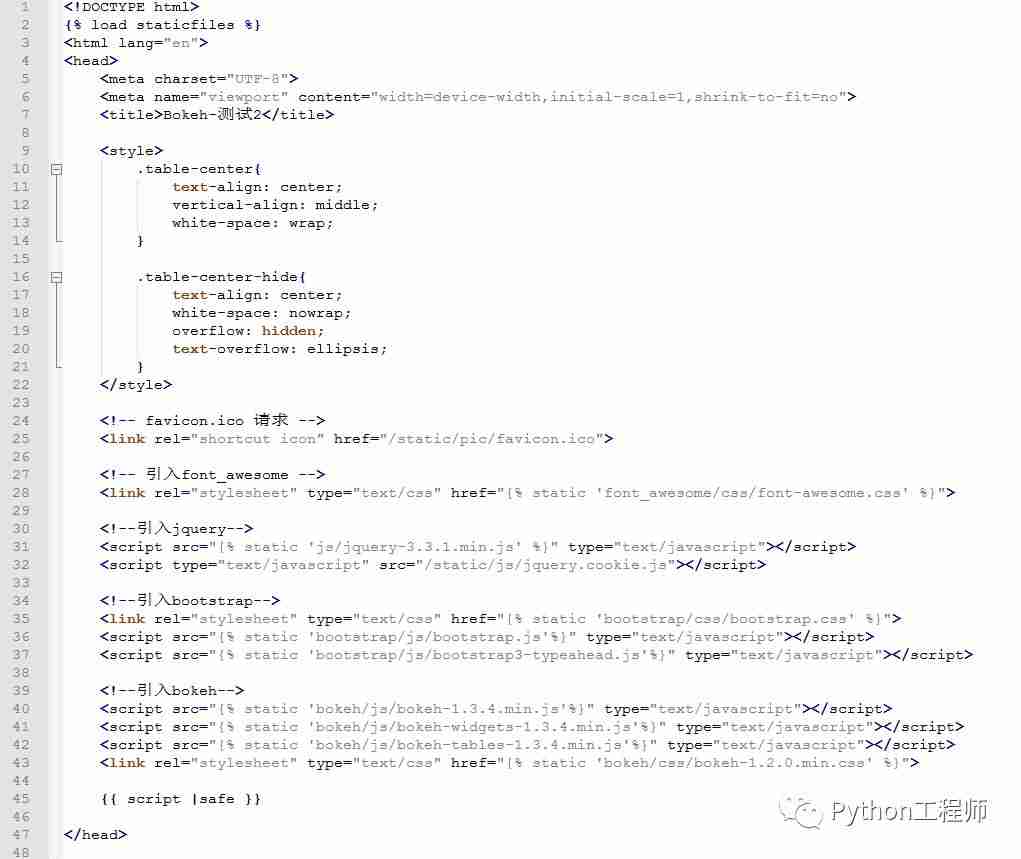
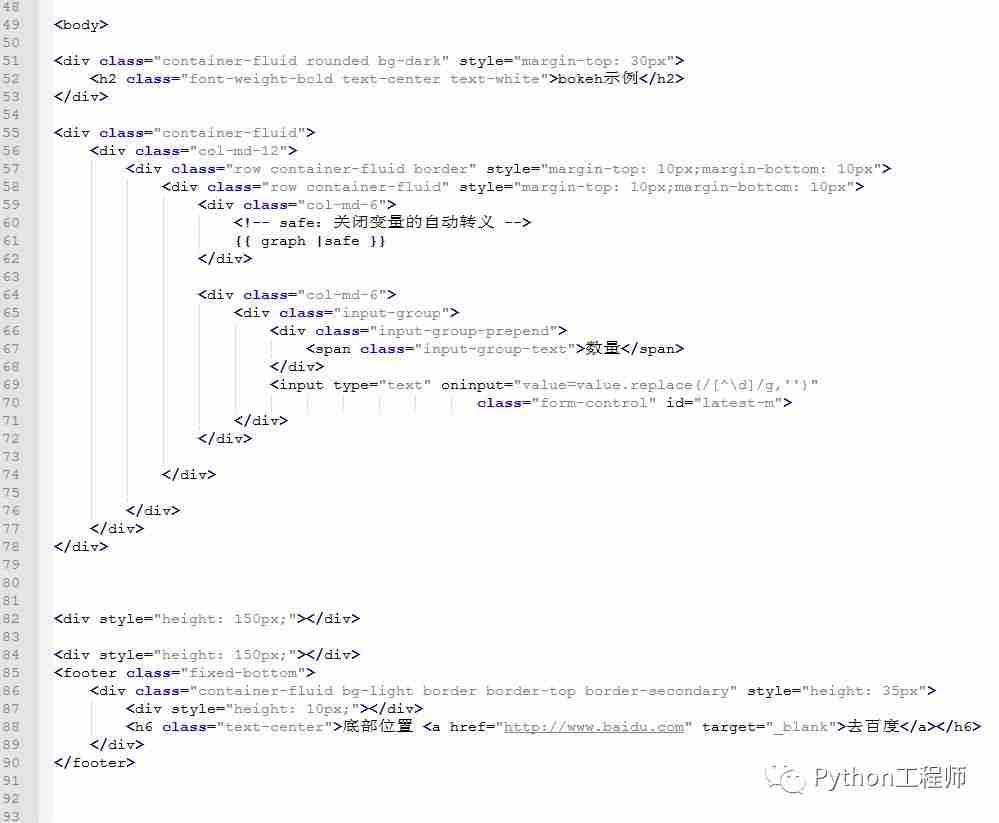

Part 3:前端代码解读
{{ script |safe }}在body内新增一段代码{{ graph |safe }},注意放置的位置Part 4:后端代码
View类
代码语言:javascript代码运行次数:0运行复制from django.shortcuts import renderfrom django.views.generic.base import Viewfrom bokeh.plotting import figure, output_file, showfrom bokeh.resources import CDNfrom bokeh.embed import componentsclass Test2View(View): def get(self, request): tools_set = "hover,pan,wheel_zoom,box_zoom,reset,save,box_select" p = figure(plot_width=800, plot_height=400, tools=tools_set) p.vbar(x=[2, 4, 6, 8], width=1, bottom=1000, top=[6000, 7000, 8000, 6500], color="firebrick") script, div = components(p, CDN) return render(request, 'bokeh_example_2.html', { 'script': script, 'graph': div, })url地址
代码语言:javascript代码运行次数:0运行复制from django.urls import re_path, pathfrom .views import Test1View, Test2Viewapp_name = "bokeh_examples"urlpatterns = [ re_path('^test1/$', Test1View.as_view(), name='test1'), re_path('^test2/$', Test2View.as_view(), name='test2'),]代码截图
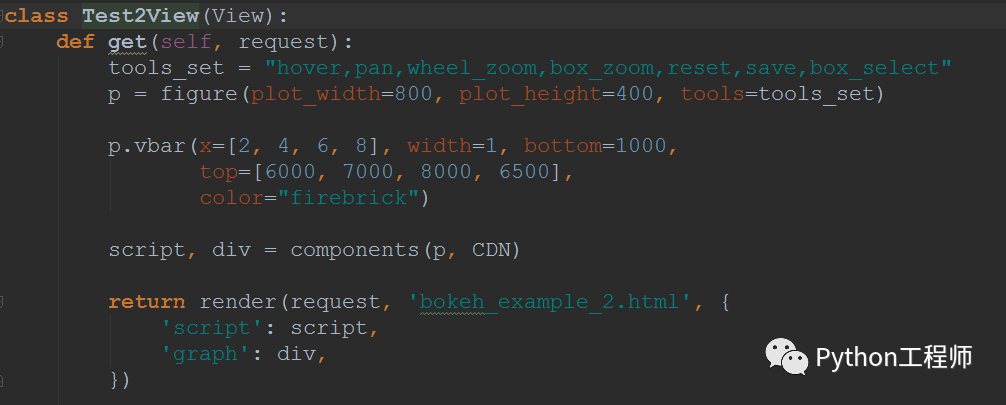
Part 5:部分代码解读
figure,CDN,componentsDjango从后端传给前端两个参数script,graph其中script对应一段js代码,graph对应一段html代码关于如何控制图片在前端显示的位置大小,目前还有点问题,后续再剖析











火山引擎是字节跳动旗下企业级云与AI服务平台。聚焦大模型核心能力,依托字节自研豆包多模态大模型,凭借火山方舟一站式平台,提供模型精调、推理部署、智能应用搭建等全链路服务,结合高性能AI算力,助力各行业快速落地大模型数字化与智能化应用。








AirBuddy 3 是面向 macOS 的蓝牙外设增强工具,可集中查看 AirPods、Beats 与苹果设备电量,提供快速连接、播放控制、电量提醒、桌面小组件和多台 Mac 外设接力等功能。

AirServer macOS版可把 Mac 转换为无线投屏接收端,通过 AirPlay 或 Google Cast 接收手机、平板和电脑画面,并支持多设备同时连接、高清镜像及会话录制,适合家庭娱乐、课堂教学、会议演示和应用展示。



Autodesk Maya 是面向影视、电视、动画和游戏行业的专业三维制作软件,集多边形与 NURBS 建模、角色绑定、关键帧和动作捕捉动画、Bifrost 特效模拟、材质开发及 Arnold 渲染于一体,

AirServer Windows版可把电脑变成AirPlay、Google Cast和Miracast无线投屏接收端,适合会议演示、课堂教学及家庭大屏分享。发送设备通常无需另装客户端,并可同时接收和智能排列多个镜像会话。