


MySQL主从复制原理与配置详解
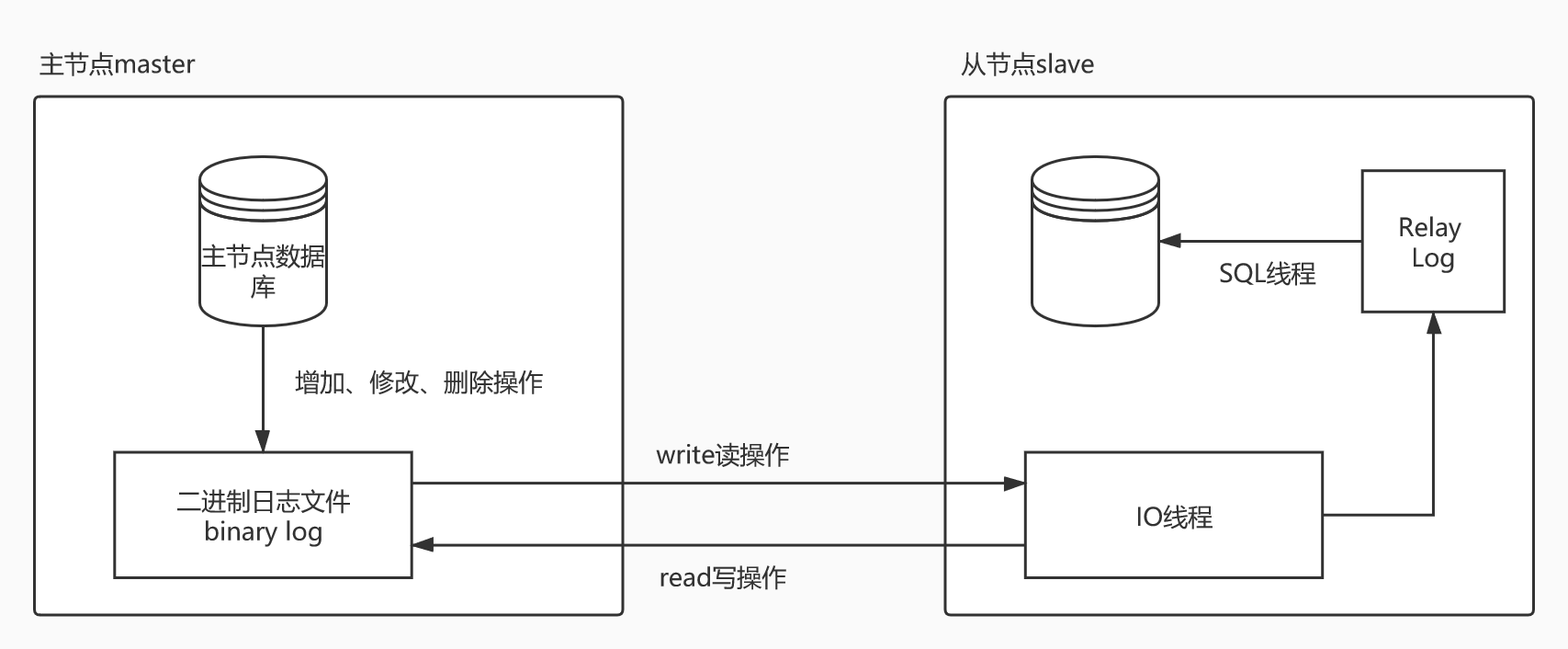
1、主从同步(主从复制的)的原理。答:主从同步的核心是二进制日志文件binarylog,对数据库所有的增加、修改、删除操作都会在日志表里面记录一下的。mysql主从复制是异步的,串行化的,有延迟的,并不是实时的。第一步,master主节点将改变的数据记录在本地的二进制日志中binarylog,该过程称为二进制日志事件。第二步,slave将master的binarylog拷贝到自己的relaylog(中继日志文件)中。第三步,中继日志事件,将数据读取到自己的数据库之中。2、mysql集群的优点,如下
1、主从同步(主从复制的)的原理。
答:主从同步的核心是二进制日志文件binary log,对数据库所有的增加、修改、删除操作都会在日志表里面记录一下的。mysql主从复制是异步的,串行化的,有延迟的,并不是实时的。
第一步,master主节点将改变的数据记录在本地的二进制日志中binary log,该过程称为二进制日志事件。第二步,slave将master的binary log拷贝到自己的relay log(中继日志文件)中。第三步,中继日志事件,将数据读取到自己的数据库之中。
2、mysql集群的优点,如下所示:
1)、负载均衡。2)、失败迁移。
3、由于我的机器一台是window10安装的mysql,一台是centos7安装的mysql,所以它们的配置文件分别是windows的配置文件是my.ini,linux的配置文件是my.cnf。
首先,我需要配置一下允许远程连接我的window的mysql,如下所示:
代码语言:javascript代码运行次数:0运行复制 1 Enter password: ****** 2 Welcome to the MySQL monitor. Commands end with ; or \g. 3 Your MySQL connection id is 3 4 Server version: 5.7.24-log MySQL Community Server (GPL) 5 6 Copyright (c) 2000, 2018, Oracle and/or its affiliates. All rights reserved. 7 8 Oracle is a registered trademark of Oracle Corporation and/or its 9 affiliates. Other names may be trademarks of their respective10 owners.11 12 Type 'help;' or '\h' for help. Type '\c' to clear the current input statement.13 14 mysql> use mysql;15 Database changed16 mysql> grant all privileges on *.* to 'root'@'%' identified by '123456' with grant option;17 Query OK, 0 rows affected, 1 warning (0.03 sec)18 19 mysql> flush privileges;20 Query OK, 0 rows affected (0.03 sec)21 22 mysql> select host,user from user;23 +-----------+---------------+24 | host | user |25 +-----------+---------------+26 | % | root |27 | % | user1 |28 | localhost | mysql.session |29 | localhost | mysql.sys |30 | localhost | root |31 +-----------+---------------+32 5 rows in set (0.00 sec)33 34 mysql>然后使用linux的远程连接一下window的mysql,可以连接即可,如果不可以连接,需要关闭window的防火墙。反之,开启Linux的mysql可以远程连接并关闭防火墙。
代码语言:javascript代码运行次数:0运行复制 1 [root@k8s-node3 ~]# mysql -uroot -h192.168.0.116 -p123456 2 mysql: [Warning] Using a password on the command line interface can be insecure. 3 Welcome to the MySQL monitor. Commands end with ; or \g. 4 Your MySQL connection id is 4 5 Server version: 5.7.24-log MySQL Community Server (GPL) 6 7 Copyright (c) 2000, 2020, Oracle and/or its affiliates. All rights reserved. 8 9 Oracle is a registered trademark of Oracle Corporation and/or its10 affiliates. Other names may be trademarks of their respective11 owners.12 13 Type 'help;' or '\h' for help. Type '\c' to clear the current input statement.14 15 mysql> show databases;16 +4、由于我的mysql是默认安装的,所以my.ini在这个路径下面C:\ProgramData\MySQL\MySQL Server 5.7\my.ini,根据个人需求进行配置吧,开始配置,如下所示:
代码语言:javascript代码运行次数:0运行复制 1 [mysqld] 2 # 主节点master增加唯一标识符 3 server-id=1 4 # 开始配置二进制日志文件 5 log-bin="D:/program/mysql/mysql-bin" 6 # 开始配置二进制日志错误文件 7 log-error="D:/program/mysql/mysql-error" 8 # 主从同步的时候忽略的数据库 9 binlog-ignore-db=mysql10 # 可选参数,指定主从同步的时候,同步那些数据库11 binlog-do-db=test我上面的配置一开始配置错了,导致mysql重启起不来了。还有下面的配置和自己的配置冲突了,我这里将默认的先注释了,如下所示:
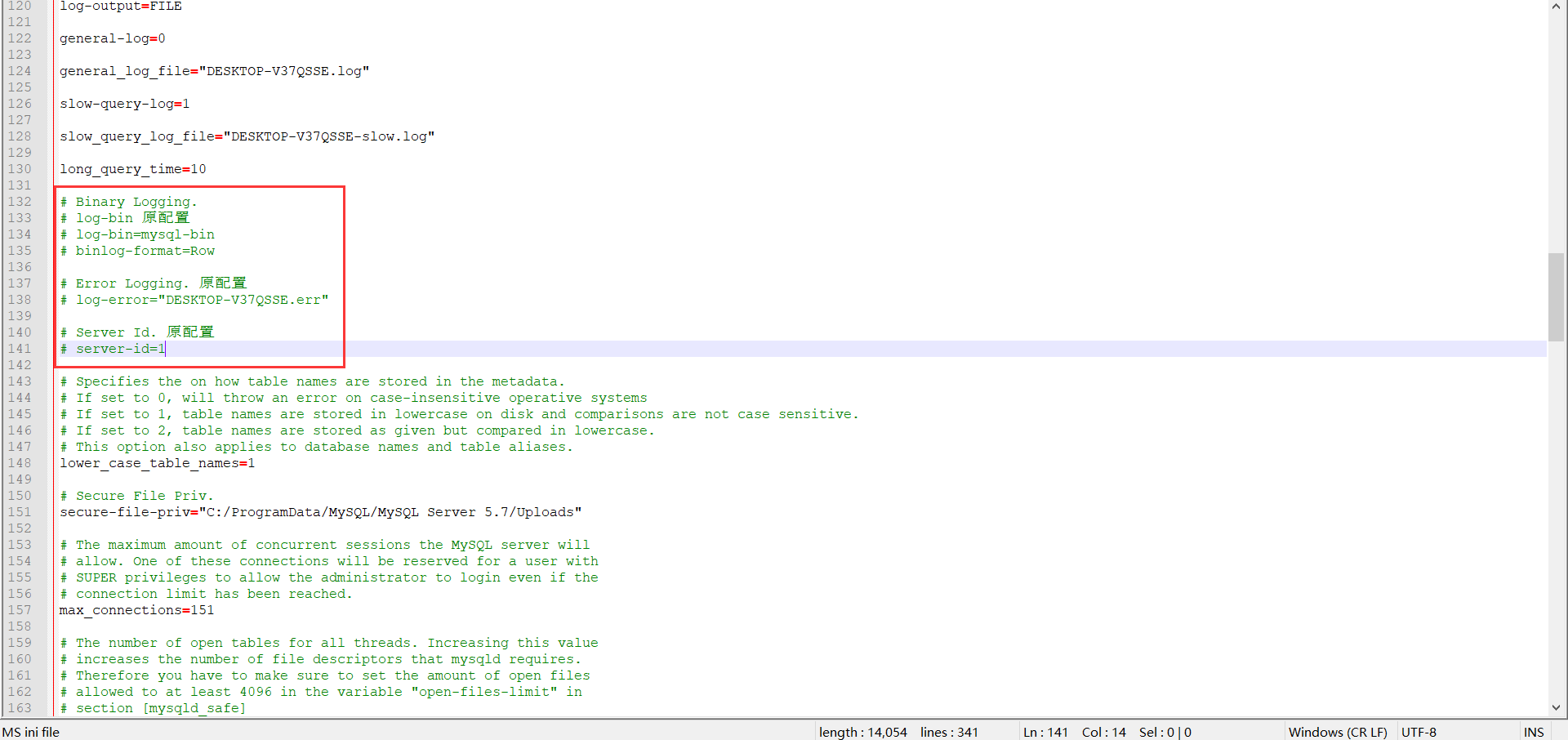
Windows中的数据库授权那台计算机中的数据库是自己的从数据库。
代码语言:javascript代码运行次数:0运行复制1 mysql> grant replication slave,reload,super on *.* to 'root'@'192.168.110.%' identified by 'root';2 Query OK, 0 rows affected, 1 warning (0.00 sec)3 4 mysql>5 mysql> flush privileges;6 Query OK, 0 rows affected (0.00 sec)7 8 mysql>9 mysql>查看主数据库的状态,每次在做主从同步前,需要观察主机状态的最新值,需要记住File、Position的值的。命令如下所示:
代码语言:javascript代码运行次数:0运行复制1 mysql> show master status;2 +--------------------+----------+--------------+------------------+-------------------+3 | File | Position | Binlog_Do_DB | Binlog_Ignore_DB | Executed_Gtid_Set |4 +--------------------+----------+--------------+------------------+-------------------+5 | mysql-error.000001 | 154 | biehl | mysql | |6 +--------------------+----------+--------------+------------------+-------------------+7 1 row in set (0.00 sec)8 9 mysql>如果my.ini配置正确的话,重启window的mysql之后,会在自己的指定目录D:\program\mysql生成下面三个文件,mysql-bin.000001、mysql-error.err、mysql-bin.index。
5、开始在linux的mysql配置,如下所示:
代码语言:javascript代码运行次数:0运行复制1 [mysqld]2 # 从节点slave增加唯一标识符3 server-id=24 # 配置日志路径5 log-bin=mysql-bin6 # 配置主从同步的数据库名称7 replicate-do-db=test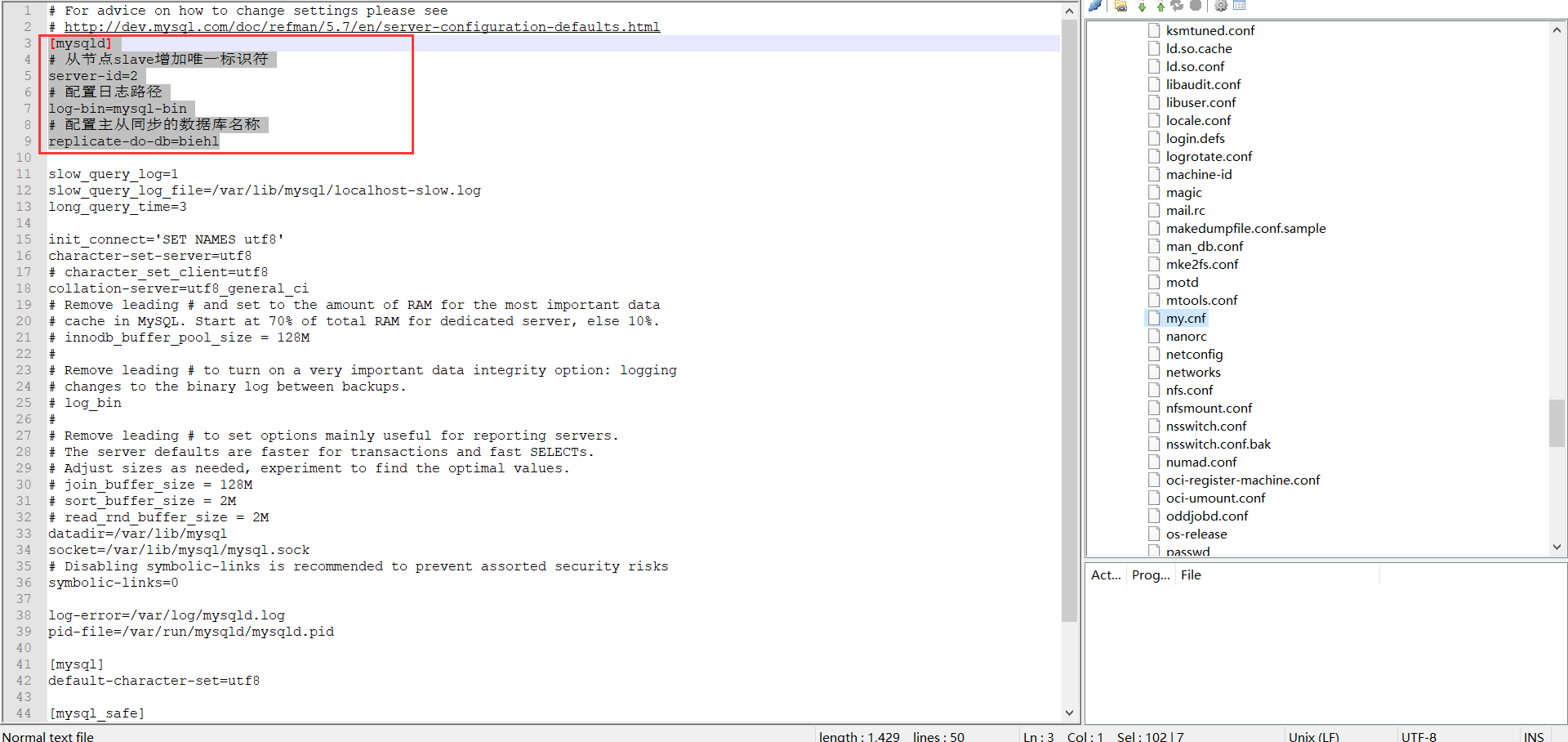
Linux中的数据库授权那台计算机中的数据库是自己的主数据库,由于修改了my.ini所以这里重启一下Mysql的数据库。
代码语言:javascript代码运行次数:0运行复制 1 [root@k8s-node3 ~]# systemctl restart mysqld.service 2 [root@k8s-node3 ~]# systemctl status mysqld.service 3 ● mysqld.service - MySQL Server 4 Loaded: loaded (/usr/lib/systemd/system/mysqld.service; enabled; vendor preset: disabled) 5 Active: active (running) since Fri 2020-07-31 12:21:36 CST; 7s ago 6 Docs: man:mysqld(8) 7 http://dev.mysql.com/doc/refman/en/using-systemd.html 8 Process: 93026 ExecStart=/usr/sbin/mysqld --daemonize --pid-file=/var/run/mysqld/mysqld.pid $MYSQLD_OPTS (code=exited, status=0/SUCCESS) 9 Process: 92998 ExecStartPre=/usr/bin/mysqld_pre_systemd (code=exited, status=0/SUCCESS)10 Main PID: 93028 (mysqld)11 Tasks: 2712 Memory: 246.4M13 CGroup: /system.slice/mysqld.service14 └─93028 /usr/sbin/mysqld --daemonize --pid-file=/var/run/mysqld/mysqld.pid15 16 Jul 31 12:21:28 k8s-node3 systemd[1]: Starting MySQL Server...17 Jul 31 12:21:36 k8s-node3 systemd[1]: Started MySQL Server.18 [root@k8s-node3 ~]# 由于没有重启Mysql的数据库之前报错了,自己重启一下然后执行命令即可。
代码语言:javascript代码运行次数:0运行复制 1 mysql> change master to master_host='192.168.0.116',master_user='root',master_password='123456',master_port=3306,master_log_file='mysql-error.000001',master_log_pos=154 ; 2 ERROR 1794 (HY000): Slave is not configured or failed to initialize properly. You must at least set --server-id to enable either a master or a slave. Additional error messages can be found in the MySQL error log. 3 mysql> exit 4 Bye 5 [root@k8s-node3 ~]# mysql -uroot -h127.0.0.1 -p123456 6 mysql: [Warning] Using a password on the command line interface can be insecure. 7 Welcome to the MySQL monitor. Commands end with ; or \g. 8 Your MySQL connection id is 2 9 Server version: 5.7.30-log MySQL Community Server (GPL)10 11 Copyright (c) 2000, 2020, Oracle and/or its affiliates. All rights reserved.12 13 Oracle is a registered trademark of Oracle Corporation and/or its14 affiliates. Other names may be trademarks of their respective15 owners.16 17 Type 'help;' or '\h' for help. Type '\c' to clear the current input statement.18 19 mysql> change master to master_host='192.168.0.116',master_user='root',master_password='123456',master_port=3306,master_log_file='mysql-error.000001',master_log_pos=154 ;20 Query OK, 0 rows affected, 1 warning (0.01 sec)21 22 mysql> 6、开启主从同步,这里在linux执行即可,如下所示:
代码语言:javascript代码运行次数:0运行复制1 mysql> start slave;2 Query OK, 0 rows affected (0.01 sec)3 4 mysql> 然后检验是否真的执行了,检查从节点的工作状态,如下所示:
代码语言:javascript代码运行次数:0运行复制 1 mysql> show slave status \G 2 *************************** 1. row *************************** 3 Slave_IO_State: 4 Master_Host: 192.168.0.116 5 Master_User: root 6 Master_Port: 3306 7 Connect_Retry: 60 8 Master_Log_File: mysql-error.000001 9 Read_Master_Log_Pos: 15410 Relay_Log_File: k8s-node3-relay-bin.00000111 Relay_Log_Pos: 412 Relay_Master_Log_File: mysql-error.00000113 Slave_IO_Running: No14 Slave_SQL_Running: Yes15 Replicate_Do_DB: biehl16 Replicate_Ignore_DB: 17 Replicate_Do_Table: 18 Replicate_Ignore_Table: 19 Replicate_Wild_Do_Table: 20 Replicate_Wild_Ignore_Table: 21 Last_Errno: 022 Last_Error: 23 Skip_Counter: 024 Exec_Master_Log_Pos: 15425 Relay_Log_Space: 15426 Until_Condition: None27 Until_Log_File: 28 Until_Log_Pos: 029 Master_SSL_Allowed: No30 Master_SSL_CA_File: 31 Master_SSL_CA_Path: 32 Master_SSL_Cert: 33 Master_SSL_Cipher: 34 Master_SSL_Key: 35 Seconds_Behind_Master: NULL36 Master_SSL_Verify_Server_Cert: No37 Last_IO_Errno: 123638 Last_IO_Error: Got fatal error 1236 from master when reading data from binary log: 'Could not find first log file name in binary log index file'39 Last_SQL_Errno: 040 Last_SQL_Error: 41 Replicate_Ignore_Server_Ids: 42 Master_Server_Id: 143 Master_UUID: 262f593f-746e-11e9-b769-d8c497e293c144 Master_Info_File: /var/lib/mysql/master.info45 SQL_Delay: 046 SQL_Remaining_Delay: NULL47 Slave_SQL_Running_State: Slave has read all relay log; waiting for more updates48 Master_Retry_Count: 8640049 Master_Bind: 50 Last_IO_Error_Timestamp: 200731 12:25:3551 Last_SQL_Error_Timestamp: 52 Master_SSL_Crl: 53 Master_SSL_Crlpath: 54 Retrieved_Gtid_Set: 55 Executed_Gtid_Set: 56 Auto_Position: 057 Replicate_Rewrite_DB: 58 Channel_Name: 59 Master_TLS_Version: 60 1 row in set (0.00 sec)61 62 mysql> 主要观察这两个都是yes即可,Slave_IO_Running: No和 Slave_SQL_Running: Yes,这里如果不都是yes,看Last_IO_Error: Got fatal error 1236 from master when reading data from binary log: 'Could not find first log file name in binary log index file'报错信息。
代码语言:javascript代码运行次数:0运行复制 1 mysql> stop slave; 2 Query OK, 0 rows affected (0.00 sec) 3 4 mysql> reset slave; 5 Query OK, 0 rows affected (0.00 sec) 6 7 mysql> start slave; 8 Query OK, 0 rows affected (0.01 sec) 9 10 mysql> show slave status \G11 *************************** 1. row ***************************12 Slave_IO_State: Waiting for master to send event13 Master_Host: 192.168.0.11614 Master_User: root15 Master_Port: 330616 Connect_Retry: 6017 Master_Log_File: mysql-bin.00000118 Read_Master_Log_Pos: 15419 Relay_Log_File: k8s-node3-relay-bin.00000320 Relay_Log_Pos: 36721 Relay_Master_Log_File: mysql-bin.00000122 Slave_IO_Running: Yes23 Slave_SQL_Running: Yes24 Replicate_Do_DB: biehl25 Replicate_Ignore_DB: 26 Replicate_Do_Table: 27 Replicate_Ignore_Table: 28 Replicate_Wild_Do_Table: 29 Replicate_Wild_Ignore_Table: 30 Last_Errno: 031 Last_Error: 32 Skip_Counter: 033 Exec_Master_Log_Pos: 15434 Relay_Log_Space: 57835 Until_Condition: None36 Until_Log_File: 37 Until_Log_Pos: 038 Master_SSL_Allowed: No39 Master_SSL_CA_File: 40 Master_SSL_CA_Path: 41 Master_SSL_Cert: 42 Master_SSL_Cipher: 43 Master_SSL_Key: 44 Seconds_Behind_Master: 045 Master_SSL_Verify_Server_Cert: No46 Last_IO_Errno: 047 Last_IO_Error: 48 Last_SQL_Errno: 049 Last_SQL_Error: 50 Replicate_Ignore_Server_Ids: 51 Master_Server_Id: 152 Master_UUID: 262f593f-746e-11e9-b769-d8c497e293c153 Master_Info_File: /var/lib/mysql/master.info54 SQL_Delay: 055 SQL_Remaining_Delay: NULL56 Slave_SQL_Running_State: Slave has read all relay log; waiting for more updates57 Master_Retry_Count: 8640058 Master_Bind: 59 Last_IO_Error_Timestamp: 60 Last_SQL_Error_Timestamp: 61 Master_SSL_Crl: 62 Master_SSL_Crlpath: 63 Retrieved_Gtid_Set: 64 Executed_Gtid_Set: 65 Auto_Position: 066 Replicate_Rewrite_DB: 67 Channel_Name: 68 Master_TLS_Version: 69 1 row in set (0.00 sec)70 71 mysql> 如果报了主从使用了相同的server-id,需要进行检查,在主从中分别查看serverid,show variables like '%server_id%';
代码语言:javascript代码运行次数:0运行复制 1 Enter password: ****** 2 Welcome to the MySQL monitor. Commands end with ; or \g. 3 Your MySQL connection id is 4 4 Server version: 5.7.24-log MySQL Community Server (GPL) 5 6 Copyright (c) 2000, 2018, Oracle and/or its affiliates. All rights reserved. 7 8 Oracle is a registered trademark of Oracle Corporation and/or its 9 affiliates. Other names may be trademarks of their respective10 owners.11 12 Type 'help;' or '\h' for help. Type '\c' to clear the current input statement.13 14 mysql> show variables like '%server_id%';15 +----------------+-------+16 | Variable_name | Value |17 +----------------+-------+18 | server_id | 1 |19 | server_id_bits | 32 |20 +----------------+-------+21 2 rows in set, 1 warning (0.01 sec)22 23 mysql>然后在从节点上进行查看,如下所示:
代码语言:javascript代码运行次数:0运行复制 1 mysql> show variables like '%server_id%'; 2 +----------------+-------+ 3 | Variable_name | Value | 4 +----------------+-------+ 5 | server_id | 2 | 6 | server_id_bits | 32 | 7 +----------------+-------+ 8 2 rows in set (0.00 sec) 9 10 mysql> 7、测试一下主节点和从节点是否可以同步,可以在主节点的数据表插入一条数据,观察从节点的数据库是否有数据同步,需要注意的是从节点需要创建好数据库和数据表的,不然总是报一些莫名其妙的错误。在主节点添加数据,可以发现从节点已经新增数据了。

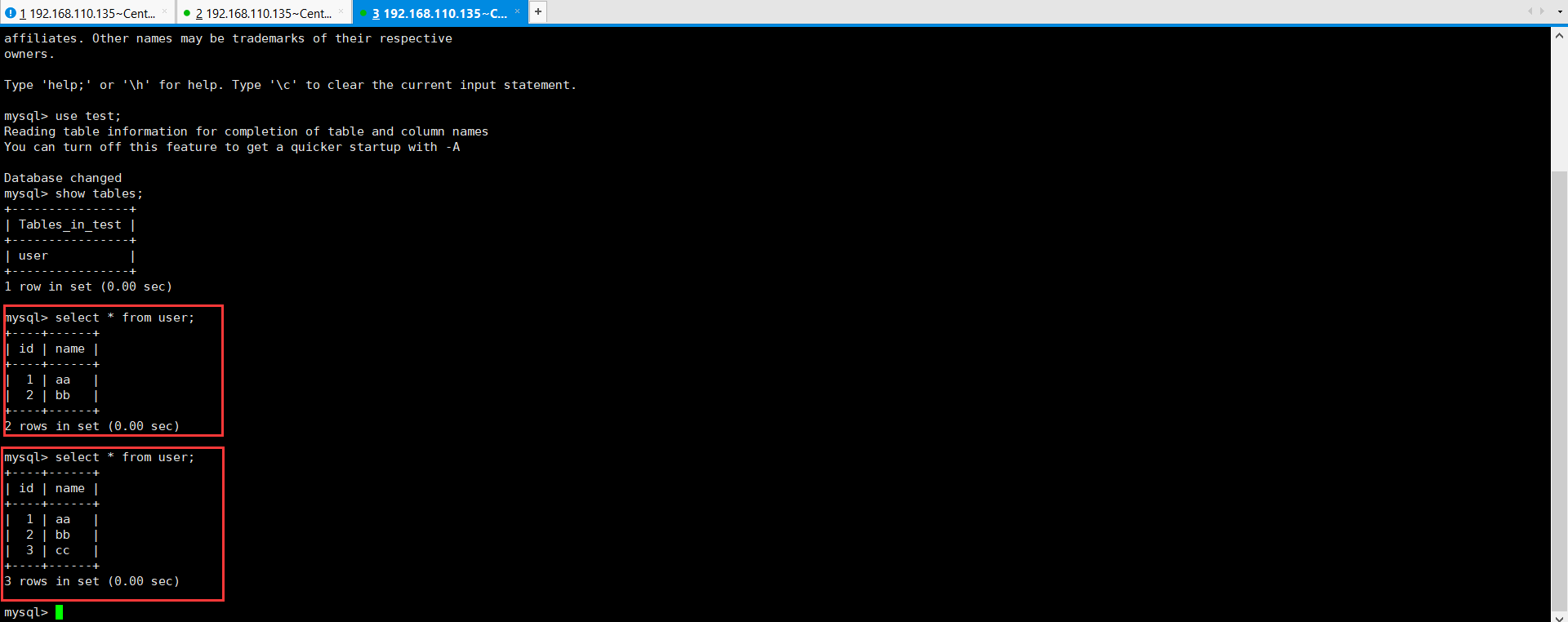
可以测试修改,删除操作,发现都是可以正常执行的。










火山引擎是字节跳动旗下企业级云与AI服务平台。聚焦大模型核心能力,依托字节自研豆包多模态大模型,凭借火山方舟一站式平台,提供模型精调、推理部署、智能应用搭建等全链路服务,结合高性能AI算力,助力各行业快速落地大模型数字化与智能化应用。








AirBuddy 3 是面向 macOS 的蓝牙外设增强工具,可集中查看 AirPods、Beats 与苹果设备电量,提供快速连接、播放控制、电量提醒、桌面小组件和多台 Mac 外设接力等功能。

AirServer macOS版可把 Mac 转换为无线投屏接收端,通过 AirPlay 或 Google Cast 接收手机、平板和电脑画面,并支持多设备同时连接、高清镜像及会话录制,适合家庭娱乐、课堂教学、会议演示和应用展示。



Autodesk Maya 是面向影视、电视、动画和游戏行业的专业三维制作软件,集多边形与 NURBS 建模、角色绑定、关键帧和动作捕捉动画、Bifrost 特效模拟、材质开发及 Arnold 渲染于一体,

AirServer Windows版可把电脑变成AirPlay、Google Cast和Miracast无线投屏接收端,适合会议演示、课堂教学及家庭大屏分享。发送设备通常无需另装客户端,并可同时接收和智能排列多个镜像会话。