


SpringBoot整合Shiro权限管理教程
让我们开始SpringBoot-09Shiro的HelloShiro教程。我们将从创建一个简单的Maven项目开始,然后逐步搭建Shiro环境。创建一个简单的Maven项目首先,我们需要创建一个最基本的Maven项目。导入依赖接下来,我们需要在pom.xml中添加以下依赖:<dependencies><dependency><groupId>org.apache.shiro</groupId><arti
让我们开始SpringBoot-09 Shiro的Hello Shiro教程。我们将从创建一个简单的Maven项目开始,然后逐步搭建Shiro环境。
- 创建一个简单的Maven项目
首先,我们需要创建一个最基本的Maven项目。
- 导入依赖
接下来,我们需要在pom.xml中添加以下依赖:
        org.apache.shiro
        shiro-core
        1.7.0


        org.slf4j
        jcl-over-slf4j
        2.0.0-alpha1


        org.slf4j
        slf4j-log4j12
        2.0.0-alpha1


        log4j
        log4j
        1.2.17
- 创建log4j.properties
为了配置日志,我们需要创建log4j.properties文件:
log4j.rootLogger=INFO, stdout
log4j.appender.stdout=org.apache.log4j.ConsoleAppender
log4j.appender.stdout.layout=org.apache.log4j.PatternLayout
log4j.appender.stdout.layout.ConversionPattern=%d %p [%c] - %m %n
# General Apache libraries
log4j.logger.org.apache=WARN
# Spring
log4j.logger.org.springframework=WARN
# Default Shiro logging
log4j.logger.org.apache.shiro=INFO
# Disable verbose logging
log4j.logger.org.apache.shiro.util.ThreadContext=WARN
log4j.logger.org.apache.shiro.cache.ehcache.EhCache=WARN
- 创建shiro.ini
创建shiro.ini文件来配置Shiro的用户和角色:
[users] root = secret, admin guest = guest, guest presidentskroob = 12345, president darkhelmet = ludicrousspeed, darklord, schwartz lonestarr = vespa, goodguy, schwartz[roles] admin = schwartz = lightsaber: goodguy = winnebago:drive:eagle5
- 创建Quickstart类
最后,我们创建一个Quickstart类来测试Shiro的功能:
import org.apache.shiro.SecurityUtils; import org.apache.shiro.authc.*; import org.apache.shiro.config.IniSecurityManagerFactory; import org.apache.shiro.mgt.SecurityManager; import org.apache.shiro.session.Session; import org.apache.shiro.subject.Subject; import org.apache.shiro.util.Factory; import org.slf4j.Logger; import org.slf4j.LoggerFactory;public class Quickstart { private static final transient Logger log = LoggerFactory.getLogger(Quickstart.class);
public static void main(String[] args) { // The easiest way to create a Shiro SecurityManager with configured // realms, users, roles and permissions is to use the simple INI config. // We'll do that by using a factory that can ingest a .ini file and // return a SecurityManager instance: // Use the shiro.ini file at the root of the classpath // (file: and url: prefixes load from files and urls respectively): Factoryfactory = new IniSecurityManagerFactory("classpath:shiro.ini"); SecurityManager securityManager = factory.getInstance(); // for this simple example quickstart, make the SecurityManager // accessible as a JVM singleton. Most applications wouldn't do this // and instead rely on their container configuration or web.xml for // webapps. That is outside the scope of this simple quickstart, so // we'll just do the bare minimum so you can continue to get a feel // for things. SecurityUtils.setSecurityManager(securityManager); // Now that a simple Shiro environment is set up, let's see what you can do: // get the currently executing user: Subject currentUser = SecurityUtils.getSubject(); // Do some stuff with a Session (no need for a web or EJB container!!!) Session session = currentUser.getSession(); session.setAttribute("someKey", "aValue"); String value = (String) session.getAttribute("someKey"); if (value.equals("aValue")) { log.info("Retrieved the correct value! [" + value + "]"); } // let's login the current user so we can check against roles and permissions: if (!currentUser.isAuthenticated()) { UsernamePasswordToken token = new UsernamePasswordToken("lonestarr", "vespa"); token.setRememberMe(true); try { currentUser.login(token); } catch (UnknownAccountException uae) { log.info("There is no user with username of " + token.getPrincipal()); } catch (IncorrectCredentialsException ice) { log.info("Password for account " + token.getPrincipal() + " was incorrect!"); } catch (LockedAccountException lae) { log.info("The account for username " + token.getPrincipal() + " is locked. " + "Please contact your administrator to unlock it."); } // ... catch more exceptions here (maybe custom ones specific to your application? catch (AuthenticationException ae) { //unexpected condition? error? } } //say who they are: //print their identifying principal (in this case, a username): log.info("User [" + currentUser.getPrincipal() + "] logged in successfully."); //test a role: if (currentUser.hasRole("schwartz")) { log.info("May the Schwartz be with you!"); } else { log.info("Hello, mere mortal."); } //test a typed permission (not instance-level) if (currentUser.isPermitted("lightsaber:wield")) { log.info("You may use a lightsaber ring. Use it wisely."); } else { log.info("Sorry, lightsaber rings are for schwartz masters only."); } //a (very powerful) Instance Level permission: if (currentUser.isPermitted("winnebago:drive:eagle5")) { log.info("You are permitted to 'drive' the winnebago with license plate (id) 'eagle5'. " + "Here are the keys - have fun!"); } else { log.info("Sorry, you aren't allowed to drive the 'eagle5' winnebago!"); } //all done - log out! currentUser.logout(); System.exit(0); } }
- 启动测试
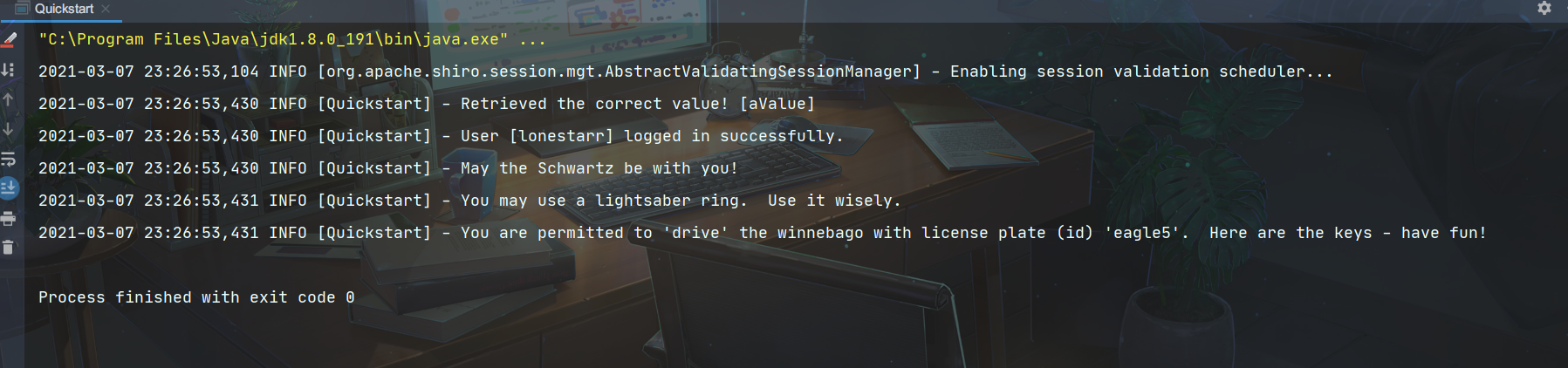
- 可能遇到错误
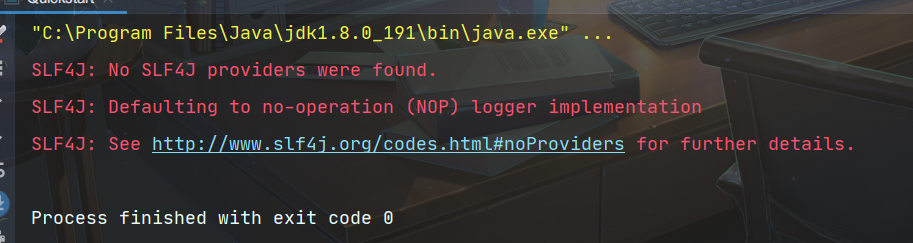
解决办法:
这是因为依赖中的问题。将以下依赖的scope标签删除:
org.slf4j
jcl-over-slf4j
2.0.0-alpha1


org.slf4j
slf4j-log4j12
2.0.0-alpha1
Shiro环境搭建
Shiro环境搭建需要三个要素:
- ShiroFilterFactoryBean
- DefaultWebSecurityManager
- Realm
我们需要倒着来创建。
创建config文件夹和ShiroConfig、UserRealm类
首先,创建UserRealm类:
public class UserRealm extends AuthorizingRealm {
// 授权
@Override
protected AuthorizationInfo doGetAuthorizationInfo(PrincipalCollection principalCollection) {
return null;
}//认证
@Override
protected AuthenticationInfo doGetAuthenticationInfo(AuthenticationToken authenticationToken) throws AuthenticationException {
return null;
}
}
然后,创建ShiroConfig类:
@Configuration
public class ShiroConfig {
//ShiroFilterFactoryBean
@Bean
public ShiroFilterFactoryBean shiroFilterFactoryBean(@Qualifier("defaultWebSecurityManager") DefaultWebSecurityManager defaultWebSecurityManager){
ShiroFilterFactoryBean bean = new ShiroFilterFactoryBean();
//设置安全管理器
bean.setSecurityManager(defaultWebSecurityManager);
return bean;
}//DefaultWebSecurityManager
@Bean
public DefaultWebSecurityManager defaultWebSecurityManager(@Qualifier("userRealm") UserRealm userRealm){
DefaultWebSecurityManager securityManager = new DefaultWebSecurityManager();
securityManager.setRealm(userRealm);
return securityManager;
}
//创建 realm 对象
@Bean
public UserRealm userRealm(){
return new UserRealm();
}
}
这样,我们就完成了SpringBoot-09 Shiro的Hello Shiro教程的基本步骤。接下来,您可以根据需要进一步扩展和配置Shiro的功能。



















火山引擎是字节跳动旗下企业级云与AI服务平台。聚焦大模型核心能力,依托字节自研豆包多模态大模型,凭借火山方舟一站式平台,提供模型精调、推理部署、智能应用搭建等全链路服务,结合高性能AI算力,助力各行业快速落地大模型数字化与智能化应用。








AirBuddy 3 是面向 macOS 的蓝牙外设增强工具,可集中查看 AirPods、Beats 与苹果设备电量,提供快速连接、播放控制、电量提醒、桌面小组件和多台 Mac 外设接力等功能。

AirServer macOS版可把 Mac 转换为无线投屏接收端,通过 AirPlay 或 Google Cast 接收手机、平板和电脑画面,并支持多设备同时连接、高清镜像及会话录制,适合家庭娱乐、课堂教学、会议演示和应用展示。

火山引擎是字节跳动旗下企业级云与AI服务平台。聚焦大模型核心能力,依托字节自研豆包多模态大模型,凭借火山方舟一站式平台,提供模型精调、推理部署、智能应用搭建等全链路服务,结合高性能AI算力,助力各行业快速落地大模型数字化与智能化应用。

PixTV 是一款在浏览器中使用的 AI 视觉内容创作平台,提供图片、视频、音频、文字生成、AI 分镜、局部重绘、提示词反推和无限画布等工具,适合短剧、漫剧、广告及社交媒体内容制作。


Autodesk Maya 是面向影视、电视、动画和游戏行业的专业三维制作软件,集多边形与 NURBS 建模、角色绑定、关键帧和动作捕捉动画、Bifrost 特效模拟、材质开发及 Arnold 渲染于一体,