


SpringBoot多数据源切换怎么实现
配置文件(YML)spring:datasource:default-db-key:voidmemulti-db:-voidme:driver-class-name:com.mysql.cj.jdbc.Driverusername:rootpassword:rooturl:jdbc:mysql://192.168.42.153:3306/voidme?characterEncoding=utf8&autoReconnect=true&failOverReadOnly=false&maxReconnects
配置文件(YML)
spring:
  datasource:
    default-db-key: voidme
    multi-db:
      - voidme:
          driver-class-name: com.mysql.cj.jdbc.Driver
          username: root
          password: root
          url: jdbc:mysql://192.168.42.153:3306/voidme?characterEncoding=utf8&autoReconnect=true&failOverReadOnly=false&maxReconnects=10&useSSL=false
      - xcdef:
          driver-class-name: com.mysql.cj.jdbc.Driver
          username: root
          password: root
          url: jdbc:mysql://192.168.42.153:3306/xcdef?characterEncoding=utf8&autoReconnect=true&failOverReadOnly=false&maxReconnects=10&useSSL=false


mybatis:
  #1.classpath:只会到你的classes路径中查找找文件。
  #2.classpath*:不仅会到classes路径,还包括jar文件中(classes路径)进行查找。
  mapper-locations: classpath*:/mapper/**/*Mapper.xml    # mapper映射文件位置
  type-aliases-package: com.**.entity    # 实体类所在的位置
  configuration:
    log-impl: org.apache.ibatis.logging.stdout.StdOutImpl   #用于控制台打印sql语句
    map-underscore-to-camel-case: true #开启将带有下划线的表字段 映射为驼峰格式的实体类属性
核心代码
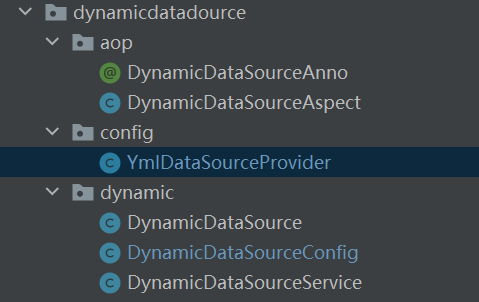
DynamicDataSource
这个类用于获取数据源的(核心)
package com.dynamicdatadource.dynamic;

import org.springframework.beans.factory.annotation.Value;
import org.springframework.jdbc.datasource.lookup.AbstractRoutingDataSource;

public class DynamicDataSource extends AbstractRoutingDataSource {

    @Value("${spring.datasource.default-db-key}")
    private String defaultDbKey;

    @Override
    protected Object determineCurrentLookupKey() {
        String currentDb = DynamicDataSourceService.currentDb();
        if (currentDb == null) {
            return defaultDbKey;
        }
        return currentDb;
    }
}
DynamicDataSourceService
这个类是数据源切换工具,我们做了线程隔离了所以不用担心多线程数据源会混乱的问题
package com.dynamicdatadource.dynamic;

import com.application.ApplicationContextProvider;
import org.slf4j.Logger;
import org.slf4j.LoggerFactory;
import org.springframework.boot.jdbc.DataSourceBuilder;

import javax.sql.DataSource;
import java.util.HashMap;
import java.util.Map;

public class DynamicDataSourceService  {
    private static final Logger log = LoggerFactory.getLogger(DynamicDataSourceService.class);

    private static final Map dataSources = new HashMap<>();
    private static final ThreadLocal dbKeys = ThreadLocal.withInitial(() -> null);

    /**
     * 动态添加一个数据源
     *
     * @param name       数据源的key
     * @param dataSource 数据源对象
     */
    public static void addDataSource(String name, DataSource dataSource) {
        DynamicDataSource dynamicDataSource = ApplicationContextProvider.getApplicationContext().getBean(DynamicDataSource.class);
        dataSources.put(name, dataSource);
        dynamicDataSource.setTargetDataSources(dataSources);
        dynamicDataSource.afterPropertiesSet();
        log.info("添加了数据源:{}",name);
    }

    /**
     * @param name   数据源的key
     * @param driverClassName  驱动
     * @param url     数据库连接地址
     * @param username   数据库账户
     * @param password   数据库密码
     */
    public static void addDataSource(String name, String driverClassName,String url,String username,String password) {
        DataSourceBuilder builder = DataSourceBuilder.create();
        builder.driverClassName(driverClassName);
        builder.username(username);
        builder.password(password);
        builder.url(url);
        addDataSource(name,builder.build());
        log.info("添加了数据源:{}",name);
    }
    /**
     * 切换数据源
     */
    public static void switchDb(String dbKey) {
        dbKeys.set(dbKey);
    }

    /**
     * 重置数据源(切换为默认的数据源)
     */
    public static void resetDb() {
        dbKeys.remove();
    }

    /**
     * 获取当前数据源的key
     */
    public static String currentDb() {
        return dbKeys.get();
    }
}
DynamicDataSourceConfig
将数据源配置到springboot中和初始化Mybaitis配置
package com.dynamicdatadource.dynamic;

import lombok.Data;
import org.apache.ibatis.logging.Log;
import org.mybatis.spring.SqlSessionFactoryBean;
import org.springframework.boot.context.properties.ConfigurationProperties;
import org.springframework.context.annotation.Bean;
import org.springframework.context.annotation.Configuration;
import org.springframework.core.io.support.PathMatchingResourcePatternResolver;
import org.springframework.jdbc.datasource.DataSourceTransactionManager;
import org.springframework.transaction.PlatformTransactionManager;

import java.io.IOException;
import java.util.HashMap;
import java.util.Map;

@Configuration
@ConfigurationProperties(prefix = "mybatis")
@Data
public class DynamicDataSourceConfig {

    private String mapperLocations;
    private String typeAliasesPackage;
    @Data
    public class MybatisConfiguration{
        private String logImpl;
        private boolean mapUnderscoreToCamelCase;
    }
    private  MybatisConfiguration configuration=new MybatisConfiguration();


    /**
     * 动态数据源
     */
    @Bean
    public DynamicDataSource dynamicDataSource() {
        DynamicDataSource dataSource = new DynamicDataSource();
        Map targetDataSources = new HashMap<>();
        dataSource.setTargetDataSources(targetDataSources);
        return dataSource;
    }

    /**
     * 会话工厂Mybaitis
     */
    @Bean
    public SqlSessionFactoryBean sqlSessionFactoryBean() throws IOException, ClassNotFoundException {
        org.apache.ibatis.session.Configuration configuration = new org.apache.ibatis.session.Configuration();
        configuration.setMapUnderscoreToCamelCase(this.configuration.isMapUnderscoreToCamelCase()); //开启驼峰命名
        configuration.setLogImpl((Class) Class.forName(this.configuration.getLogImpl())); //控制台打印sql日志
        SqlSessionFactoryBean sqlSessionFactoryBean = new SqlSessionFactoryBean();
        sqlSessionFactoryBean.setDataSource(dynamicDataSource());
        sqlSessionFactoryBean.setConfiguration(configuration);
        PathMatchingResourcePatternResolver resolver = new PathMatchingResourcePatternResolver();
        sqlSessionFactoryBean.setMapperLocations(resolver.getResources(mapperLocations));
        sqlSessionFactoryBean.setTypeAliasesPackage(typeAliasesPackage);
        return sqlSessionFactoryBean;
    }

    /**
     * 事务管理器
     */
    @Bean
    public PlatformTransactionManager transactionManager() {
        return new DataSourceTransactionManager(dynamicDataSource());
    }
}
加载YML数据库配置类
package com.dynamicdatadource.config;

import com.dynamicdatadource.dynamic.DynamicDataSourceService;
import lombok.Data;
import org.springframework.boot.autoconfigure.jdbc.DataSourceProperties;
import org.springframework.boot.context.properties.ConfigurationProperties;
import org.springframework.boot.jdbc.DataSourceBuilder;
import org.springframework.stereotype.Component;

import javax.annotation.PostConstruct;
import javax.sql.DataSource;
import java.util.List;
import java.util.Map;
import java.util.Set;

@Component
@Data
@ConfigurationProperties(prefix = "spring.datasource")
public class YmlDataSourceProvider  {

    private List> multiDb;

    private DataSource buildDataSource(DataSourceProperties prop) {
        DataSourceBuilder builder = DataSourceBuilder.create();
        builder.driverClassName(prop.getDriverClassName());
        builder.username(prop.getUsername());
        builder.password(prop.getPassword());
        builder.url(prop.getUrl());
        return builder.build();
    }

    public void initDataSource() {
        multiDb.forEach(map -> {
            Set keys = map.keySet();
            keys.forEach(key -> {
                DataSourceProperties properties = map.get(key);
                DataSource dataSource = buildDataSource(properties);
                DynamicDataSourceService.addDataSource(key, dataSource);
            });
        });
    }

    //在构造函数之后执行
    @PostConstruct
    public void init() {
        initDataSource();
    }
}
aop切换
package com.dynamicdatadource.aop;

import java.lang.annotation.ElementType;
import java.lang.annotation.Retention;
import java.lang.annotation.RetentionPolicy;
import java.lang.annotation.Target;

@Target({ElementType.METHOD,ElementType.TYPE})//作用:方法和类
@Retention(RetentionPolicy.RUNTIME)
public @interface DynamicDataSourceAnno {
    String key() default "";
}
package com.dynamicdatadource.aop;
import com.dynamicdatadource.dynamic.DynamicDataSourceService;
import org.apache.commons.lang.StringUtils;
import org.aspectj.lang.ProceedingJoinPoint;
import org.aspectj.lang.annotation.Around;
import org.aspectj.lang.annotation.Aspect;
import org.aspectj.lang.annotation.Pointcut;
import org.aspectj.lang.reflect.MethodSignature;
import org.springframework.stereotype.Component;
// 用于单独的请求或者类进行切换数据库
@Aspect
@Component
public class DynamicDataSourceAspect {
@Pointcut("@annotation(com.dynamicdatadource.aop.DynamicDataSourceAnno)")
public void dynamicDataSourceAnno() {
}
@Around("dynamicDataSourceAnno()")
public Object DynamicDataSourceAspectAroundAnno(ProceedingJoinPoint joinPoint) {
Object object = null;
try {
MethodSignature signature = (MethodSignature)joinPoint.getSignature();
DynamicDataSourceAnno dynamicDataSourceAnno = signature.getMethod().getAnnotation(DynamicDataSourceAnno.class);
String key = dynamicDataSourceAnno.key();
if (StringUtils.isNotBlank(key)) {
//切换为指定数据库
DynamicDataSourceService.switchDb(key);
}
object = joinPoint.proceed();
} catch (Throwable e) {
e.printStackTrace();
}finally {
//还原为默认配置
DynamicDataSourceService.resetDb();
}
return object;
}
// 还可以扩展包路径切换
}效果
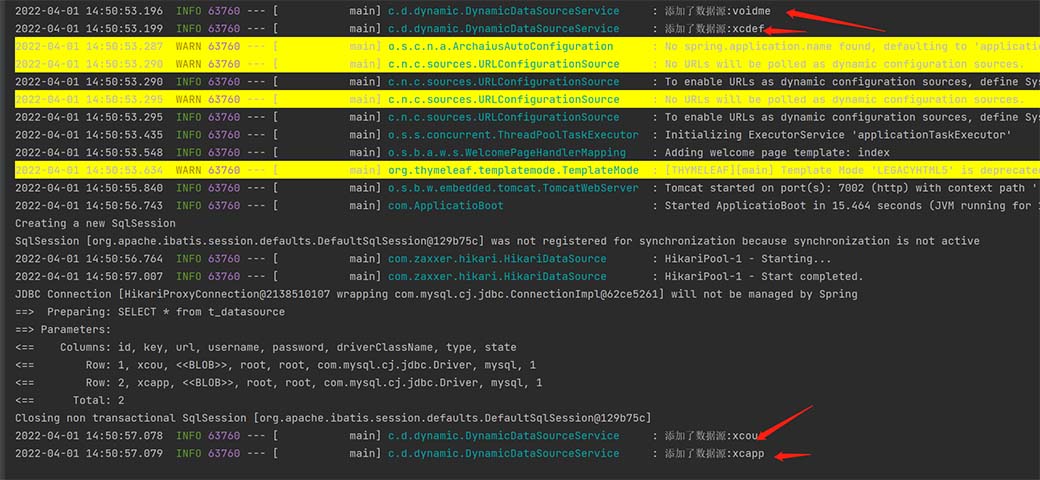
运行程序之后,就会将数据源加入到数据源列表中了
扩展
MysqlDataSourceInitialize
从数据库中将配置信息查询出来,然后动态添加到数据源列表中
package com.dao.config;

import com.dao.DatasourceDao;
import com.dynamicdatadource.aop.DynamicDataSourceAnno;
import com.dynamicdatadource.dynamic.DynamicDataSourceService;
import com.entity.DataSourceEneity;
import org.springframework.beans.factory.InitializingBean;
import org.springframework.beans.factory.annotation.Autowired;
import org.springframework.boot.ApplicationArguments;
import org.springframework.boot.ApplicationRunner;
import org.springframework.stereotype.Component;

import javax.annotation.PostConstruct;
import javax.sql.DataSource;
import java.util.List;

//从数据库中查询出全部的数据源,添加到数据源容器中

/**
 * 表结构如下:
 *
 * CREATE TABLE `t_datasource` (
 *   `id` int(11) NOT NULL,
 *   `key` varchar(255) CHARACTER SET utf8mb4 COLLATE utf8mb4_general_ci NOT NULL COMMENT '绑定的key,用于数据源的切换',
 *   `url` text CHARACTER SET utf8mb4 COLLATE utf8mb4_general_ci NOT NULL COMMENT '数据库连接地址',
 *   `username` varchar(255) CHARACTER SET utf8mb4 COLLATE utf8mb4_general_ci NOT NULL COMMENT '数据库用户名',
 *   `password` varchar(255) CHARACTER SET utf8mb4 COLLATE utf8mb4_general_ci NOT NULL COMMENT '数据库密码',
 *   `driverClassName` varchar(255) CHARACTER SET utf8mb4 COLLATE utf8mb4_general_ci NOT NULL COMMENT '数据库驱动',
 *   `type` varchar(50) CHARACTER SET utf8mb4 COLLATE utf8mb4_general_ci NOT NULL COMMENT '数据库类型:  mysql ,oracle,..',
 *   `state` int(2) NOT NULL COMMENT '是否可用: 1可用 ,2不可用',
 *   PRIMARY KEY (`id`),
 *   UNIQUE KEY `key` (`key`)
 * ) ENGINE=InnoDB DEFAULT CHARSET=utf8mb4 COLLATE=utf8mb4_general_ci;
 *
 * 上表要放入到默认数据源中的数据库里才行
 */
@Component
public class MysqlDataSourceInitialize implements ApplicationRunner  {

    @Autowired
    private DatasourceDao datasourceDao;

    //项目启动后执行初始化数据源
    @Override
    public void run(ApplicationArguments args) throws Exception {
        try {
            List dataSources = datasourceDao.getDataSources();
            for (DataSourceEneity dataSource : dataSources) {
                DynamicDataSourceService.addDataSource(dataSource.getKey(),dataSource.getDataSource());
            }
        } catch (Exception e) {
            e.printStackTrace();
        }
    }
}
DataSourceEneity实体类
@Data
public class DataSourceEneity {
    private int id;
    private String key;
    private String url;
    private String username;
    private String password;
    private String driverClassName;
    private String type;
    private int state;

    public  DataSource getDataSource() {
        DataSourceBuilder builder = DataSourceBuilder.create();
        builder.driverClassName(driverClassName);
        builder.username(username);
        builder.password(password);
        builder.url(url);
        return  builder.build();
    }
} 










火山引擎是字节跳动旗下企业级云与AI服务平台。聚焦大模型核心能力,依托字节自研豆包多模态大模型,凭借火山方舟一站式平台,提供模型精调、推理部署、智能应用搭建等全链路服务,结合高性能AI算力,助力各行业快速落地大模型数字化与智能化应用。








AirBuddy 3 是面向 macOS 的蓝牙外设增强工具,可集中查看 AirPods、Beats 与苹果设备电量,提供快速连接、播放控制、电量提醒、桌面小组件和多台 Mac 外设接力等功能。

AirServer macOS版可把 Mac 转换为无线投屏接收端,通过 AirPlay 或 Google Cast 接收手机、平板和电脑画面,并支持多设备同时连接、高清镜像及会话录制,适合家庭娱乐、课堂教学、会议演示和应用展示。

火山引擎是字节跳动旗下企业级云与AI服务平台。聚焦大模型核心能力,依托字节自研豆包多模态大模型,凭借火山方舟一站式平台,提供模型精调、推理部署、智能应用搭建等全链路服务,结合高性能AI算力,助力各行业快速落地大模型数字化与智能化应用。

PixTV 是一款在浏览器中使用的 AI 视觉内容创作平台,提供图片、视频、音频、文字生成、AI 分镜、局部重绘、提示词反推和无限画布等工具,适合短剧、漫剧、广告及社交媒体内容制作。


Autodesk Maya 是面向影视、电视、动画和游戏行业的专业三维制作软件,集多边形与 NURBS 建模、角色绑定、关键帧和动作捕捉动画、Bifrost 特效模拟、材质开发及 Arnold 渲染于一体,