


SpringBoot+nginx怎么实现资源上传功能
1.nginx安装及配置小编使用的服务器是阿里云的轻量应用服务器,系统使用的是ubuntu。注意记得开放9090tcp端口,如果不使用9090端口作为服务器端口也可不用。安装首先,获取安装包是必要的吧,这里提供一个nginx-1.11.3-ubuntu.tar.gzhttps://pan.baidu.com/s/1vvb41qkoj4vqfyfckxbkja(密码45wz)小编是将安装包放在/usr/nginx中,进入目录下然后执行tar-zxvfnginx-1.11.3.tar.gz进行解压配置修改/u
1.nginx安装及配置
小编使用的服务器是阿里云的轻量应用服务器,系统使用的是ubuntu。注意记得开放 9090tcp端口,如果不使用 9090端口作为服务器端口也可不用。
安装
首先,获取安装包是必要的吧,这里提供一个nginx-1.11.3-ubuntu.tar.gz https://pan.baidu.com/s/1vvb41qkoj4vqfyfckxbkja (密码45wz)
小编是将安装包放在/usr/nginx 中,进入目录下然后执行 tar -zxvf nginx-1.11.3.tar.gz 进行解压
配置
修改 /usr/nginx/conf/nginx.conf :
server {
 listen  9090;
 server_name localhost;

 location ~ .(jpg|png|jpeg|gif|bmp)$ { #可识别的文件后缀
 root /usr/nginx/image/; #图片的映射路径
  autoindex on; #开启自动索引
 expires 1h; #过期时间
 }
 location ~ .(css|js)$ {
  root /usr/nginx/static/;
  autoindex on;
  expires 1h;
 }
 location ~ .(avi|mov|rmvb|rm|flv|mp4|3gp)$ {
  root /usr/nginx/video/;
  autoindex on;
  expires 1h;
 }
该修改的修改,该增加的增加,切记勿乱删
最后一步,启动nginx,执行 ./usr/nginx/sbin/nginx
到这里服务器nginx就准备可以了
你可以试下在 /usr/nginx/image 下放图片01.jpg,然后在本地 看看图片能否访问到
2. springboot 实现资源的上传
pom.xml:
 org.springframework.boot
 spring-boot-starter-parent
 2.1.7.release


  org.springframework.boot
  spring-boot-starter-web
  2.1.7.release


  org.springframework.boot
  spring-boot-starter-test
  2.1.7.release
  test


  org.apache.commons
  commons-lang3
  3.8.1


  org.apache.commons
  commons-io
  1.3.2


  commons-net
  commons-net
  3.6


  commons-fileupload
  commons-fileupload
  1.3.3


  org.projectlombok
  lombok
  1.16.22


  com.jcraft
  jsch
  0.1.54


  joda-time
  joda-time
  2.10.3
appilcation.yml:
ftp:
 host: 自己服务器ip
 username: 服务器账号
 password: 服务器密码
 port: 22
 rootpath: /usr/nginx/image
 img:
 url: http://ip:9090/  # ftp.img.url 可以不添加,这里只是为了上传文件成功后返回文件路径
工具类 ftputil.class:
import com.jcraft.jsch.*;
import org.slf4j.logger;
import org.slf4j.loggerfactory;
import org.springframework.beans.factory.annotation.value;
import org.springframework.stereotype.component;
import java.io.inputstream;
import java.util.properties;
@component
public class ftputil {
 private static logger logger = loggerfactory.getlogger(ftputil.class);
 /**
  * ftp服务器ip地址
  */
 private static string host;
 @value("${ftp.host}")
 public void sethost(string val){
  ftputil.host = val;
 }
 /**
  * 端口
  */
 private static int port;
 @value("${ftp.port}")
 public void setport(int val){
  ftputil.port = val;
 }
 /**
  * 用户名
  */
 private static string username;
 @value("${ftp.username}")
 public void setusername(string val){
  ftputil.username = val;
 }
 /**
  * 密码
  */
 private static string password;
 @value("${ftp.password}")
 public void setpassword(string val){
  ftputil.password = val;
 }
 /**
  * 存放图片的根目录
  */
 private static string rootpath;
 @value("${ftp.rootpath}")
 public void setrootpath(string val){
  ftputil.rootpath = val;
 }
 /**
  * 存放图片的路径
  */
 private static string imgurl;
 @value("${ftp.img.url}")
 public void setimgurl(string val){
  ftputil.imgurl = val;
 }
 /**
  * 获取连接
  */
 private static channelsftp getchannel() throws exception{
  jsch jsch = new jsch();
  //->ssh root@host:port
  session sshsession = jsch.getsession(username,host,port);
  //密码
  sshsession.setpassword(password);
  properties sshconfig = new properties();
  sshconfig.put("stricthostkeychecking", "no");
  sshsession.setconfig(sshconfig);
  sshsession.connect();
  channel channel = sshsession.openchannel("sftp");
  channel.connect();
  return (channelsftp) channel;
 }
 /**
  * ftp上传图片
  * @param inputstream 图片io流
  * @param imagepath 路径,不存在就创建目录
  * @param imagesname 图片名称
  * @return urlstr 图片的存放路径
  */
 public static string putimages(inputstream inputstream, string imagepath, string imagesname){
  try {
   channelsftp sftp = getchannel();
   string path = rootpath + imagepath + "/";
   createdir(path,sftp);
   //上传文件
   sftp.put(inputstream, path + imagesname);
   logger.info("上传成功!");
   sftp.quit();
   sftp.exit();
   //处理返回的路径
   string resultfile;
   resultfile = imgurl + imagepath + imagesname;
   return resultfile;
  } catch (exception e) {
   logger.error("上传失败:" + e.getmessage());
  }
  return "";
 }
 /**
  * 创建目录
  */
 private static void createdir(string path,channelsftp sftp) throws sftpexception {
  string[] folders = path.split("/");
  sftp.cd("/");
  for ( string folder : folders ) {
   if ( folder.length() > 0 ) {
    try {
     sftp.cd( folder );
    }catch ( sftpexception e ) {
     sftp.mkdir( folder );
     sftp.cd( folder );
    }
   }
  }
 }
 /**
  * 删除图片
  */
 public static void delimages(string imagesname){
  try {
   channelsftp sftp = getchannel();
   string path = rootpath + imagesname;
   sftp.rm(path);
   sftp.quit();
   sftp.exit();
  } catch (exception e) {
   e.printstacktrace();
  }
 }
}
工具类idutils.class(修改上传图片名):
import java.util.random;
public class idutils {
 /**
  * 生成随机图片名
  */
 public static string genimagename() {
  //取当前时间的长整形值包含毫秒
  long millis = system.currenttimemillis();
  //加上三位随机数
  random random = new random();
  int end3 = random.nextint(999);
  //如果不足三位前面补0
  string str = millis + string.format("%03d", end3);
  return str;
 }
}
nginxservice.class:
import com.wzy.util.ftputil;
import com.wzy.util.idutils;
import lombok.extern.slf4j.slf4j;
import org.joda.time.datetime;
import org.springframework.stereotype.service;
import org.springframework.web.multipart.multipartfile;
import java.io.ioexception;
import java.io.inputstream;
/**
 * @package: com.wzy.service
 * @author: clarence1
 * @date: 2019/10/4 21:34
 */
@service
@slf4j
public class nginxservice {
 public object uploadpicture(multipartfile uploadfile) {
  //1、给上传的图片生成新的文件名
  //1.1获取原始文件名
  string oldname = uploadfile.getoriginalfilename();
  //1.2使用idutils工具类生成新的文件名,新文件名 = newname + 文件后缀
  string newname = idutils.genimagename();
  assert oldname != null;
  newname = newname + oldname.substring(oldname.lastindexof("."));
  //1.3生成文件在服务器端存储的子目录
  string filepath = new datetime().tostring("/yyyymmdd/");
  //2、把图片上传到图片服务器
  //2.1获取上传的io流
  inputstream input = null;
  try {
   input = uploadfile.getinputstream();
  } catch (ioexception e) {
   e.printstacktrace();
  }
  //2.2调用ftputil工具类进行上传
  return ftputil.putimages(input, filepath, newname);
 }
}
nginxcontroller.class:
import com.fasterxml.jackson.core.jsonprocessingexception;
import com.fasterxml.jackson.databind.objectmapper;
import com.wzy.service.nginxservice;
import lombok.extern.slf4j.slf4j;
import org.springframework.beans.factory.annotation.autowired;
import org.springframework.web.bind.annotation.postmapping;
import org.springframework.web.bind.annotation.requestparam;
import org.springframework.web.bind.annotation.restcontroller;
import org.springframework.web.multipart.multipartfile;
import java.util.hashmap;
import java.util.map;
@restcontroller
@slf4j
public class nginxcontroller {
 @autowired
 private nginxservice nginxservice;
 /**
  * 可上传图片、视频,只需在nginx配置中配置可识别的后缀
  */
 @postmapping("/upload")
 public string pictureupload(@requestparam(value = "file") multipartfile uploadfile) {
  long begin = system.currenttimemillis();
  string json = "";
  try {
   object result = nginxservice.uploadpicture(uploadfile);
   json = new objectmapper().writevalueasstring(result);
  } catch (jsonprocessingexception e) {
   e.printstacktrace();
  }
  long end = system.currenttimemillis();
  log.info("任务结束,共耗时:[" + (end-begin) + "]毫秒");
  return json;
 }
 @postmapping("/uploads")
 public object picturesupload(@requestparam(value = "file") multipartfile[] uploadfile) {
  long begin = system.currenttimemillis();
  map map = new hashmap<>(10);
  int count = 0;
  for (multipartfile file : uploadfile) {
   object result = nginxservice.uploadpicture(file);
   map.put(count, result);
   count++;
  }
  long end = system.currenttimemillis();
  log.info("任务结束,共耗时:[" + (end-begin) + "]毫秒");
  return map;
 }
}
启动项目,postman神器一波
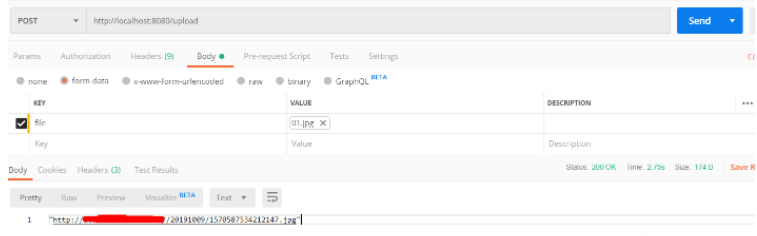

注意:
1.如果要视频跟图片一起上传的话,只要修改 nginx.conf配置文件,添加相应的视频后缀即可,代码没变,上传后也是放在 /usr/image 下,要不然文件能上传,但是访问不了
2.上面代码 uploads接口是实现多文件上传




















火山引擎是字节跳动旗下企业级云与AI服务平台。聚焦大模型核心能力,依托字节自研豆包多模态大模型,凭借火山方舟一站式平台,提供模型精调、推理部署、智能应用搭建等全链路服务,结合高性能AI算力,助力各行业快速落地大模型数字化与智能化应用。








AirBuddy 3 是面向 macOS 的蓝牙外设增强工具,可集中查看 AirPods、Beats 与苹果设备电量,提供快速连接、播放控制、电量提醒、桌面小组件和多台 Mac 外设接力等功能。

AirServer macOS版可把 Mac 转换为无线投屏接收端,通过 AirPlay 或 Google Cast 接收手机、平板和电脑画面,并支持多设备同时连接、高清镜像及会话录制,适合家庭娱乐、课堂教学、会议演示和应用展示。

火山引擎是字节跳动旗下企业级云与AI服务平台。聚焦大模型核心能力,依托字节自研豆包多模态大模型,凭借火山方舟一站式平台,提供模型精调、推理部署、智能应用搭建等全链路服务,结合高性能AI算力,助力各行业快速落地大模型数字化与智能化应用。

PixTV 是一款在浏览器中使用的 AI 视觉内容创作平台,提供图片、视频、音频、文字生成、AI 分镜、局部重绘、提示词反推和无限画布等工具,适合短剧、漫剧、广告及社交媒体内容制作。


Autodesk Maya 是面向影视、电视、动画和游戏行业的专业三维制作软件,集多边形与 NURBS 建模、角色绑定、关键帧和动作捕捉动画、Bifrost 特效模拟、材质开发及 Arnold 渲染于一体,