


SpringBoot LocalDateTime格式转换的方法是什么
简介说明项目我们经常会有前后端时间转换的场景,比如:创建时间、更新时间等。一般情况下,前后端使用时间戳或者年月日的格式进行传递。如果后端收到了前端的参数每次都手动转化为想要的格式,后端每次将数据传给前端时都手动处理为想要的格式实在是太麻烦了。方案简介要分两种情景进行配置(根据Content-Type的不同):1.application/x-www-form-urlencoded和multipart/form-data本处将此种情况记为:不使用@RequestBody2.application/json即:
简介
说明
项目我们经常会有前后端时间转换的场景,比如:创建时间、更新时间等。一般情况下,前后端使用时间戳或者年月日的格式进行传递。
如果后端收到了前端的参数每次都手动转化为想要的格式,后端每次将数据传给前端时都手动处理为想要的格式实在是太麻烦了。
方案简介
要分两种情景进行配置(根据Content-Type的不同):
1.application/x-www-form-urlencoded 和 multipart/form-data
本处将此种情况记为:不使用@RequestBody
2.application/json
即:使用@RequestBody的接口
本处将此种情况记为:使用@RequestBody
备注
有人说,可以这样配置:
spring:
jackson:
date-format: yyyy-MM-dd HH:mm:ss
time-zone: GMT+8
serialization:
write-dates-as-timestamps: false
这种配置只适用于Date这种,不适用于LocalDateTime等。
Date序列化/反序列化时都是用的这种格式:"2020-08-19T16:30:18.823+00:00"。
不使用@RequestBody
方案1:@ControllerAdvice+@InitBinder
配置类
package com.example.config;

import org.springframework.web.bind.WebDataBinder;
import org.springframework.web.bind.annotation.ControllerAdvice;
import org.springframework.web.bind.annotation.InitBinder;

import java.beans.PropertyEditorSupport;
import java.time.LocalDate;
import java.time.LocalDateTime;
import java.time.LocalTime;
import java.time.format.DateTimeFormatter;

@ControllerAdvice
public class LocalDateTimeAdvice {
    @InitBinder
    protected void initBinder(WebDataBinder binder) {
        binder.registerCustomEditor(LocalDateTime.class, new PropertyEditorSupport() {
            @Override
            public void setAsText(String text) throws IllegalArgumentException {
                setValue(LocalDateTime.parse(text, DateTimeFormatter.ofPattern("yyyy-MM-dd HH:mm:ss")));
            }
        });

        binder.registerCustomEditor(LocalDate.class, new PropertyEditorSupport() {
            @Override
            public void setAsText(String text) throws IllegalArgumentException {
                setValue(LocalDate.parse(text, DateTimeFormatter.ofPattern("yyyy-MM-dd")));
            }
        });

        binder.registerCustomEditor(LocalTime.class, new PropertyEditorSupport() {
            @Override
            public void setAsText(String text) throws IllegalArgumentException {
                setValue(LocalTime.parse(text, DateTimeFormatter.ofPattern("HH:mm:ss")));
            }
        });
    }
}
Entity
package com.example.business.entity;

import lombok.AllArgsConstructor;
import lombok.Data;

import java.time.LocalDateTime;

@Data
@AllArgsConstructor
public class User {
    private Long id;

    private String userName;

    private LocalDateTime createTime;
}
Controller
package com.example.business.controller;

import com.example.business.entity.User;
import org.springframework.web.bind.annotation.PostMapping;
import org.springframework.web.bind.annotation.RequestMapping;
import org.springframework.web.bind.annotation.RestController;

@RestController
@RequestMapping("user")
public class UserController {
    @PostMapping("save")
    public User save(User user) {
        System.out.println("保存用户:" + user);
        return user;
    }
}
测试
postman访问:http://localhost:8080/user/save?userName=Tony&createTime=2021-09-16 21:13:21
postman结果:
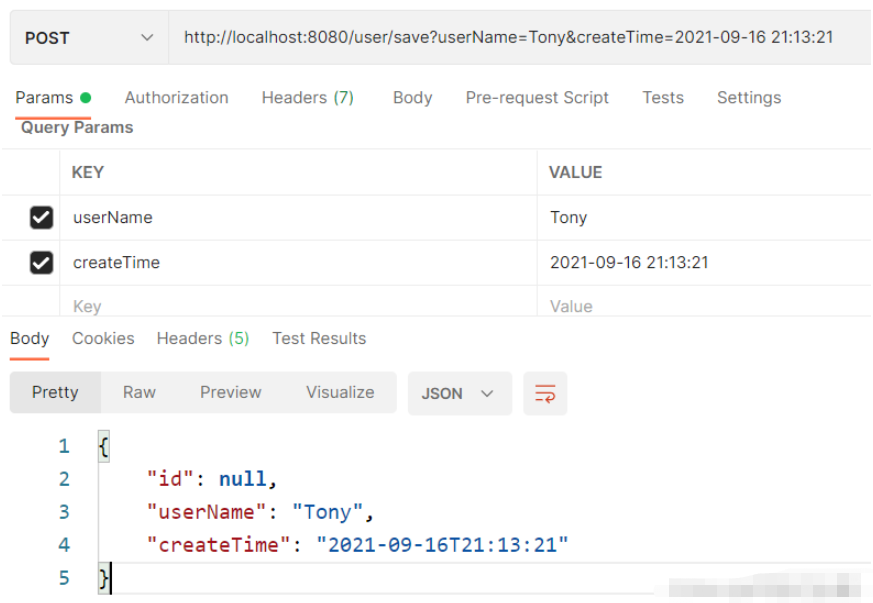
后端结果:

方案2:自定义参数转换器(Converter)
实现 org.springframework.core.convert.converter.Converter,自定义参数转换器。
配置类
package com.example.config;

import org.springframework.context.annotation.Bean;
import org.springframework.context.annotation.Configuration;
import org.springframework.core.convert.converter.Converter;

import java.time.LocalDateTime;
import java.time.format.DateTimeFormatter;

@Configuration
public class LocalDateTimeConfig {

    @Bean
    public Converter localDateTimeConverter() {
        return new LocalDateTimeConverter();
    }

    public static class LocalDateTimeConverter implements Converter {
        @Override
        public LocalDateTime convert(String s) {
            return LocalDateTime.parse(s, DateTimeFormatter.ofPattern("yyyy-MM-dd HH:mm:ss"));
        }
    }
}
Entity
package com.example.business.entity;

import lombok.AllArgsConstructor;
import lombok.Data;

import java.time.LocalDateTime;

@Data
@AllArgsConstructor
public class User {
    private Long id;

    private String userName;

    private LocalDateTime createTime;
}
Controller
package com.example.business.controller;

import com.example.business.entity.User;
import org.springframework.web.bind.annotation.PostMapping;
import org.springframework.web.bind.annotation.RequestMapping;
import org.springframework.web.bind.annotation.RestController;

@RestController
@RequestMapping("user")
public class UserController {
    @PostMapping("save")
    public User save(User user) {
        System.out.println("保存用户:" + user);
        return user;
    }
}
测试
postman访问:http://localhost:8080/user/save?userName=Tony&createTime=2021-09-16 21:13:21
postman结果:
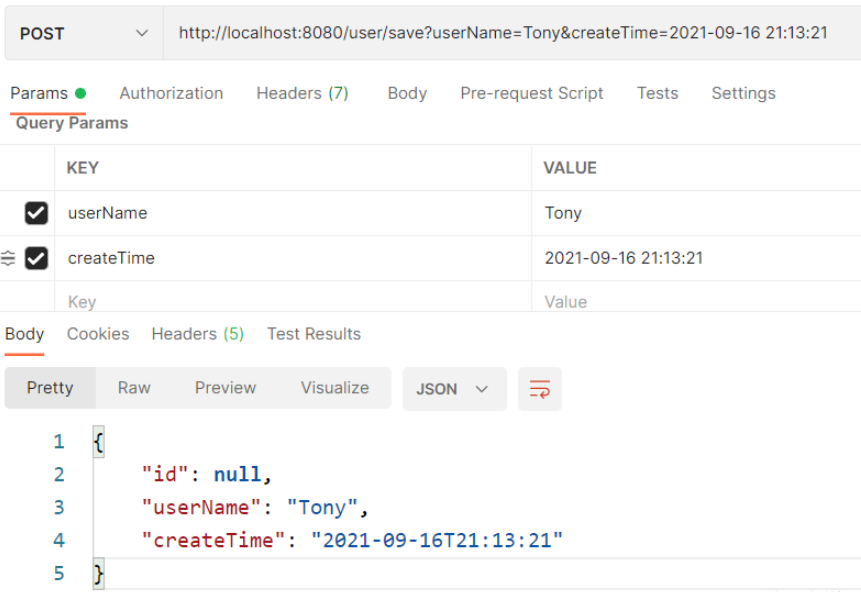
后端结果

使用@RequestBody
方案1:配置ObjectMapper
法1:只用配置类
本方法只配置ObjectMapper即可,Entity不需要加@JsonFormat。
配置类
package com.knife.example.config;

import com.fasterxml.jackson.core.JsonParser;
import com.fasterxml.jackson.databind.DeserializationContext;
import com.fasterxml.jackson.databind.MapperFeature;
import com.fasterxml.jackson.databind.ObjectMapper;
import com.fasterxml.jackson.databind.deser.std.DateDeserializers;
import com.fasterxml.jackson.databind.ser.std.DateSerializer;
import com.fasterxml.jackson.datatype.jsr310.JavaTimeModule;
import com.fasterxml.jackson.datatype.jsr310.deser.LocalDateDeserializer;
import com.fasterxml.jackson.datatype.jsr310.deser.LocalDateTimeDeserializer;
import com.fasterxml.jackson.datatype.jsr310.deser.LocalTimeDeserializer;
import com.fasterxml.jackson.datatype.jsr310.ser.LocalDateSerializer;
import com.fasterxml.jackson.datatype.jsr310.ser.LocalDateTimeSerializer;
import com.fasterxml.jackson.datatype.jsr310.ser.LocalTimeSerializer;
import lombok.SneakyThrows;
import org.springframework.boot.autoconfigure.jackson.JacksonProperties;
import org.springframework.context.annotation.Bean;
import org.springframework.context.annotation.Configuration;
import org.springframework.http.converter.json.Jackson2ObjectMapperBuilder;

import java.text.SimpleDateFormat;
import java.time.LocalDate;
import java.time.LocalDateTime;
import java.time.LocalTime;
import java.time.format.DateTimeFormatter;
import java.util.Date;

@Configuration
public class JacksonConfig {

    @Bean
    public ObjectMapper objectMapper(Jackson2ObjectMapperBuilder builder,
									 JacksonProperties jacksonProperties) {
        ObjectMapper objectMapper = builder.build();

		// 把“忽略重复的模块注册”禁用,否则下面的注册不生效
		objectMapper.disable(MapperFeature.IGNORE_DUPLICATE_MODULE_REGISTRATIONS);
        objectMapper.registerModule(configTimeModule());
		// 重新设置为生效,避免被其他地方覆盖
		objectMapper.enable(MapperFeature.IGNORE_DUPLICATE_MODULE_REGISTRATIONS);
        return objectMapper;
    }

    private JavaTimeModule configTimeModule() {
		JavaTimeModule javaTimeModule = new JavaTimeModule();

		String localDateTimeFormat = "yyyy-MM-dd HH:mm:ss";
		String localDateFormat = "yyyy-MM-dd";
		String localTimeFormat = "HH:mm:ss";
		String dateFormat = "yyyy-MM-dd HH:mm:ss";

		// 序列化
		javaTimeModule.addSerializer(
				LocalDateTime.class,
				new LocalDateTimeSerializer(DateTimeFormatter.ofPattern(localDateTimeFormat)));
		javaTimeModule.addSerializer(
				LocalDate.class,
				new LocalDateSerializer(DateTimeFormatter.ofPattern(localDateFormat)));
		javaTimeModule.addSerializer(
				LocalTime.class,
				new LocalTimeSerializer(DateTimeFormatter.ofPattern(localTimeFormat)));
		javaTimeModule.addSerializer(
				Date.class,
				new DateSerializer(false, new SimpleDateFormat(dateFormat)));

		// 反序列化
		javaTimeModule.addDeserializer(
				LocalDateTime.class,
				new LocalDateTimeDeserializer(DateTimeFormatter.ofPattern(localDateTimeFormat)));
		javaTimeModule.addDeserializer(
				LocalDate.class,
				new LocalDateDeserializer(DateTimeFormatter.ofPattern(localDateFormat)));
		javaTimeModule.addDeserializer(
				LocalTime.class,
				new LocalTimeDeserializer(DateTimeFormatter.ofPattern(localTimeFormat)));
		javaTimeModule.addDeserializer(Date.class, new DateDeserializers.DateDeserializer(){
			@SneakyThrows
			@Override
			public Date deserialize(JsonParser jsonParser, DeserializationContext dc){
				String text = jsonParser.getText().trim();
				SimpleDateFormat sdf = new SimpleDateFormat(dateFormat);
				return sdf.parse(text);
			}
		});

		return javaTimeModule;
	}

}
Entity
package com.example.business.entity;

import lombok.Data;

import java.time.LocalDateTime;

@Data
public class User {
    private Long id;

    private String userName;

    private LocalDateTime createTime;
}
Controller
package com.example.business.controller;

import com.example.business.entity.User;
import org.springframework.web.bind.annotation.PostMapping;
import org.springframework.web.bind.annotation.RequestBody;
import org.springframework.web.bind.annotation.RequestMapping;
import org.springframework.web.bind.annotation.RestController;

@RestController
@RequestMapping("user")
public class UserController {
    @PostMapping("save")
    public User save(@RequestBody User user) {
        System.out.println("保存用户:" + user);
        return user;
    }
}
测试
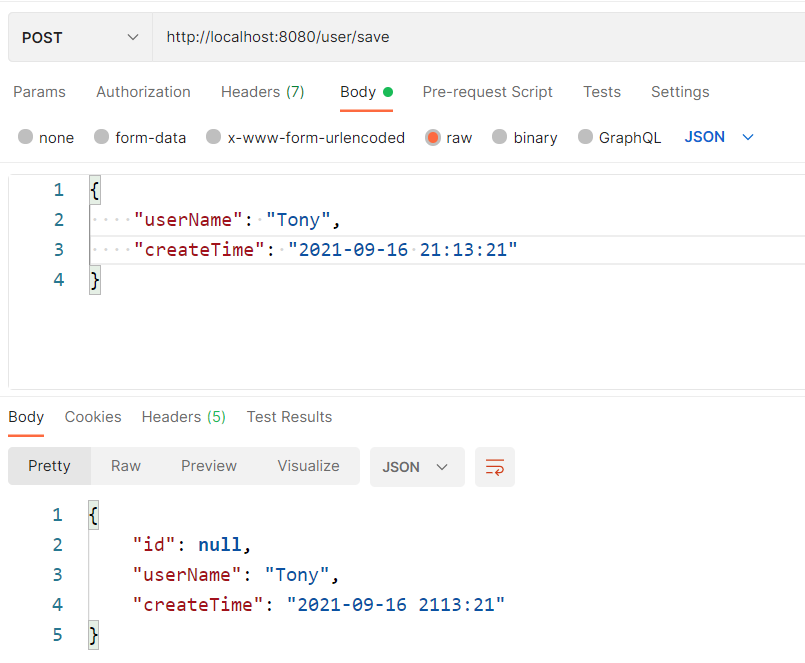
后端结果
保存用户:User(id=null, userName=Tony, createTime=2021-09-16T21:13:21)
法2:配置类+@JsonFormat
本方法需要配置ObjectMapper,Entity也需要加@JsonFormat。
配置类
 import com.fasterxml.jackson.databind.ObjectMapper;
import com.fasterxml.jackson.datatype.jdk8.Jdk8Module;
import com.fasterxml.jackson.datatype.jsr310.JavaTimeModule;
import com.fasterxml.jackson.module.paramnames.ParameterNamesModule;
import org.springframework.boot.autoconfigure.jackson.JacksonProperties;
import org.springframework.boot.jackson.JsonComponent;
import org.springframework.context.annotation.Bean;
import org.springframework.context.annotation.Configuration;
import org.springframework.http.converter.json.Jackson2ObjectMapperBuilder;

@Configuration
public class JacksonConfig {

    @Bean
    public ObjectMapper serializingObjectMapper(Jackson2ObjectMapperBuilder builder,
                                                JacksonProperties jacksonProperties) {
        ObjectMapper objectMapper = builder.build();

		// 把“忽略重复的模块注册”禁用,否则下面的注册不生效
		objectMapper.disable(MapperFeature.IGNORE_DUPLICATE_MODULE_REGISTRATIONS);

        // 自动扫描并注册相关模块
        objectMapper.findAndRegisterModules();

        // 手动注册相关模块
        // objectMapper.registerModule(new ParameterNamesModule());
        // objectMapper.registerModule(new Jdk8Module());
        // objectMapper.registerModule(new JavaTimeModule());

		// 重新设置为生效,避免被其他地方覆盖
		objectMapper.enable(MapperFeature.IGNORE_DUPLICATE_MODULE_REGISTRATIONS);

        return objectMapper;
    }

}
Entity
package com.example.business.entity;

import com.fasterxml.jackson.annotation.JsonFormat;
import lombok.Data;

import java.time.LocalDateTime;

@Data
public class User {
    private Long id;

    private String userName;

    @JsonFormat(pattern = "yyyy-MM-dd HH:mm:ss", timezone = "GMT+8")
    private LocalDateTime createTime;
}
Controller
package com.example.business.controller;

import com.example.business.entity.User;
import org.springframework.web.bind.annotation.PostMapping;
import org.springframework.web.bind.annotation.RequestBody;
import org.springframework.web.bind.annotation.RequestMapping;
import org.springframework.web.bind.annotation.RestController;

@RestController
@RequestMapping("user")
public class UserController {
    @PostMapping("save")
    public User save(@RequestBody User user) {
        System.out.println("保存用户:" + user);
        return user;
    }
}
测试
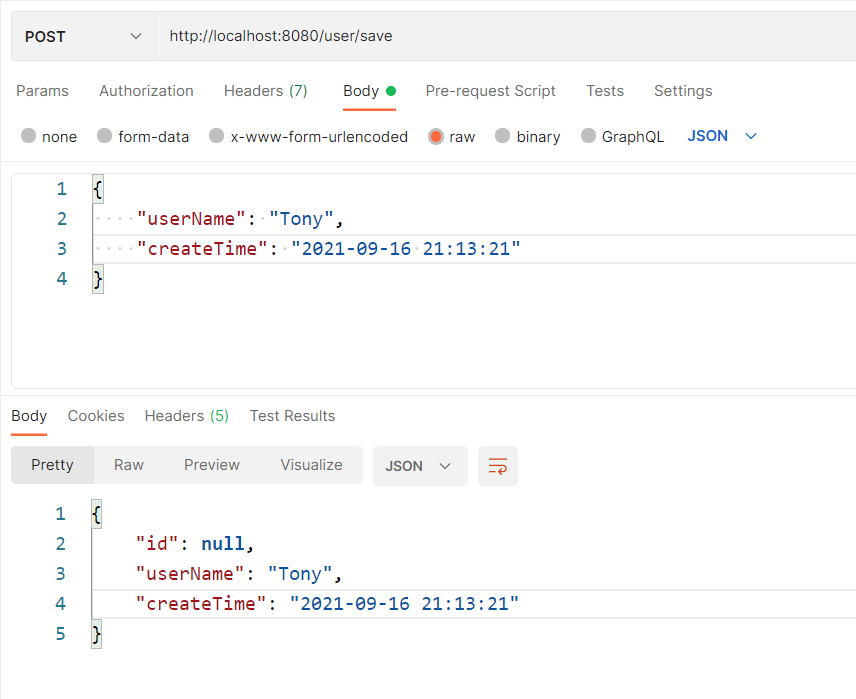
后端结果
保存用户:User(id=null, userName=Tony, createTime=2021-09-16T21:13:21)
方案2:Jackson2ObjectMapperBuilderCustomizer
import com.fasterxml.jackson.datatype.jsr310.deser.LocalDateDeserializer;
import com.fasterxml.jackson.datatype.jsr310.deser.LocalDateTimeDeserializer;
import com.fasterxml.jackson.datatype.jsr310.deser.LocalTimeDeserializer;
import com.fasterxml.jackson.datatype.jsr310.ser.LocalDateSerializer;
import com.fasterxml.jackson.datatype.jsr310.ser.LocalDateTimeSerializer;
import com.fasterxml.jackson.datatype.jsr310.ser.LocalTimeSerializer;
import org.springframework.boot.autoconfigure.jackson.Jackson2ObjectMapperBuilderCustomizer;
import org.springframework.context.annotation.Bean;
import org.springframework.context.annotation.Configuration;

import java.time.LocalDate;
import java.time.LocalDateTime;
import java.time.LocalTime;
import java.time.format.DateTimeFormatter;

@Configuration
public class LocalDateTimeConfig {

    private final String localDateTimeFormat = "yyyy-MM-dd HH:mm:ss";
    private final String localDateFormat = "yyyy-MM-dd";
    private final String localTimeFormat = "HH:mm:ss";

    @Bean
    public Jackson2ObjectMapperBuilderCustomizer jackson2ObjectMapperBuilderCustomizer() {
        return builder -> {

            // 反序列化(接收数据)
            builder.deserializerByType(LocalDateTime.class,
                    new LocalDateTimeDeserializer(DateTimeFormatter.ofPattern(localDateTimeFormat)));
            builder.deserializerByType(LocalDate.class,
                    new LocalDateDeserializer(DateTimeFormatter.ofPattern(localDateFormat)));
            builder.deserializerByType(LocalTime.class,
                    new LocalTimeDeserializer(DateTimeFormatter.ofPattern(localTimeFormat)));

            // 序列化(返回数据)
            builder.serializerByType(LocalDateTime.class,
                    new LocalDateTimeSerializer(DateTimeFormatter.ofPattern(localDateTimeFormat)));
            builder.serializerByType(LocalDate.class,
                    new LocalDateSerializer(DateTimeFormatter.ofPattern(localDateFormat)));
            builder.serializerByType(LocalTime.class,
                    new LocalTimeSerializer(DateTimeFormatter.ofPattern(localTimeFormat)));
        };
    }
} 









火山引擎是字节跳动旗下企业级云与AI服务平台。聚焦大模型核心能力,依托字节自研豆包多模态大模型,凭借火山方舟一站式平台,提供模型精调、推理部署、智能应用搭建等全链路服务,结合高性能AI算力,助力各行业快速落地大模型数字化与智能化应用。








AirBuddy 3 是面向 macOS 的蓝牙外设增强工具,可集中查看 AirPods、Beats 与苹果设备电量,提供快速连接、播放控制、电量提醒、桌面小组件和多台 Mac 外设接力等功能。

AirServer macOS版可把 Mac 转换为无线投屏接收端,通过 AirPlay 或 Google Cast 接收手机、平板和电脑画面,并支持多设备同时连接、高清镜像及会话录制,适合家庭娱乐、课堂教学、会议演示和应用展示。



Autodesk Maya 是面向影视、电视、动画和游戏行业的专业三维制作软件,集多边形与 NURBS 建模、角色绑定、关键帧和动作捕捉动画、Bifrost 特效模拟、材质开发及 Arnold 渲染于一体,

AirServer Windows版可把电脑变成AirPlay、Google Cast和Miracast无线投屏接收端,适合会议演示、课堂教学及家庭大屏分享。发送设备通常无需另装客户端,并可同时接收和智能排列多个镜像会话。