展开菜单
首页 精品内容 本月促销 装机必备 Windows PDF教程 macOS软件 IOS软件 Android AI 专题
全部分类

当前位置:

首页 > 编程开发 > redis使用实例分析

redis使用实例分析

Redis Assistant
Redis Assistant

Redis Assistant 是一款为Redis设计的高效可视化管理与监控工具,提供多种操作模式,高效处理服务器数据。日常使用里的持续防护和信息管理会更突出,适合把安全控制放进长期使用流程中的场景。

¥19
Windows/macOS/Linux 2026-08-22
正版软件 Windows macOS软件 Linux 数据库管理工具
立即下载

第一part:原生jedis连接redis首先我们为要先了解,我们在原先使用mysql的时候,用jdbc连接数据库。同理这里我们连接redis,就要使用jedis。第一步:新建java项目,导包新建java项目,导包redis.clientsjedis3.3.0com.alibabafastjson1.2.73第二步:打开redis服务,写方法打开redis服务新建一个测试类,写一个方法publicclassPing{publicstaticvoidmain(String[]args){Jedisjedi

本文目录

    第一part:原生jedis连接redis

    首先我们为要先了解,我们在原先使用mysql的时候,用jdbc连接数据库。同理这里我们连接redis,就要使用jedis。

    第一步:新建java项目,导包

    新建java项目,导包

    
        redis.clients
        jedis
        3.3.0


        com.alibaba
        fastjson
        1.2.73
    

    第二步:打开redis服务,写方法

    打开redis服务

    新建一个测试类,写一个方法

    public class Ping {
     	public static void main(String[] args) { 
     		Jedis jedis = new Jedis("127.0.0.1",6379);
     		System.out.println("连接成功"); //查看服务是否运行 
     		System.out.println("服务正在运行: "+jedis.ping());
     	} 
     }

    证明连同了

    第三步:简单操作

    这里写一些简单的jedis对各种类型的操作

    基本操作api

    public class TestPassword { 
    public static void main(String[] args) { 
    Jedis jedis = new Jedis("127.0.0.1", 6379); 
    //验证密码,如果没有设置密码这段代码省略
     // jedis.auth("password"); 
    jedis.connect(); //连接 
    jedis.disconnect(); //断开连接 
    jedis.flushAll(); //清空所有的key } }

    对于key操作的命令

    public class TestKey { 
    public static void main(String[] args) { 
    Jedis jedis = new Jedis("127.0.0.1", 6379);
     System.out.println("清空数据:"+jedis.flushDB()); 
     System.out.println("判断某个键是否在:"+jedis.exists("username")); 
     System.out.println("新增<'username','kuangshen'>的键值对:"+jedis.set("username", "kuangshen")); 
     System.out.println("新增<'password','password'>的键值 对:"+jedis.set("password", "password")); 
     System.out.print("系统中所有的键如下:"); 
     Set keys = jedis.keys("*"); 
     System.out.println(keys); 
     System.out.println("删除键password:"+jedis.del("password"));  
     System.out.println("判断键password是否存在:"+jedis.exists("password")); 
     System.out.println("查看键username所存储的值的类 型:"+jedis.type("username")); 
     System.out.println("随机返回key空间的一个:"+jedis.randomKey()); 
     System.out.println("重命名key:"+jedis.rename("username","name")); System.out.println("取出改后的name:"+jedis.get("name")); System.out.println("按索引查询:"+jedis.select(0)); 
     System.out.println("删除当前选择数据库中的所key:"+jedis.flushDB()); 
     System.out.println("返回当前数据库中key的数目:"+jedis.dbSize()); 
     System.out.println("删除所有数据库中的所有key:"+jedis.flushAll());
      } 
    }

    对String操作的命令

    public class TestString { 
    public static void main(String[] args) { 
    	Jedis jedis = new Jedis("127.0.0.1", 6379); 
    	jedis.flushDB(); 
    	System.out.println("===========增加数据==========="); 
    	System.out.println(jedis.set("key1","value1")); 
    	System.out.println(jedis.set("key2","value2")); 
    	System.out.println(jedis.set("key3", "value3"));
    	System.out.println("删除键key2:"+jedis.del("key2")); 
    	System.out.println("获取键key2:"+jedis.get("key2")); 
    	System.out.println("修改key1:"+jedis.set("key1", "value1Changed"));
    	 System.out.println("获取key1的值:"+jedis.get("key1")); 
    	 System.out.println("在key3后面加入值:"+jedis.append("key3", "End")); 
    	 System.out.println("key3的值:"+jedis.get("key3")); 
    	 System.out.println("增加多个键值 对:"+jedis.mset("key01","value01","key02","value02","key03","value03")); 
    	 System.out.println("获取多个键值 对:"+jedis.mget("key01","key02","key03")); 
    	 System.out.println("获取多个键值 对:"+jedis.mget("key01","key02","key03","key04")); 
    	 System.out.println("删除多个键值对:"+jedis.del("key01","key02")); 
    	 System.out.println("获取多个键值 对:"+jedis.mget("key01","key02","key03"));
    	 jedis.flushDB();
    	  System.out.println("===========新增键值对防止覆盖原先值=============="); 
    	  System.out.println(jedis.setnx("key1", "value1")); 
    	  System.out.println(jedis.setnx("key2", "value2")); 
    	  System.out.println(jedis.setnx("key2", "value2-new")); 
    	  System.out.println(jedis.get("key1")); 
    	  System.out.println(jedis.get("key2")); 
    	  System.out.println("===========新增键值对并设置有效时间============="); 
    	  System.out.println(jedis.setex("key3", 2, "value3")); 
    	  System.out.println(jedis.get("key3")); 
    	  try {
    	  	TimeUnit.SECONDS.sleep(3); 
    	  } catch (InterruptedException e) {
    	   	e.printStackTrace(); 
    	   }
    	   System.out.println(jedis.get("key3")); 
    	   System.out.println("===========获取原值,更新为新值=========="); 
    	   System.out.println(jedis.getSet("key2", "key2GetSet")); 
    	   System.out.println(jedis.get("key2"));
    	   System.out.println("获得key2的值的字串:"+jedis.getrange("key2", 2, 4));
       } 
     }

    事务操作

    public class TestMulti {
     public static void main(String[] args) {
      //创建客户端连接服务端,redis服务端需要被开启 
      Jedis jedis = new Jedis("127.0.0.1", 6379); 
      jedis.flushDB(); 
      JSONObject jsonObject = new JSONObject(); 
      jsonObject.put("hello", "world"); 
      jsonObject.put("name", "java"); 
      //开启事务 
      Transaction multi = jedis.multi(); 
      String result = jsonObject.toJSONString(); 
      try{
    	  //向redis存入一条数据 
    	  multi.set("json", result); 
    	  //再存入一条数据 
    	  multi.set("json2", result); 
    	  //这里引发了异常,用0作为被除数 
    	  int i = 100/0; 
    	  //如果没有引发异常,执行进入队列的命令
    	  multi.exec(); 
      }catch(Exception e){ 
      	e.printStackTrace(); 
      	//如果出现异常,回滚 
      	multi.discard(); 
      }finally{ 
    	  System.out.println(jedis.get("json")); 
    	  System.out.println(jedis.get("json2"));
    	   //最终关闭客户端 
    	   jedis.close(); 
       } 
      } 
     }

    第二part:springboot整合redis

    在SpringBoot中一般使用RedisTemplate提供的方法来操作Redis。
    源码分析

    @Bean
    @ConditionalOnMissingBean(name = {"redisTemplate"}) // 我们可以自己定一个redisTemplate来替换这个默认的!
    public RedisTemplate redisTemplate(RedisConnectionFactory redisConnectionFactory) throws UnknownHostException {
        // 默认的RedisTemplate没有过多的设置,redis对象都是需要序列化的
        // 两个泛型都是Object,Object类型的,我们后续使用需要强制转换成
        RedisTemplate template = new RedisTemplate();
        template.setConnectionFactory(redisConnectionFactory);
        return template;
    }
    
    @Bean
    @ConditionalOnMissingBean
    public StringRedisTemplate stringRedisTemplate(RedisConnectionFactory redisConnectionFactory) throws UnknownHostException {
        StringRedisTemplate template = new StringRedisTemplate();
        template.setConnectionFactory(redisConnectionFactory);
        return template;
    }

    第一步:导入依赖

    导入依赖

    
        org.springframework.boot
        spring-boot-starter-data-redis
    

    第二步:yml文件配置

    yml文件配置

    spring.redis.host=127.0.0.1
    spring.redis.port=6379

    第三步:测试

    测试

    @SpringBootTest
    class Redis02SpringbootApplicationTests {
    
        @Autowired
        private RedisTemplate redisTemplate;
    
        @Test
        void contextLoads() {
            redisTemplate.opsForValue().set("mykey", "我是大帅哥");
            System.out.println(redisTemplate.opsForValue().get("mykey"));
        }
    
    }

    第四步:自定义RedisTemplate

    通过开头的源码可以看出,SpringBoot自动帮我们在容器中生成了一个RedisTemplate和一个StringRedisTemplate。但是,这个RedisTemplate的泛型是,写代码不方便,需要写好多类型转换的代码;我们需要一个泛型为形式RedisTemplate。并且,这个RedisTemplate没有设置数据存在Redis时,key及value的序列化方式。看到这个@ConditionalOnMissingBean注解后,就知道如果Spring容器中有了RedisTemplate对象了,这个自动配置的RedisTemplate不会实例化。因此我们可以直接自己写个配置类,配置RedisTemplate。
    自定义RedisTemplate

    @Configuration
    public class RedisConfig {
    
        @Bean
        public RedisTemplate redisTemplate(RedisConnectionFactory redisConnectionFactory) throws UnknownHostException {
            RedisTemplate template = new RedisTemplate();
            template.setConnectionFactory(redisConnectionFactory);
    
            // 序列化配置
            Jackson2JsonRedisSerializer objectJackson2JsonRedisSerializer = new Jackson2JsonRedisSerializer(Object.class);
            ObjectMapper om = new ObjectMapper();
            om.setVisibility(PropertyAccessor.ALL, JsonAutoDetect.Visibility.ANY);
            om.enableDefaultTyping();
            objectJackson2JsonRedisSerializer.setObjectMapper(om);
            StringRedisSerializer stringRedisSerializer = new StringRedisSerializer();
    
            template.setKeySerializer(stringRedisSerializer);
            template.setHashKeySerializer(stringRedisSerializer);
            template.setValueSerializer(objectJackson2JsonRedisSerializer);
            template.setHashValueSerializer(objectJackson2JsonRedisSerializer);
    
            template.afterPropertiesSet();
    
            return template;
        }
    }

    第五步:写一个工具类,便于操作

    写一个Redis工具类(直接用RedisTemplate操作Redis,需要很多行代码,因此直接封装好一个RedisUtils,这样写代码更方便点。这个RedisUtils交给Spring容器实例化,使用时直接注解注入。)
    这里是别人写的工具类,很全!!!

    import org.springframework.data.redis.connection.DataType;
    import org.springframework.data.redis.core.Cursor;
    import org.springframework.data.redis.core.ScanOptions;
    import org.springframework.data.redis.core.StringRedisTemplate;
    import org.springframework.data.redis.core.ZSetOperations.TypedTuple;
    
    import java.util.Collection;
    import java.util.Date;
    import java.util.List;
    import java.util.Map;
    import java.util.Map.Entry;
    import java.util.Set;
    import java.util.concurrent.TimeUnit;
    
    /**
     * Redis工具类*/
    public class RedisUtil {
        private StringRedisTemplate redisTemplate;
    
        public void setRedisTemplate(StringRedisTemplate redisTemplate) {
            this.redisTemplate = redisTemplate;
        }
    
        public StringRedisTemplate getRedisTemplate() {
            return this.redisTemplate;
        }
    
        /** -------------------key相关操作--------------------- */
    
        /**
         * 删除key
         * 
         * @param key
         */
        public void delete(String key) {
            redisTemplate.delete(key);
        }
    
        /**
         * 批量删除key
         * 
         * @param keys
         */
        public void delete(Collection keys) {
            redisTemplate.delete(keys);
        }
    
        /**
         * 序列化key
         * 
         * @param key
         * @return
         */
        public byte[] dump(String key) {
            return redisTemplate.dump(key);
        }
    
        /**
         * 是否存在key
         * 
         * @param key
         * @return
         */
        public Boolean hasKey(String key) {
            return redisTemplate.hasKey(key);
        }
    
        /**
         * 设置过期时间
         * 
         * @param key
         * @param timeout
         * @param unit
         * @return
         */
        public Boolean expire(String key, long timeout, TimeUnit unit) {
            return redisTemplate.expire(key, timeout, unit);
        }
    
        /**
         * 设置过期时间
         * 
         * @param key
         * @param date
         * @return
         */
        public Boolean expireAt(String key, Date date) {
            return redisTemplate.expireAt(key, date);
        }
    
        /**
         * 查找匹配的key
         * 
         * @param pattern
         * @return
         */
        public Set keys(String pattern) {
            return redisTemplate.keys(pattern);
        }
    
        /**
         * 将当前数据库的 key 移动到给定的数据库 db 当中
         * 
         * @param key
         * @param dbIndex
         * @return
         */
        public Boolean move(String key, int dbIndex) {
            return redisTemplate.move(key, dbIndex);
        }
    
        /**
         * 移除 key 的过期时间,key 将持久保持
         * 
         * @param key
         * @return
         */
        public Boolean persist(String key) {
            return redisTemplate.persist(key);
        }
    
        /**
         * 返回 key 的剩余的过期时间
         * 
         * @param key
         * @param unit
         * @return
         */
        public Long getExpire(String key, TimeUnit unit) {
            return redisTemplate.getExpire(key, unit);
        }
    
        /**
         * 返回 key 的剩余的过期时间
         * 
         * @param key
         * @return
         */
        public Long getExpire(String key) {
            return redisTemplate.getExpire(key);
        }
    
        /**
         * 从当前数据库中随机返回一个 key
         * 
         * @return
         */
        public String randomKey() {
            return redisTemplate.randomKey();
        }
    
        /**
         * 修改 key 的名称
         * 
         * @param oldKey
         * @param newKey
         */
        public void rename(String oldKey, String newKey) {
            redisTemplate.rename(oldKey, newKey);
        }
    
        /**
         * 仅当 newkey 不存在时,将 oldKey 改名为 newkey
         * 
         * @param oldKey
         * @param newKey
         * @return
         */
        public Boolean renameIfAbsent(String oldKey, String newKey) {
            return redisTemplate.renameIfAbsent(oldKey, newKey);
        }
    
        /**
         * 返回 key 所储存的值的类型
         * 
         * @param key
         * @return
         */
        public DataType type(String key) {
            return redisTemplate.type(key);
        }
    
        /** -------------------string相关操作--------------------- */
    
        /**
         * 设置指定 key 的值
         * @param key
         * @param value
         */
        public void set(String key, String value) {
            redisTemplate.opsForValue().set(key, value);
        }
    
        /**
         * 获取指定 key 的值
         * @param key
         * @return
         */
        public String get(String key) {
            return redisTemplate.opsForValue().get(key);
        }
    
        /**
         * 返回 key 中字符串值的子字符
         * @param key
         * @param start
         * @param end
         * @return
         */
        public String getRange(String key, long start, long end) {
            return redisTemplate.opsForValue().get(key, start, end);
        }
    
        /**
         * 将给定 key 的值设为 value ,并返回 key 的旧值(old value)
         * 
         * @param key
         * @param value
         * @return
         */
        public String getAndSet(String key, String value) {
            return redisTemplate.opsForValue().getAndSet(key, value);
        }
    
        /**
         * 对 key 所储存的字符串值,获取指定偏移量上的位(bit)
         * 
         * @param key
         * @param offset
         * @return
         */
        public Boolean getBit(String key, long offset) {
            return redisTemplate.opsForValue().getBit(key, offset);
        }
    
        /**
         * 批量获取
         * 
         * @param keys
         * @return
         */
        public List multiGet(Collection keys) {
            return redisTemplate.opsForValue().multiGet(keys);
        }
    
        /**
         * 设置ASCII码, 字符串'a'的ASCII码是97, 转为二进制是'01100001', 此方法是将二进制第offset位值变为value
         * 
         * @param key 位置
         * @param value
         *            值,true为1, false为0
         * @return
         */
        public boolean setBit(String key, long offset, boolean value) {
            return redisTemplate.opsForValue().setBit(key, offset, value);
        }
    
        /**
         * 将值 value 关联到 key ,并将 key 的过期时间设为 timeout
         * 
         * @param key
         * @param value
         * @param timeout
         *            过期时间
         * @param unit
         *            时间单位, 天:TimeUnit.DAYS 小时:TimeUnit.HOURS 分钟:TimeUnit.MINUTES
         *            秒:TimeUnit.SECONDS 毫秒:TimeUnit.MILLISECONDS
         */
        public void setEx(String key, String value, long timeout, TimeUnit unit) {
            redisTemplate.opsForValue().set(key, value, timeout, unit);
        }
    
        /**
         * 只有在 key 不存在时设置 key 的值
         * 
         * @param key
         * @param value
         * @return 之前已经存在返回false,不存在返回true
         */
        public boolean setIfAbsent(String key, String value) {
            return redisTemplate.opsForValue().setIfAbsent(key, value);
        }
    
        /**
         * 用 value 参数覆写给定 key 所储存的字符串值,从偏移量 offset 开始
         * 
         * @param key
         * @param value
         * @param offset
         *            从指定位置开始覆写
         */
        public void setRange(String key, String value, long offset) {
            redisTemplate.opsForValue().set(key, value, offset);
        }
    
        /**
         * 获取字符串的长度
         * 
         * @param key
         * @return
         */
        public Long size(String key) {
            return redisTemplate.opsForValue().size(key);
        }
    
        /**
         * 批量添加
         * 
         * @param maps
         */
        public void multiSet(Map maps) {
            redisTemplate.opsForValue().multiSet(maps);
        }
    
        /**
         * 同时设置一个或多个 key-value 对,当且仅当所有给定 key 都不存在
         * 
         * @param maps
         * @return 之前已经存在返回false,不存在返回true
         */
        public boolean multiSetIfAbsent(Map maps) {
            return redisTemplate.opsForValue().multiSetIfAbsent(maps);
        }
    
        /**
         * 增加(自增长), 负数则为自减
         * 
         * @param key
         * @return
         */
        public Long incrBy(String key, long increment) {
            return redisTemplate.opsForValue().increment(key, increment);
        }
    
        /**
         * 
         * @param key
         * @return
         */
        public Double incrByFloat(String key, double increment) {
            return redisTemplate.opsForValue().increment(key, increment);
        }
    
        /**
         * 追加到末尾
         * 
         * @param key
         * @param value
         * @return
         */
        public Integer append(String key, String value) {
            return redisTemplate.opsForValue().append(key, value);
        }
    
        /** -------------------hash相关操作------------------------- */
    
        /**
         * 获取存储在哈希表中指定字段的值
         * 
         * @param key
         * @param field
         * @return
         */
        public Object hGet(String key, String field) {
            return redisTemplate.opsForHash().get(key, field);
        }
    
        /**
         * 获取所有给定字段的值
         * 
         * @param key
         * @return
         */
        public Map hGetAll(String key) {
            return redisTemplate.opsForHash().entries(key);
        }
    
        /**
         * 获取所有给定字段的值
         * 
         * @param key
         * @param fields
         * @return
         */
        public List hMultiGet(String key, Collection fields) {
            return redisTemplate.opsForHash().multiGet(key, fields);
        }
    
        public void hPut(String key, String hashKey, String value) {
            redisTemplate.opsForHash().put(key, hashKey, value);
        }
    
        public void hPutAll(String key, Map maps) {
            redisTemplate.opsForHash().putAll(key, maps);
        }
    
        /**
         * 仅当hashKey不存在时才设置
         * 
         * @param key
         * @param hashKey
         * @param value
         * @return
         */
        public Boolean hPutIfAbsent(String key, String hashKey, String value) {
            return redisTemplate.opsForHash().putIfAbsent(key, hashKey, value);
        }
    
        /**
         * 删除一个或多个哈希表字段
         * 
         * @param key
         * @param fields
         * @return
         */
        public Long hDelete(String key, Object... fields) {
            return redisTemplate.opsForHash().delete(key, fields);
        }
    
        /**
         * 查看哈希表 key 中,指定的字段是否存在
         * 
         * @param key
         * @param field
         * @return
         */
        public boolean hExists(String key, String field) {
            return redisTemplate.opsForHash().hasKey(key, field);
        }
    
        /**
         * 为哈希表 key 中的指定字段的整数值加上增量 increment
         * 
         * @param key
         * @param field
         * @param increment
         * @return
         */
        public Long hIncrBy(String key, Object field, long increment) {
            return redisTemplate.opsForHash().increment(key, field, increment);
        }
    
        /**
         * 为哈希表 key 中的指定字段的整数值加上增量 increment
         * 
         * @param key
         * @param field
         * @param delta
         * @return
         */
        public Double hIncrByFloat(String key, Object field, double delta) {
            return redisTemplate.opsForHash().increment(key, field, delta);
        }
    
        /**
         * 获取所有哈希表中的字段
         * 
         * @param key
         * @return
         */
        public Set hKeys(String key) {
            return redisTemplate.opsForHash().keys(key);
        }
    
        /**
         * 获取哈希表中字段的数量
         * 
         * @param key
         * @return
         */
        public Long hSize(String key) {
            return redisTemplate.opsForHash().size(key);
        }
    
        /**
         * 获取哈希表中所有值
         * 
         * @param key
         * @return
         */
        public List hValues(String key) {
            return redisTemplate.opsForHash().values(key);
        }
    
        /**
         * 迭代哈希表中的键值对
         * 
         * @param key
         * @param options
         * @return
         */
        public Cursor> hScan(String key, ScanOptions options) {
            return redisTemplate.opsForHash().scan(key, options);
        }
    
        /** ------------------------list相关操作---------------------------- */
    
        /**
         * 通过索引获取列表中的元素
         * 
         * @param key
         * @param index
         * @return
         */
        public String lIndex(String key, long index) {
            return redisTemplate.opsForList().index(key, index);
        }
    
        /**
         * 获取列表指定范围内的元素
         * 
         * @param key
         * @param start
         *            开始位置, 0是开始位置
         * @param end
         *            结束位置, -1返回所有
         * @return
         */
        public List lRange(String key, long start, long end) {
            return redisTemplate.opsForList().range(key, start, end);
        }
    
        /**
         * 存储在list头部
         * 
         * @param key
         * @param value
         * @return
         */
        public Long lLeftPush(String key, String value) {
            return redisTemplate.opsForList().leftPush(key, value);
        }
    
        /**
         * 
         * @param key
         * @param value
         * @return
         */
        public Long lLeftPushAll(String key, String... value) {
            return redisTemplate.opsForList().leftPushAll(key, value);
        }
    
        /**
         * 
         * @param key
         * @param value
         * @return
         */
        public Long lLeftPushAll(String key, Collection value) {
            return redisTemplate.opsForList().leftPushAll(key, value);
        }
    
        /**
         * 当list存在的时候才加入
         * 
         * @param key
         * @param value
         * @return
         */
        public Long lLeftPushIfPresent(String key, String value) {
            return redisTemplate.opsForList().leftPushIfPresent(key, value);
        }
    
        /**
         * 如果pivot存在,再pivot前面添加
         * 
         * @param key
         * @param pivot
         * @param value
         * @return
         */
        public Long lLeftPush(String key, String pivot, String value) {
            return redisTemplate.opsForList().leftPush(key, pivot, value);
        }
    
        /**
         * 
         * @param key
         * @param value
         * @return
         */
        public Long lRightPush(String key, String value) {
            return redisTemplate.opsForList().rightPush(key, value);
        }
    
        /**
         * 
         * @param key
         * @param value
         * @return
         */
        public Long lRightPushAll(String key, String... value) {
            return redisTemplate.opsForList().rightPushAll(key, value);
        }
    
        /**
         * 
         * @param key
         * @param value
         * @return
         */
        public Long lRightPushAll(String key, Collection value) {
            return redisTemplate.opsForList().rightPushAll(key, value);
        }
    
        /**
         * 为已存在的列表添加值
         * 
         * @param key
         * @param value
         * @return
         */
        public Long lRightPushIfPresent(String key, String value) {
            return redisTemplate.opsForList().rightPushIfPresent(key, value);
        }
    
        /**
         * 在pivot元素的右边添加值
         * 
         * @param key
         * @param pivot
         * @param value
         * @return
         */
        public Long lRightPush(String key, String pivot, String value) {
            return redisTemplate.opsForList().rightPush(key, pivot, value);
        }
    
        /**
         * 通过索引设置列表元素的值
         * 
         * @param key
         * @param index
         *            位置
         * @param value
         */
        public void lSet(String key, long index, String value) {
            redisTemplate.opsForList().set(key, index, value);
        }
    
        /**
         * 移出并获取列表的第一个元素
         * 
         * @param key
         * @return 删除的元素
         */
        public String lLeftPop(String key) {
            return redisTemplate.opsForList().leftPop(key);
        }
    
        /**
         * 移出并获取列表的第一个元素, 如果列表没有元素会阻塞列表直到等待超时或发现可弹出元素为止
         * 
         * @param key
         * @param timeout
         *            等待时间
         * @param unit
         *            时间单位
         * @return
         */
        public String lBLeftPop(String key, long timeout, TimeUnit unit) {
            return redisTemplate.opsForList().leftPop(key, timeout, unit);
        }
    
        /**
         * 移除并获取列表最后一个元素
         * 
         * @param key
         * @return 删除的元素
         */
        public String lRightPop(String key) {
            return redisTemplate.opsForList().rightPop(key);
        }
    
        /**
         * 移出并获取列表的最后一个元素, 如果列表没有元素会阻塞列表直到等待超时或发现可弹出元素为止
         * 
         * @param key
         * @param timeout
         *            等待时间
         * @param unit
         *            时间单位
         * @return
         */
        public String lBRightPop(String key, long timeout, TimeUnit unit) {
            return redisTemplate.opsForList().rightPop(key, timeout, unit);
        }
    
        /**
         * 移除列表的最后一个元素,并将该元素添加到另一个列表并返回
         * 
         * @param sourceKey
         * @param destinationKey
         * @return
         */
        public String lRightPopAndLeftPush(String sourceKey, String destinationKey) {
            return redisTemplate.opsForList().rightPopAndLeftPush(sourceKey,
                    destinationKey);
        }
    
        /**
         * 从列表中弹出一个值,将弹出的元素插入到另外一个列表中并返回它; 如果列表没有元素会阻塞列表直到等待超时或发现可弹出元素为止
         * 
         * @param sourceKey
         * @param destinationKey
         * @param timeout
         * @param unit
         * @return
         */
        public String lBRightPopAndLeftPush(String sourceKey, String destinationKey,
                long timeout, TimeUnit unit) {
            return redisTemplate.opsForList().rightPopAndLeftPush(sourceKey,
                    destinationKey, timeout, unit);
        }
    
        /**
         * 删除集合中值等于value得元素
         * 
         * @param key
         * @param index
         *            index=0, 删除所有值等于value的元素; index>0, 从头部开始删除第一个值等于value的元素;
         *            index<0, 从尾部开始删除第一个值等于value的元素;
         * @param value
         * @return
         */
        public Long lRemove(String key, long index, String value) {
            return redisTemplate.opsForList().remove(key, index, value);
        }
    
        /**
         * 裁剪list
         * 
         * @param key
         * @param start
         * @param end
         */
        public void lTrim(String key, long start, long end) {
            redisTemplate.opsForList().trim(key, start, end);
        }
    
        /**
         * 获取列表长度
         * 
         * @param key
         * @return
         */
        public Long lLen(String key) {
            return redisTemplate.opsForList().size(key);
        }
    
        /** --------------------set相关操作-------------------------- */
    
        /**
         * set添加元素
         * 
         * @param key
         * @param values
         * @return
         */
        public Long sAdd(String key, String... values) {
            return redisTemplate.opsForSet().add(key, values);
        }
    
        /**
         * set移除元素
         * 
         * @param key
         * @param values
         * @return
         */
        public Long sRemove(String key, Object... values) {
            return redisTemplate.opsForSet().remove(key, values);
        }
    
        /**
         * 移除并返回集合的一个随机元素
         * 
         * @param key
         * @return
         */
        public String sPop(String key) {
            return redisTemplate.opsForSet().pop(key);
        }
    
        /**
         * 将元素value从一个集合移到另一个集合
         * 
         * @param key
         * @param value
         * @param destKey
         * @return
         */
        public Boolean sMove(String key, String value, String destKey) {
            return redisTemplate.opsForSet().move(key, value, destKey);
        }
    
        /**
         * 获取集合的大小
         * 
         * @param key
         * @return
         */
        public Long sSize(String key) {
            return redisTemplate.opsForSet().size(key);
        }
    
        /**
         * 判断集合是否包含value
         * 
         * @param key
         * @param value
         * @return
         */
        public Boolean sIsMember(String key, Object value) {
            return redisTemplate.opsForSet().isMember(key, value);
        }
    
        /**
         * 获取两个集合的交集
         * 
         * @param key
         * @param otherKey
         * @return
         */
        public Set sIntersect(String key, String otherKey) {
            return redisTemplate.opsForSet().intersect(key, otherKey);
        }
    
        /**
         * 获取key集合与多个集合的交集
         * 
         * @param key
         * @param otherKeys
         * @return
         */
        public Set sIntersect(String key, Collection otherKeys) {
            return redisTemplate.opsForSet().intersect(key, otherKeys);
        }
    
        /**
         * key集合与otherKey集合的交集存储到destKey集合中
         * 
         * @param key
         * @param otherKey
         * @param destKey
         * @return
         */
        public Long sIntersectAndStore(String key, String otherKey, String destKey) {
            return redisTemplate.opsForSet().intersectAndStore(key, otherKey,
                    destKey);
        }
    
        /**
         * key集合与多个集合的交集存储到destKey集合中
         * 
         * @param key
         * @param otherKeys
         * @param destKey
         * @return
         */
        public Long sIntersectAndStore(String key, Collection otherKeys,
                String destKey) {
            return redisTemplate.opsForSet().intersectAndStore(key, otherKeys,
                    destKey);
        }
    
        /**
         * 获取两个集合的并集
         * 
         * @param key
         * @param otherKeys
         * @return
         */
        public Set sUnion(String key, String otherKeys) {
            return redisTemplate.opsForSet().union(key, otherKeys);
        }
    
        /**
         * 获取key集合与多个集合的并集
         * 
         * @param key
         * @param otherKeys
         * @return
         */
        public Set sUnion(String key, Collection otherKeys) {
            return redisTemplate.opsForSet().union(key, otherKeys);
        }
    
        /**
         * key集合与otherKey集合的并集存储到destKey中
         * 
         * @param key
         * @param otherKey
         * @param destKey
         * @return
         */
        public Long sUnionAndStore(String key, String otherKey, String destKey) {
            return redisTemplate.opsForSet().unionAndStore(key, otherKey, destKey);
        }
    
        /**
         * key集合与多个集合的并集存储到destKey中
         * 
         * @param key
         * @param otherKeys
         * @param destKey
         * @return
         */
        public Long sUnionAndStore(String key, Collection otherKeys,
                String destKey) {
            return redisTemplate.opsForSet().unionAndStore(key, otherKeys, destKey);
        }
    
        /**
         * 获取两个集合的差集
         * 
         * @param key
         * @param otherKey
         * @return
         */
        public Set sDifference(String key, String otherKey) {
            return redisTemplate.opsForSet().difference(key, otherKey);
        }
    
        /**
         * 获取key集合与多个集合的差集
         * 
         * @param key
         * @param otherKeys
         * @return
         */
        public Set sDifference(String key, Collection otherKeys) {
            return redisTemplate.opsForSet().difference(key, otherKeys);
        }
    
        /**
         * key集合与otherKey集合的差集存储到destKey中
         * 
         * @param key
         * @param otherKey
         * @param destKey
         * @return
         */
        public Long sDifference(String key, String otherKey, String destKey) {
            return redisTemplate.opsForSet().differenceAndStore(key, otherKey,
                    destKey);
        }
    
        /**
         * key集合与多个集合的差集存储到destKey中
         * 
         * @param key
         * @param otherKeys
         * @param destKey
         * @return
         */
        public Long sDifference(String key, Collection otherKeys,
                String destKey) {
            return redisTemplate.opsForSet().differenceAndStore(key, otherKeys,
                    destKey);
        }
    
        /**
         * 获取集合所有元素
         * 
         * @param key
         * @return
         */
        public Set setMembers(String key) {
            return redisTemplate.opsForSet().members(key);
        }
    
        /**
         * 随机获取集合中的一个元素
         * 
         * @param key
         * @return
         */
        public String sRandomMember(String key) {
            return redisTemplate.opsForSet().randomMember(key);
        }
    
        /**
         * 随机获取集合中count个元素
         * 
         * @param key
         * @param count
         * @return
         */
        public List sRandomMembers(String key, long count) {
            return redisTemplate.opsForSet().randomMembers(key, count);
        }
    
        /**
         * 随机获取集合中count个元素并且去除重复的
         * 
         * @param key
         * @param count
         * @return
         */
        public Set sDistinctRandomMembers(String key, long count) {
            return redisTemplate.opsForSet().distinctRandomMembers(key, count);
        }
    
        /**
         * 
         * @param key
         * @param options
         * @return
         */
        public Cursor sScan(String key, ScanOptions options) {
            return redisTemplate.opsForSet().scan(key, options);
        }
    
        /**------------------zSet相关操作--------------------------------*/
        
        /**
         * 添加元素,有序集合是按照元素的score值由小到大排列
         * 
         * @param key
         * @param value
         * @param score
         * @return
         */
        public Boolean zAdd(String key, String value, double score) {
            return redisTemplate.opsForZSet().add(key, value, score);
        }
    
        /**
         * 
         * @param key
         * @param values
         * @return
         */
        public Long zAdd(String key, Set> values) {
            return redisTemplate.opsForZSet().add(key, values);
        }
    
        /**
         * 
         * @param key
         * @param values
         * @return
         */
        public Long zRemove(String key, Object... values) {
            return redisTemplate.opsForZSet().remove(key, values);
        }
    
        /**
         * 增加元素的score值,并返回增加后的值
         * 
         * @param key
         * @param value
         * @param delta
         * @return
         */
        public Double zIncrementScore(String key, String value, double delta) {
            return redisTemplate.opsForZSet().incrementScore(key, value, delta);
        }
    
        /**
         * 返回元素在集合的排名,有序集合是按照元素的score值由小到大排列
         * 
         * @param key
         * @param value
         * @return 0表示第一位
         */
        public Long zRank(String key, Object value) {
            return redisTemplate.opsForZSet().rank(key, value);
        }
    
        /**
         * 返回元素在集合的排名,按元素的score值由大到小排列
         * 
         * @param key
         * @param value
         * @return
         */
        public Long zReverseRank(String key, Object value) {
            return redisTemplate.opsForZSet().reverseRank(key, value);
        }
    
        /**
         * 获取集合的元素, 从小到大排序
         * 
         * @param key
         * @param start
         *            开始位置
         * @param end
         *            结束位置, -1查询所有
         * @return
         */
        public Set zRange(String key, long start, long end) {
            return redisTemplate.opsForZSet().range(key, start, end);
        }
    
        /**
         * 获取集合元素, 并且把score值也获取
         * 
         * @param key
         * @param start
         * @param end
         * @return
         */
        public Set> zRangeWithScores(String key, long start,
                long end) {
            return redisTemplate.opsForZSet().rangeWithScores(key, start, end);
        }
    
        /**
         * 根据Score值查询集合元素
         * 
         * @param key
         * @param min
         *            最小值
         * @param max
         *            最大值
         * @return
         */
        public Set zRangeByScore(String key, double min, double max) {
            return redisTemplate.opsForZSet().rangeByScore(key, min, max);
        }
    
        /**
         * 根据Score值查询集合元素, 从小到大排序
         * 
         * @param key
         * @param min
         *            最小值
         * @param max
         *            最大值
         * @return
         */
        public Set> zRangeByScoreWithScores(String key,
                double min, double max) {
            return redisTemplate.opsForZSet().rangeByScoreWithScores(key, min, max);
        }
    
        /**
         * 
         * @param key
         * @param min
         * @param max
         * @param start
         * @param end
         * @return
         */
        public Set> zRangeByScoreWithScores(String key,
                double min, double max, long start, long end) {
            return redisTemplate.opsForZSet().rangeByScoreWithScores(key, min, max,
                    start, end);
        }
    
        /**
         * 获取集合的元素, 从大到小排序
         * 
         * @param key
         * @param start
         * @param end
         * @return
         */
        public Set zReverseRange(String key, long start, long end) {
            return redisTemplate.opsForZSet().reverseRange(key, start, end);
        }
    
        /**
         * 获取集合的元素, 从大到小排序, 并返回score值
         * 
         * @param key
         * @param start
         * @param end
         * @return
         */
        public Set> zReverseRangeWithScores(String key,
                long start, long end) {
            return redisTemplate.opsForZSet().reverseRangeWithScores(key, start,
                    end);
        }
    
        /**
         * 根据Score值查询集合元素, 从大到小排序
         * 
         * @param key
         * @param min
         * @param max
         * @return
         */
        public Set zReverseRangeByScore(String key, double min,
                double max) {
            return redisTemplate.opsForZSet().reverseRangeByScore(key, min, max);
        }
    
        /**
         * 根据Score值查询集合元素, 从大到小排序
         * 
         * @param key
         * @param min
         * @param max
         * @return
         */
        public Set> zReverseRangeByScoreWithScores(
                String key, double min, double max) {
            return redisTemplate.opsForZSet().reverseRangeByScoreWithScores(key,
                    min, max);
        }
    
        /**
         * 
         * @param key
         * @param min
         * @param max
         * @param start
         * @param end
         * @return
         */
        public Set zReverseRangeByScore(String key, double min,
                double max, long start, long end) {
            return redisTemplate.opsForZSet().reverseRangeByScore(key, min, max,
                    start, end);
        }
    
        /**
         * 根据score值获取集合元素数量
         * 
         * @param key
         * @param min
         * @param max
         * @return
         */
        public Long zCount(String key, double min, double max) {
            return redisTemplate.opsForZSet().count(key, min, max);
        }
    
        /**
         * 获取集合大小
         * 
         * @param key
         * @return
         */
        public Long zSize(String key) {
            return redisTemplate.opsForZSet().size(key);
        }
    
        /**
         * 获取集合大小
         * 
         * @param key
         * @return
         */
        public Long zZCard(String key) {
            return redisTemplate.opsForZSet().zCard(key);
        }
    
        /**
         * 获取集合中value元素的score值
         * 
         * @param key
         * @param value
         * @return
         */
        public Double zScore(String key, Object value) {
            return redisTemplate.opsForZSet().score(key, value);
        }
    
        /**
         * 移除指定索引位置的成员
         * 
         * @param key
         * @param start
         * @param end
         * @return
         */
        public Long zRemoveRange(String key, long start, long end) {
            return redisTemplate.opsForZSet().removeRange(key, start, end);
        }
    
        /**
         * 根据指定的score值的范围来移除成员
         * 
         * @param key
         * @param min
         * @param max
         * @return
         */
        public Long zRemoveRangeByScore(String key, double min, double max) {
            return redisTemplate.opsForZSet().removeRangeByScore(key, min, max);
        }
    
        /**
         * 获取key和otherKey的并集并存储在destKey中
         * 
         * @param key
         * @param otherKey
         * @param destKey
         * @return
         */
        public Long zUnionAndStore(String key, String otherKey, String destKey) {
            return redisTemplate.opsForZSet().unionAndStore(key, otherKey, destKey);
        }
    
        /**
         * 
         * @param key
         * @param otherKeys
         * @param destKey
         * @return
         */
        public Long zUnionAndStore(String key, Collection otherKeys,
                String destKey) {
            return redisTemplate.opsForZSet()
                    .unionAndStore(key, otherKeys, destKey);
        }
    
        /**
         * 交集
         * 
         * @param key
         * @param otherKey
         * @param destKey
         * @return
         */
        public Long zIntersectAndStore(String key, String otherKey,
                String destKey) {
            return redisTemplate.opsForZSet().intersectAndStore(key, otherKey,
                    destKey);
        }
    
        /**
         * 交集
         * 
         * @param key
         * @param otherKeys
         * @param destKey
         * @return
         */
        public Long zIntersectAndStore(String key, Collection otherKeys,
                String destKey) {
            return redisTemplate.opsForZSet().intersectAndStore(key, otherKeys,
                    destKey);
        }
    
        /**
         * 
         * @param key
         * @param options
         * @return
         */
        public Cursor> zScan(String key, ScanOptions options) {
            return redisTemplate.opsForZSet().scan(key, options);
        }
    }

    第六步:用工具类进行测试

    测试

    @SpringBootTest
    class Redis02SpringbootApplicationTests {
    
        @Autowired
        private RedisTemplate redisTemplate;
    
        @Test
        void contextLoads() {
            redisUtil.set("mykey", "我是大帅哥");
            System.out.println(redisUtil.get("mykey"));
        }
    
    }

    第三part:实际项目使用redis+mysql

    第一步:导包

    
         org.springframework.boot
          spring-boot-starter-data-redis
    

    第二步:yml配置文件改变

    在原来的mysql配置基础上,再加上redis的配置

    spring:
      datasource:
        driver-class-name: com.mysql.jdbc.Driver
        url: jdbc:mysql://localhost:3306/book?useSSL=false
        username: root
        password: root
        type: com.alibaba.druid.pool.DruidDataSource
    
      redis:
        # Redis数据库索引(默认为0)
        database: 0
        # host主机,默认为localhost
        host: 127.0.0.1
        # 端口号,默认为6379
        port: 6379
        # 密码,默认为空
        password:
        # 连接池
        jedis:
          pool:
            # 连接池最大连接数(使用负值表示没有限制)
            max-active: 8
            # 连接池中的最小空闲连接
            min-idle: 0
            # 连接池中的最大空闲连接
            max-idle: 8
            # 连接池最大阻塞等待时间(使用负值表示没有限制)
            max-wait: -1
        # 连接超时时间(毫秒)
        timeout: 5000

    第三步:序列化要传输的数据
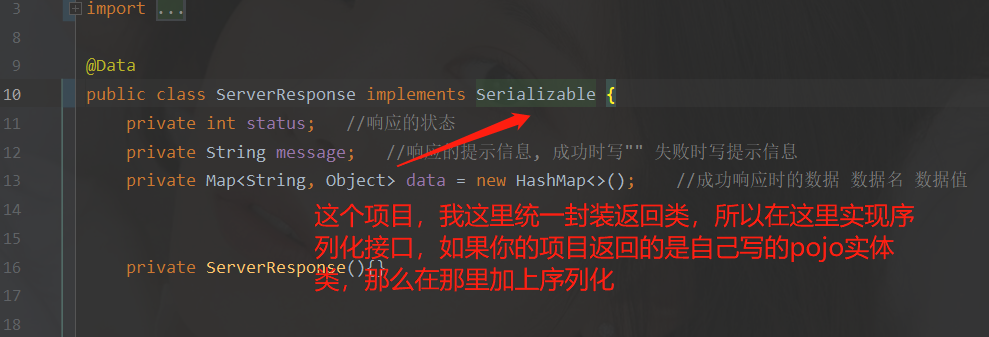
    redis使用实例分析

    第四步:编写redisconfig配置文件

    RedisConfiguration(序列化,必须配置,不然会json格式在redis中缓存会乱码; Springboot1.x和2.x版本的序列化配置也不同,需要特别注意)

    package com.hzf.config;
    
    import org.springframework.cache.CacheManager;
    import org.springframework.cache.annotation.CachingConfigurerSupport;
    import org.springframework.cache.annotation.EnableCaching;
    import org.springframework.cache.interceptor.KeyGenerator;
    import org.springframework.context.annotation.Bean;
    import org.springframework.context.annotation.Configuration;
    import org.springframework.data.redis.cache.RedisCacheManager;
    import org.springframework.data.redis.connection.RedisConnectionFactory;
    import org.springframework.data.redis.core.RedisTemplate;
    import org.springframework.data.redis.serializer.Jackson2JsonRedisSerializer;
    import org.springframework.data.redis.serializer.JdkSerializationRedisSerializer;
    import org.springframework.data.redis.serializer.StringRedisSerializer;
    
    import java.lang.reflect.Method;
    
    @Configuration
    @EnableCaching
    public class RedisConfiguration extends CachingConfigurerSupport {
    
        /**
         * 缓存对象集合中,缓存是以 key-value 形式保存的。当不指定缓存的 key 时,SpringBoot 会使用 SimpleKeyGenerator 生成 key。
         * @return
         */
        @Bean
        public KeyGenerator keyGenerator() {
            return new KeyGenerator() {
                @Override
                public Object generate(Object target, Method method, Object... params) {
                    StringBuilder sb = new StringBuilder();
                    sb.append(target.getClass().getName());
                    sb.append(method.getName());
                    for (Object obj : params) {
                        sb.append(obj.toString());
                    }
                    return sb.toString();
                }
            };
        }
    
        @Bean
        public CacheManager cacheManager(RedisConnectionFactory connectionFactory) {
            RedisCacheManager redisCacheManager = RedisCacheManager.builder(connectionFactory).build();
            return redisCacheManager;
        }
    
        /**
         * @return 返回类型
         * @Description: 防止redis入库序列化乱码的问题
         */
        @Bean
        public RedisTemplate redisTemplate(RedisConnectionFactory redisConnectionFactory) {
            RedisTemplate redisTemplate = new RedisTemplate();
            redisTemplate.setConnectionFactory(redisConnectionFactory);
            redisTemplate.setKeySerializer(new StringRedisSerializer());//key序列化
            redisTemplate.setValueSerializer(new Jackson2JsonRedisSerializer(Object.class));  //value序列化
    
            redisTemplate.setHashKeySerializer(new StringRedisSerializer());
            redisTemplate.setHashValueSerializer(new JdkSerializationRedisSerializer());
    
            redisTemplate.afterPropertiesSet();
            return redisTemplate;
        }
    }

    第五步:在我原有的项目controller中要使用缓存

    注解作用
    @Cacheable在方法执行前Spring先查看缓存中是否有数据,如果有数据,则直接返回缓存数据;没有则调用方法并将方法返回值放进缓存。
    @CachePut将方法的返回值放到缓存中。
    @CacheEvict删除缓存中的数据。

    我这里将我的controller层某个方法返回的数据,上加上@Cacheable注解,也就是我们在第一次查询后的数据将放入redis中,不会继续再走mysql查询了

    关于@Cacheable注解的详解,看别的博主所写
    https://blog.csdn.net/qq_31404603/article/details/88081039

    //主页推荐书籍
        @Cacheable(value = "recommendbooks")
        @RequestMapping(value = "/recommendBook", method = {RequestMethod.GET})
        public ServerResponse recommendBook(){
         	System.out.println("第一次查询,会显示这个信息");
            bookService.updaterecommend();
            List books = bookService.recommendBook();
            if(books != null){
                return ServerResponse.success("操作成功").data("recommendbooks",books);
            }
            return ServerResponse.error("操作失败");
    
        }

    第五步:启动类上开启使用缓存

    @EnableCaching 注解配置启用缓存

    redis使用实例分析

    第六步:测试

    启动项目,访问controller层的这个使用缓存的方法
    网页显示的数据如下:
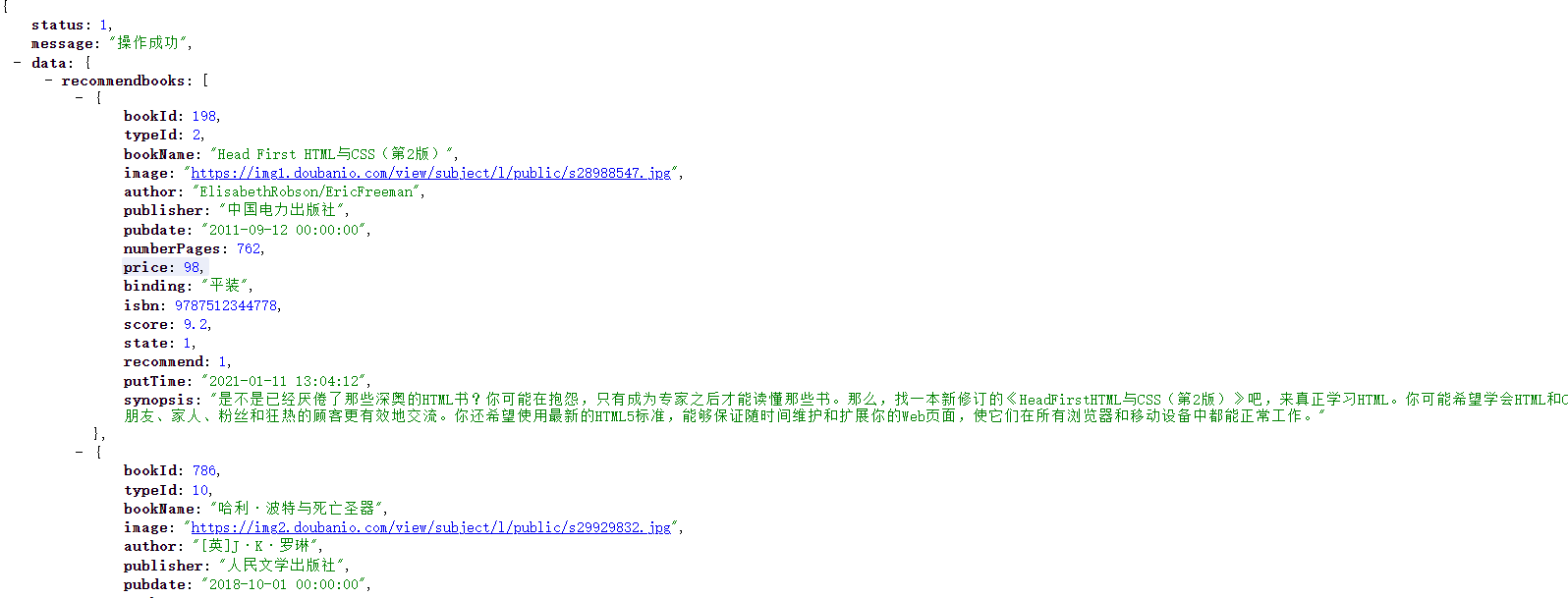
    redis使用实例分析
    后端控制台显示:
    redis使用实例分析
    之后不管怎么刷新请求,控制台不在输出那句话,且只查询了一次
    想要看到redis里面是否已经存入,我们可以直接通过命令行的方式

    keys * 找到所有key
    get key 查找某个数据

    也可以通过可视化工具进行查看
    看第四part

    第四part:redis可视化工具

    项目中用到了redis,想查询redis中的数据,一直想找一个可视化工具,今天发现了Redis Desktop Manager,试用了一下,很好用。

    第一步:下载

    Redis Desktop Manager是开源的,可以在github下载到源码。但是想在windows上用的话需要安装包。
    官网下载:https://redisdesktop.com/download
    github地址:https://github.com/uglide/RedisDesktopManager/releases
    官网地址下载需要订阅,花钱的,还是算了吧。
    晚上找到了一个免费下载的云盘:
    百度网盘:http://pan.baidu.com/s/1kU8sY3P

    第二步:安装

    exe文件,一路next就行了

    第三步:使用

    连接redis服务器:
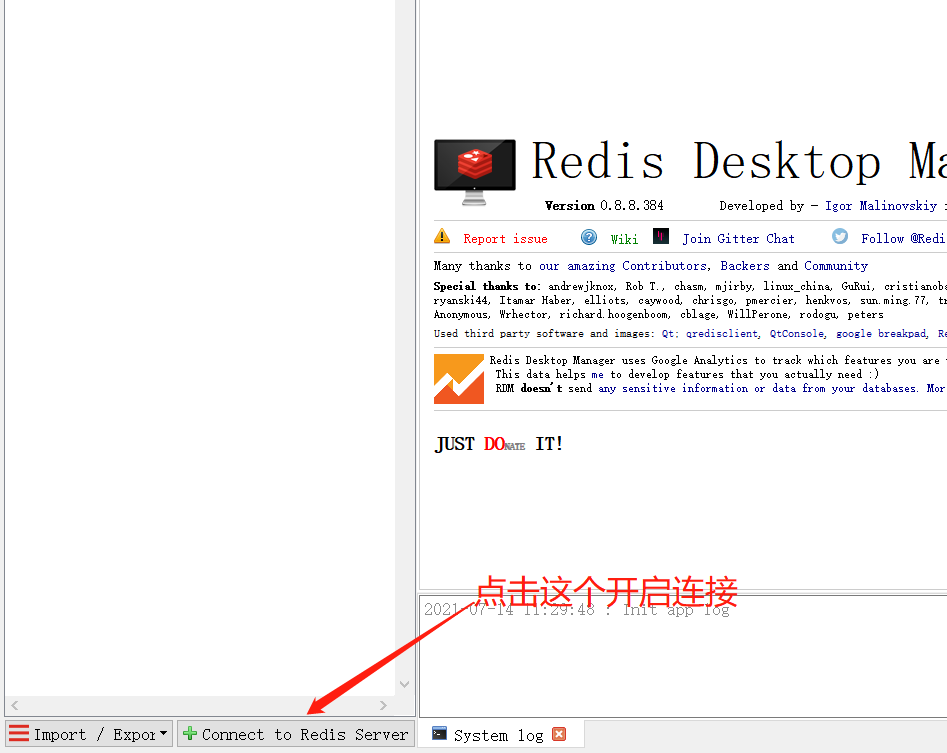
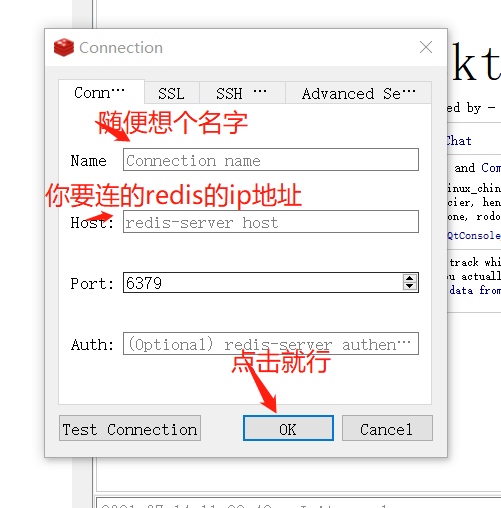
    redis使用实例分析
    redis使用实例分析
    这里连接的前提是你要连的redis服务已启动

    第四步:看实例

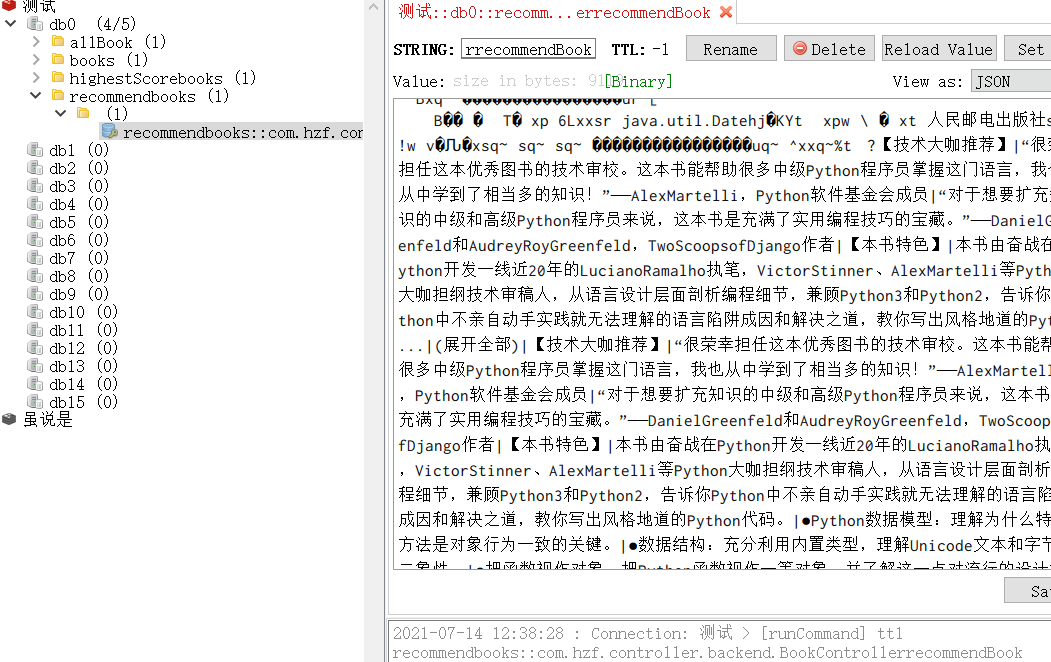
    基于第三part实际项目的数据
    可以看到存入redis中的数据,如果要是删除后,下次请求,还是先会找redis中是否有数据,有就直接返回,没有的话重新从mysql查数据,再放去redis中。

    redis使用实例分析

    本站声明:本文内容由网友自发贡献,版权归原作者所有,本站不承担相应法律责任。如您发现有涉嫌抄袭侵权的内容,请联系bd@zhengruan.com
    作者最新文章
    编程开发
    相关文章 更多
    精品专题 更多
    装机必备

    正软商城装机必备专区,精选办公、浏览器、安全防护、影音播放、压缩解压、设计创作和系统工具等电脑常用正版软件,帮助用户快速完成新电脑软件配置。

    Windows

    正软商城Windows软件专区,汇集适用于Windows电脑的办公、设计、安全防护、影音播放、开发工具和系统优化软件,提供软件介绍、系统要求、正版授权及购买下载服务。

    PDF教程

    正软商城PDF教程频道提供PDF编辑、转换、合并、拆分、压缩及格式处理方法,同时介绍常用PDF软件和工具的使用技巧。

    macOS软件

    正软商城macOS软件专区,精选适用于Mac电脑的办公、设计、影音、效率、开发和系统工具,提供软件功能介绍、macOS兼容版本、正版授权及购买下载服务。

    IOS软件

    正软商城iOS软件专区,精选适用于iPhone和iPad的办公、学习、影音、设计、效率及AI应用,提供功能介绍、适用设备、系统要求和正版获取方式等信息。

    AI

    正软商城AI软件专区,汇集AI写作、AI绘画、AI视频、AI办公、AI编程、AI翻译、智能客服和数据分析等人工智能工具,提供功能介绍、适用平台、收费方式及正版购买信息。

    Mac软件 更多
    Aperty macOS版
    Aperty macOS版

    Aperty 是 Skylum 推出的 AI 人像修图软件,支持自然肤质修饰、瑕疵处理、面部与身体调整、预设及批量同步。

    火山引擎 网页版
    火山引擎 网页版

    火山引擎是字节跳动旗下企业级云与AI服务平台。聚焦大模型核心能力,依托字节自研豆包多模态大模型,凭借火山方舟一站式平台,提供模型精调、推理部署、智能应用搭建等全链路服务,结合高性能AI算力,助力各行业快速落地大模型数字化与智能化应用。


    立刻MV 网页版
    立刻MV 网页版

    立刻MV 面向音乐人、内容创作者和品牌团队,帮助用户低成本完成歌曲 MV、歌词视频、AI 分镜、图生视频与最终合成。

    蛙蛙写作 网页版
    蛙蛙写作 网页版

    蛙蛙写作 AI 创作工具,覆盖小说、剧本、文案,一键生成文稿,打通文字转视频全流程,高效解决创作难题。

    讯飞智作 网页版
    讯飞智作 网页版

    讯飞智作是一款基于语音合成技术、虚拟人驱动技术与数字人形象声音构建能力的 AI 数字人音视频创作平台。

    超级简历WonderCV 网页版
    超级简历WonderCV 网页版

    超级简历WonderCV是面向应届生和AI小白的智能求职平台,覆盖简历、面试与职业规划。

    音述AI 网页版
    音述AI 网页版

    音述AI,是一个以“用声音述说故事”为核心的 AI 音乐创作与声音分享社区。

    AionClaw macOS版
    AionClaw macOS版

    AionClaw 是可在桌面端运行的任务型 AI 助手,通过数字专家与技能市场组合办公、创作、数据和开发能力。

    Loomy macOS版
    Loomy macOS版

    Loomy 是科大讯飞推出的桌面 AI 助手,可通过对话、任务与工作目录协助处理办公、内容创作和资料整理。

    AirBuddy 3 macOS版
    AirBuddy 3 macOS版

    AirBuddy 3 是面向 macOS 的蓝牙外设增强工具,可集中查看 AirPods、Beats 与苹果设备电量,提供快速连接、播放控制、电量提醒、桌面小组件和多台 Mac 外设接力等功能。

    AirServer macOS版
    AirServer macOS版

    AirServer macOS版可把 Mac 转换为无线投屏接收端,通过 AirPlay 或 Google Cast 接收手机、平板和电脑画面,并支持多设备同时连接、高清镜像及会话录制,适合家庭娱乐、课堂教学、会议演示和应用展示。

    AnyDesk macOS版
    AnyDesk macOS版

    AnyDesk macOS版是一款适用于远程办公、设备维护和客户支持的远程桌面工具,可连接并操作异地计算机,支持文件传输、无人值守访问、会话权限控制及跨平台协作。

    WINDOWS 更多
    讯飞绘文 网页版
    讯飞绘文 网页版

    讯飞绘文网页版是科大讯飞推出的AI图文创作与内容运营工具,覆盖热点选题、文章生成、稿件校对、智能配图、排版发布和数据复盘等环节,适合自媒体创作者及内容团队在线使用。

    Maya(Autodesk Maya) Windows版
    Maya(Autodesk Maya) Windows版

    Autodesk Maya 是面向影视、电视、动画和游戏行业的专业三维制作软件,集多边形与 NURBS 建模、角色绑定、关键帧和动作捕捉动画、Bifrost 特效模拟、材质开发及 Arnold 渲染于一体,

    Aperty Windows版
    Aperty Windows版

    Aperty 是 Skylum 推出的 AI 人像修图软件,支持自然肤质修饰、瑕疵处理、面部与身体调整、预设及批量同步。

    火山引擎 网页版
    火山引擎 网页版

    火山引擎是字节跳动旗下企业级云与AI服务平台。聚焦大模型核心能力,依托字节自研豆包多模态大模型,凭借火山方舟一站式平台,提供模型精调、推理部署、智能应用搭建等全链路服务,结合高性能AI算力,助力各行业快速落地大模型数字化与智能化应用。

    立刻MV 网页版
    立刻MV 网页版

    立刻MV 面向音乐人、内容创作者和品牌团队,帮助用户低成本完成歌曲 MV、歌词视频、AI 分镜、图生视频与最终合成。

    蛙蛙写作 网页版
    蛙蛙写作 网页版

    蛙蛙写作 AI 创作工具,覆盖小说、剧本、文案,一键生成文稿,打通文字转视频全流程,高效解决创作难题。

    讯飞智作 网页版
    讯飞智作 网页版

    讯飞智作是一款基于语音合成技术、虚拟人驱动技术与数字人形象声音构建能力的 AI 数字人音视频创作平台。

    超级简历WonderCV 网页版
    超级简历WonderCV 网页版

    超级简历WonderCV是面向应届生和AI小白的智能求职平台,覆盖简历、面试与职业规划。

    音述AI 网页版
    音述AI 网页版

    音述AI,是一个以“用声音述说故事”为核心的 AI 音乐创作与声音分享社区。

    AionClaw Windows版
    AionClaw Windows版

    AionClaw 是可在桌面端运行的任务型 AI 助手,通过数字专家与技能市场组合办公、创作、数据和开发能力。

    Loomy Windows版
    Loomy Windows版

    Loomy 是科大讯飞推出的桌面 AI 助手,可通过对话、任务与工作目录协助处理办公、内容创作和资料整理。

    AirServer Windows版
    AirServer Windows版

    AirServer Windows版可把电脑变成AirPlay、Google Cast和Miracast无线投屏接收端,适合会议演示、课堂教学及家庭大屏分享。发送设备通常无需另装客户端,并可同时接收和智能排列多个镜像会话。

    即将离开本站
    您即将前往第三方网站,请确认是否继续?

    网站备案号:苏ICP备2026018738号-1 联系邮箱:bd@zhengruan.com

    Copyright ©2018-2026