


mysql如何查询不为空的字段
mysql查询字段不为空的方法:1、利用“select*fromtable_namewhereid"";”语句查询;2、利用“select*fromtable_namewhereid!="";”语句查询。本教程操作环境:windows10系统、mysql8.0.22版本、DellG3电脑。mysql怎么查询不为空的字段1、查询不为空select*fromtablewhereid"";select*fromtablewhereid!="";2、查询为空select*fromtablewhereid="";s
mysql查询字段不为空的方法:1、利用“select * from table_name where id <> "";”语句查询;2、利用“select * from table_name where id != "";”语句查询。
本教程操作环境:windows10系统、mysql8.0.22版本、Dell G3电脑。
mysql怎么查询不为空的字段
1、查询不为空
select * from table where id <> "";
select * from table where id != "";
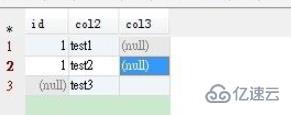
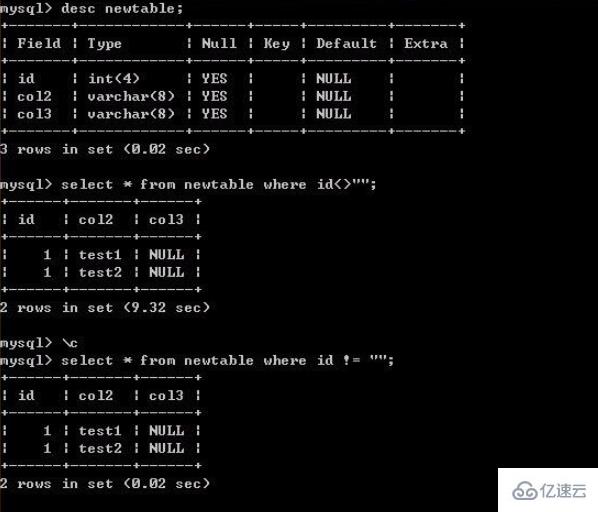
2、查询为空
select * from table where id ="";
select * from table where isNull(id);
如果字段是char或者varchar类型的,使用id=""可以的;如果字段是int类型的,使用isNull会好些。
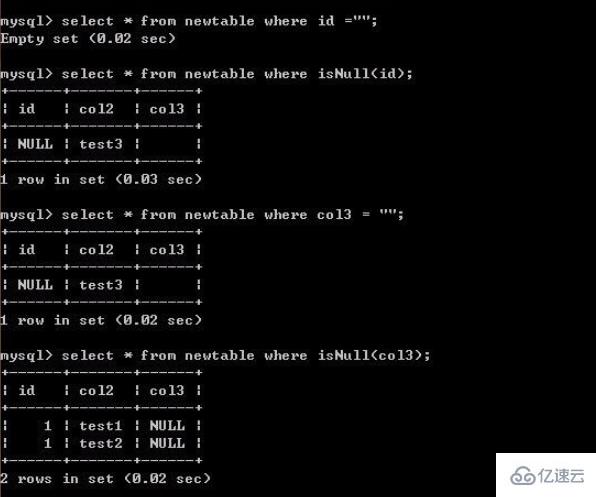









火山引擎是字节跳动旗下企业级云与AI服务平台。聚焦大模型核心能力,依托字节自研豆包多模态大模型,凭借火山方舟一站式平台,提供模型精调、推理部署、智能应用搭建等全链路服务,结合高性能AI算力,助力各行业快速落地大模型数字化与智能化应用。








AirBuddy 3 是面向 macOS 的蓝牙外设增强工具,可集中查看 AirPods、Beats 与苹果设备电量,提供快速连接、播放控制、电量提醒、桌面小组件和多台 Mac 外设接力等功能。

AirServer macOS版可把 Mac 转换为无线投屏接收端,通过 AirPlay 或 Google Cast 接收手机、平板和电脑画面,并支持多设备同时连接、高清镜像及会话录制,适合家庭娱乐、课堂教学、会议演示和应用展示。


Autodesk Maya 是面向影视、电视、动画和游戏行业的专业三维制作软件,集多边形与 NURBS 建模、角色绑定、关键帧和动作捕捉动画、Bifrost 特效模拟、材质开发及 Arnold 渲染于一体,
火山引擎是字节跳动旗下企业级云与AI服务平台。聚焦大模型核心能力,依托字节自研豆包多模态大模型,凭借火山方舟一站式平台,提供模型精调、推理部署、智能应用搭建等全链路服务,结合高性能AI算力,助力各行业快速落地大模型数字化与智能化应用。


AirServer Windows版可把电脑变成AirPlay、Google Cast和Miracast无线投屏接收端,适合会议演示、课堂教学及家庭大屏分享。发送设备通常无需另装客户端,并可同时接收和智能排列多个镜像会话。